SSG 5 Hardware Installation and Configuration Guide
52
5. ISDN Interface Windows
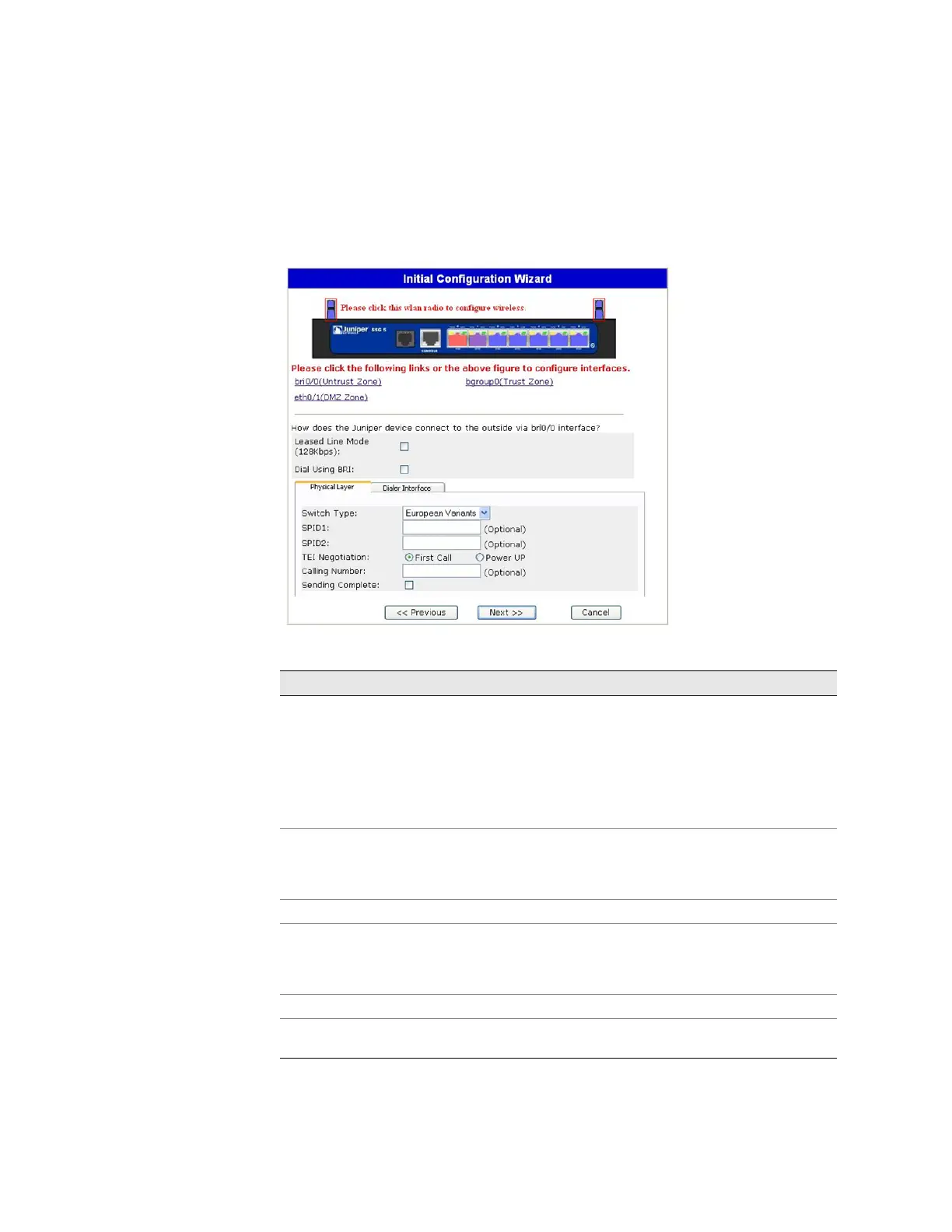
If you have one of the ISDN devices, a Physical Layer tab window similar to the
following is displayed.
Figure 23: ISDN Physical Layer Tab Window
Table 12: Fields in ISDN Physical Layer Tab Window
Field Description
Switch Type Sets the service provider switch type:
att5e: At&T 5ESS
ntdms100: Nortel DMS 100
ins-net: NTT INS-Net
etsi: European variants
ni1: National ISDN-1
SPID1 Service Provider ID, usually a seven-digit telephone number with
some optional numbers. Only the DMS-100 and NI1 switch
types require SPIDs. The DMS-100 switch type has two SPIDs
assigned, one for each B-channel.
SPID2 Back up service provider ID.
TEI Negotiation Specifies when to negotiate TEI, either at startup or on the first
call. Typically this setting is used for ISDN service offerings in
Europe and connections to DMS-100 switches that are designed
to initiate TEI negotiation.
Calling Number The ISDN network billing number.
Sending Complete checkbox Enables sending of complete information to outgoing setup
message. Usually only used in Hong Kong and Taiwan.












 To Next Page