100
OTHERS – Checking the hour meter –
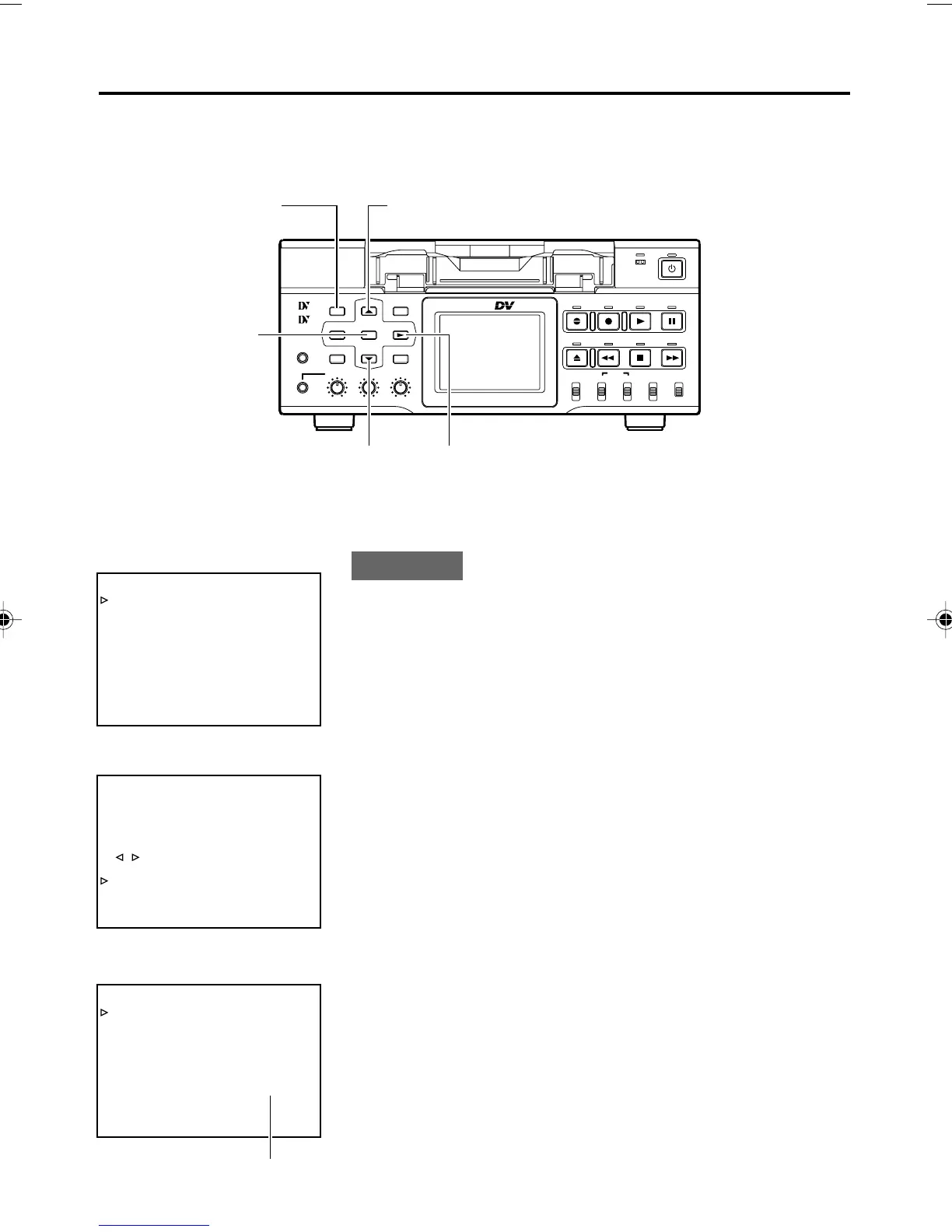
This unit displays the drum usage time as the hour meter in DRUM HOUR METER in the SYSTEM
(2/2) Menu screen. Use it as a guide for regular maintenance. (
☞ Page 7)
SET button
MENU button
8 button
9 button
: button
TOP MENU screen
SYSTEM (1/2) Menu screen
SYSTEM (2/2) Menu screen
TIXE
..PILCEIVOM
..GIFNOCKCAPKROWTEN
..TESYALPSID
..KCOLC/BU/CT
..OEDIV
..OIDUA
..ETOMER
..METSYS
–––UNEM–––
KCABEGAP
EGAPTXEN
FFOEDOMTAEPER
XEDNI.CNUFYEK”,“
VDA.FEDOMESUAPGNOL
NIM5EMITESUAPGNOL
FFOEMITCERPUKCAB
DN2EDOMVDA.F/LTS
OTUATCELESCNYS
––––––]2/1[METSYS–––
–––SYSTEM[ 2 / 2 ] ––––––
DC I N MODE OPE OFF
INDEX WRITE ON
REPL I CAT I ON OFF
REPL I CATEDELAY OFF
OPERAT I ON LOCK OFF
KCABEGAP
002000RETEMRUOHMURD
LECNACGNITTESYROTCA
CSTNNIVD/BP
F
Drum usage time
:Operation:
Set BR-DV6000 to the STOP mode:
1.
Press the MENU button to display the TOP MENU screen.
2.
Press the 8 or 9 button to bring the cursor to SYSTEM.
Press SET or the : button.
¥ The SYSTEM (1/2) Menu screen is displayed.
3.
Press the 8 or 9 button to bring the cursor to NEXT PAGE.
Press SET or the : button.
¥ The SYSTEM (2/2) Menu screen is displayed.
• The drum usage time is displayed on DRUM HOUR METER in
the SYSTEM (2/2) Menu screen.
4.
Press the MENU button to return to the normal screen.
BR-DV6000
PROFESSIONAL
MENU RESET
A.DUB
EJECT
COUNTER
AUDIO INPUT
SELECT
MONITOR OUTPUT REMOTE
LOCAL
CTL L
MIX
R
CH-1/2
MIX
CH-3/4
DV
LINE
Y/C
(CPN)
TC
UB
REW STOP FF
REC
OPERATE
PLAY PAUSE
DISP
SET SEARCH+
BLANK CUE UP
HOLD
PHONES REC LEVEL
CH-1/3 CH-2/4
MIC
SEARCH–
Mini
DV6000U_72-104_Eng.p65e 06/03/03, 11:42 PM100



 To Next Page