34
VIDEO
LINE
IN
OUT
MONITOR
OUT
DC12V
DV
IN/OUT
IN OUT
OFF
AUDIO
REMOTE2
IN
B-YR-Y
SYNC IN
TIME CODE
IN OUT
Y
COMPONENT
OUT
CH 1/3 CH 2/4
IN
OUT
MONITOR
OUT
REMOTE1
TIMER
REC PLAY
SERIAL
REMOTE
SIGNAL
GND
Y/C
SERIAL OUT
VIDEO
LINE
IN
OUT
MONITOR
OUT
DC12V
DV
IN/OUT
IN OUT
OFF
AUDIO
REMOTE2
IN
B-YR-Y
SYNC IN
TIME CODE
IN OUT
Y
COMPONENT
OUT
CH 1/3 CH 2/4
IN
OUT
MONITOR
OUT
REMOTE1
TIMER
REC PLAY
SERIAL
REMOTE
SIGNAL
GND
Y/C
IN OUT IN
SERIAL
SERIAL OUT
SERIAL
DV: BR-DV6000
❈
VIDEO
LINE
IN
OUT
MONITOR
OUT
DC12V
DV
IN/OUT
IN OUT
OFF
AUDIO
REMOTE2
IN
B-YR-Y
SYNC IN
TIME CODE
IN OUT
Y
COMPONENT
OUT
CH 1/3 CH 2/4
IN
OUT
MONITOR
OUT
REMOTE1
TIMER
REC PLAY
SERIAL
REMOTE
SIGNAL
GND
Y/C
SERIAL IN
SERIAL OUT
RM-G30
VIDEO
LINE
IN
OUT
MONITOR
OUT
DC12V
DV
IN/OUT
IN OUT
OFF
AUDIO
REMOTE2
IN
B-YR-Y
SYNC IN
TIME CODE
IN OUT
Y
COMPONENT
OUT
CH 1/3 CH 2/4
IN
OUT
MONITOR
OUT
REMOTE1
TIMER
REC PLAY
SERIAL
REMOTE
SIGNAL
GND
Y/C
SERIAL IN
SERIAL OUT
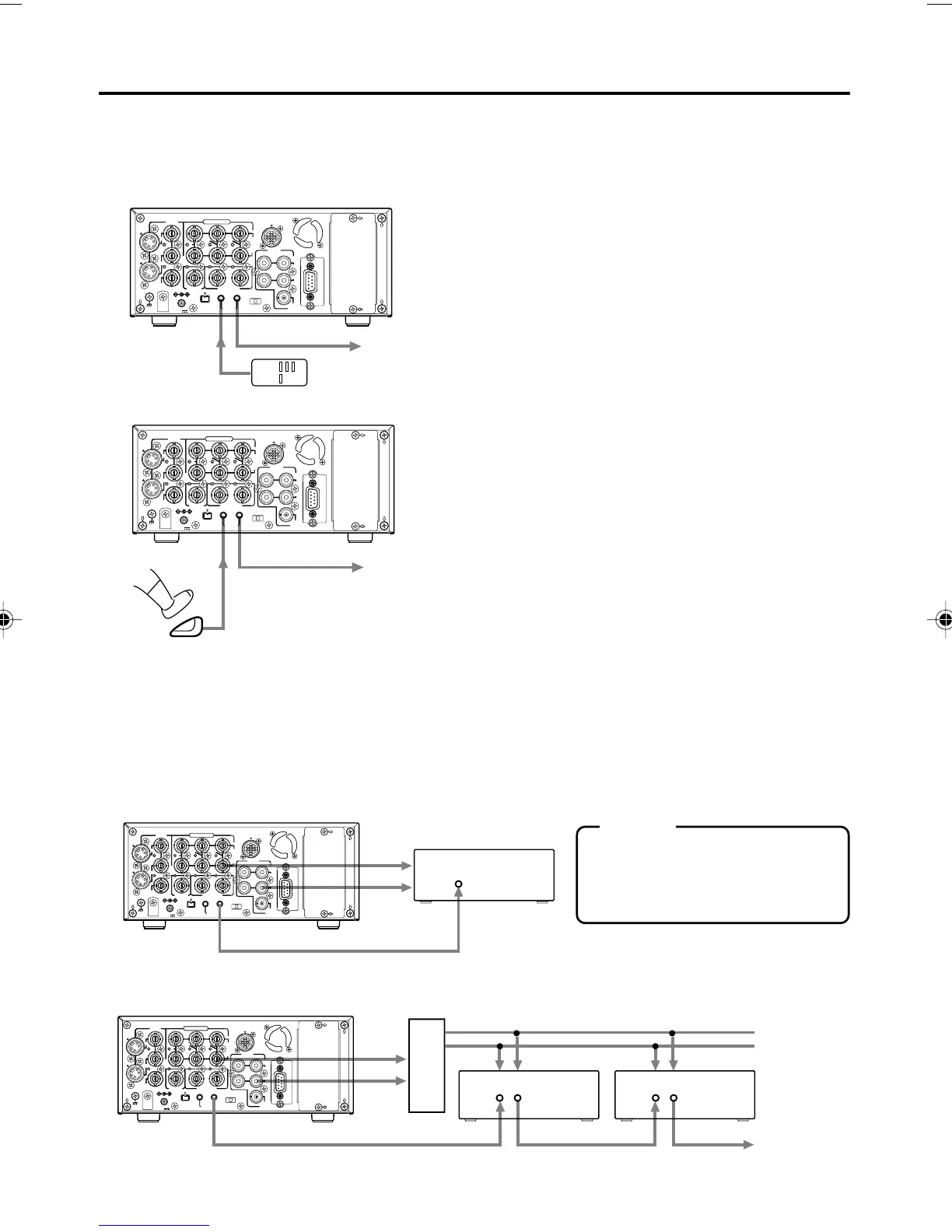
The following describes examples of serial remote terminal connection.
To use the serial remote terminals, set REMOTE SEL SER of the REMOTE (1/2) Menu screen
to “ON” or “LOC+REM.” (
☞ Page 75)
Connect the wired remote controller RM-G30 to
the SERIAL REMOTE IN terminal.
The commands of the SERIAL REMOTE IN termi-
nal is through-output from the SERIAL REMOTE
OUT terminal. (Only with OPERATE ON)
Multiple VCRs can be operated with RM-G30 by
series connection of the SERIAL REMOTE IN/OUT
terminals.
Start/stop recording with an external switch, e.g., a foot switch.
Connect an external switch, e.g., a foot switch, to
the SERIAL REMOTE IN terminal.
The format of the input signals can be selected
with FOOT SW in the REMOTE (2/2) Menu screen.
(☞ Page 46)
Dubbing of playback images or sound with other machines using the SERIAL RE-
MOTE OUT terminal.
When BR-DV6000 is in the playback mode, the REC command can be output from the SERIAL
REMOTE OUT terminal (REPLICATION function). With this function, a tape loaded in BR-DV6000
can be dubbed on another unit. For details, refer to ☞ Page 57.
BR-DV6000 can be used as a master or dubbing unit.
● Dubbing with 1 VCR.
Operate BR-DV6000 with the wired remote controller RM-G30 (sold separately)
● Dubbing with multiple VCRs (Up to 50 VCRs can be controlled comprehensively.)
Memo
If REPLICATION of the SYSTEM
(2/2) Menu screen is set to DV, the
REC command is output from the
DV terminal.
Through-output
Through-output
Foot
switch
(Master unit) BR-DV6000
(Dubbing unit) VCR
with a SERIAL terminal
Video
Sound
Dubbing unit: VCR with SERIAL IN and OUT terminals
SERIAL
terminal
REC command
Signal distributor
CONNECTION – Connection with serial remote terminals –
(Master unit) BR-DV6000
Video
Sound
DV6000U_28-051_Eng.p65e 06/03/03, 11:39 PM34



 To Next Page