37
BR-DV6000
PROFESSIONAL
A.DUB
EJECT
COUNTER
AUDIO INPUT
SELECT
MONITOR OUTPUT REMOTE
LOCAL
CTL L
MIX
R
CH-1/2
MIX
CH-3/4
DV
LINE
Y/C
(CPN)
TC
UB
REW STOP FF
REC
OPERATE
PLAY PAUSE
———
REMOTE [ 1 / 2 ]
———
REMOTE SEL 9P ON
REMOTE SEL SER ON
REMOTE SEL DV ON
REMOTE SEL JVC ON
REMOTE SEL NET ON
LOCAL FUNCT I ON STP+E J T
PREROL L 7SEC
NEXT PAGE
PAGE BACK
–––SYSTEM[2/2]––––––
DC I N MODE OPE OFF
INDEX WRITE INDEX
REPL I CAT I ON OFF
REPL I CATE DELAY OFF
OPERAT I ON LOCK ON
F
PB / DV I N NTSC
ACTORY SETT I NG CANCEL
DRUM HOUR METER 000000
PAGE BACK
PREPARATION – Operation method (main unit/
remote controller) and operation lock mode –
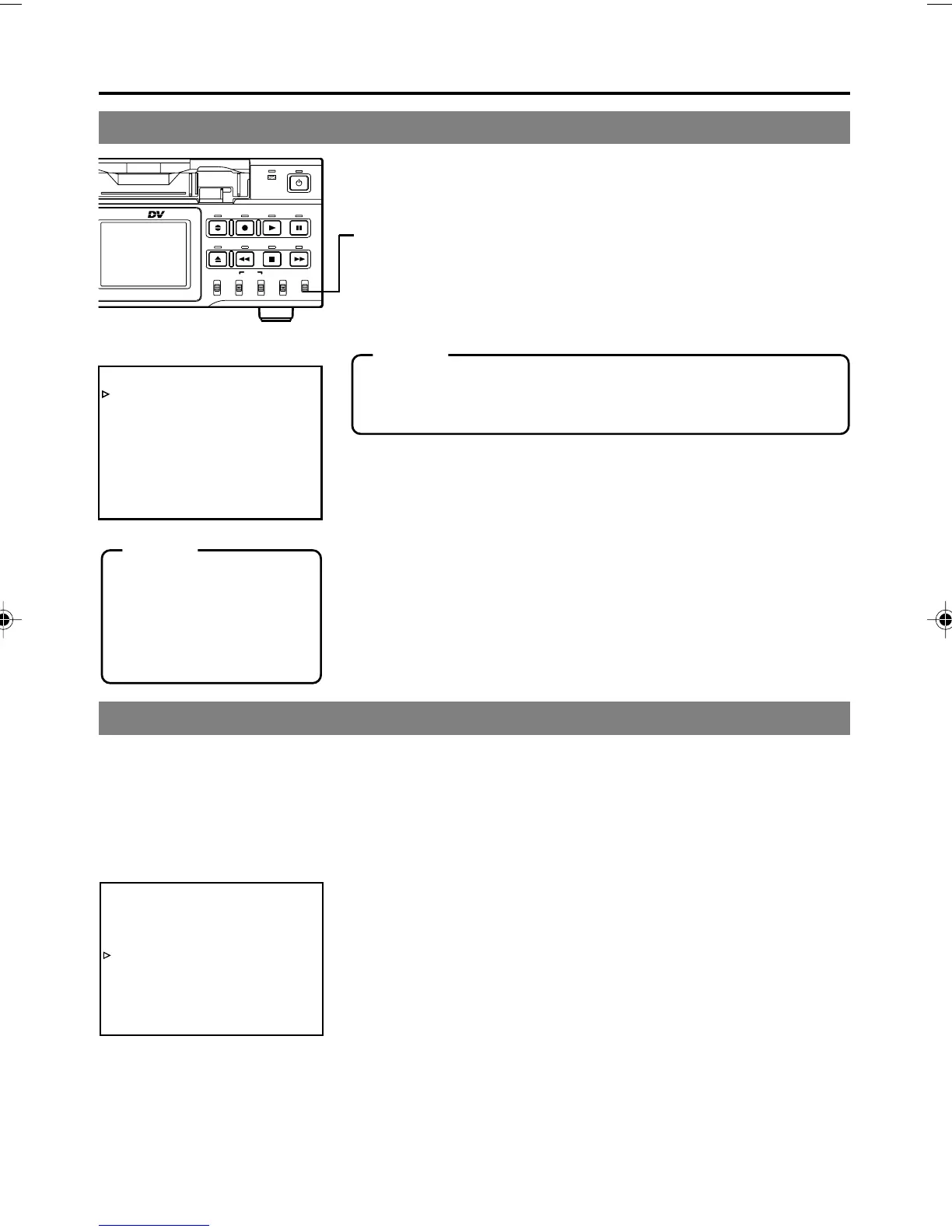
Selecting the operating method (main unit/remote controller)
OPERATION LOCK mode
REMOTE (1/2) Menu screen
Memo
With the REMOTE/LOCAL switch set to REMOTE, the JVC bus
or RS-422A can be enabled using REMOTE SEL JVC or RE-
MOTE SEL 9P in the REMOTE (1/2) Menu screen.
Memo
If the REMOTE/LOCAL
switch is set to REMOTE,
the buttons that can be op-
erated by the main unit can
be selected with LOCAL
FUNCTION.
Setting the REMOTE/LOCAL switch
•To operate with the buttons of BR-DV6000, set it to “LOCAL”.
•To operate BR-DV6000 with RS-422A or JVC-bus editing re-
mote controller that is connected to the REMOTE 1 (9-PIN) or
REMOTE 2 (12-PIN) terminal, set it to “REMOTE”.
• The setting position of the REMOTE switch for operating BR-
DV6000 with the SERIAL REMOTE terminal can be selected
using REMOTE SEL SER in the REMOTE (1/2) Menu screen.
• The setting position of the REMOTE switch for operating BR-
DV6000 with the DV terminal can be selected at REMOTE SEL
DV in the REMOTE (1/2) Menu screen.
[☞ Page 75 “REMOTE (1/2) Menu screen”]
BR-DV6000 comes with an operation lock function to prevent unauthorized or incorrect operation.
In the OPERATION LOCK mode, the operation buttons and slide switches of BR-DV6000 are
disabled. However, the OPERATE ON and MENU operations are effective.
The AUDIO MONITOR switch, TIMER switch, PHONES volume and REC LEVEL volume are al-
ways effective.
Whether to operate BR-DV6000 with its buttons or the remote
controller can be selected with the REMOTE/LOCAL switch.
Turning on the OPERATION LOCK mode
Set OPERATION LOCK in the SYSTEM (2/2) Menu screen to ON.
• If the operation button of BR-DV6000 is pressed while BR-
DV6000 is in the OPERATION LOCK mode, “OPERATION
LOCK” is displayed on the monitor or the LCD for about 3 sec-
onds.
Turning off the OPERATION LOCK mode
Set OPERATION LOCK in the SYSTEM (2/2) Menu screen to OFF.
SYSTEM (2/2) Menu screen
DV6000U_28-051_Eng.p65e 06/03/03, 11:39 PM37



 To Next Page