68
Control with RS-422A
(Analog signals)
DVí[éqÇ ÉRÉìÉgÉçÅ[ÉãÇ ÇÈèÍçá
ÅiÉfÉWÉ^ÉãêMçÜÇ égǧÅj
VIDEO
LINE
IN
OUT
MONITOR
OUT
DC12V
DV
IN/OUT
IN OUT
OFF
AUDIO
REMOTE2
IN
B-YR-Y
SYNC IN
TIME CODE
IN OUT
Y
COMPONENT
OUT
CH 1/3 CH 2/4
IN
OUT
MONITOR
OUT
REMOTE1
TIMER
REC PLAY
SERIAL
REMOTE
SIGNAL
GND
Y/C
RS-422A
AUDIO OUT
VIDEO OUT
REMOTE 1 (9P)
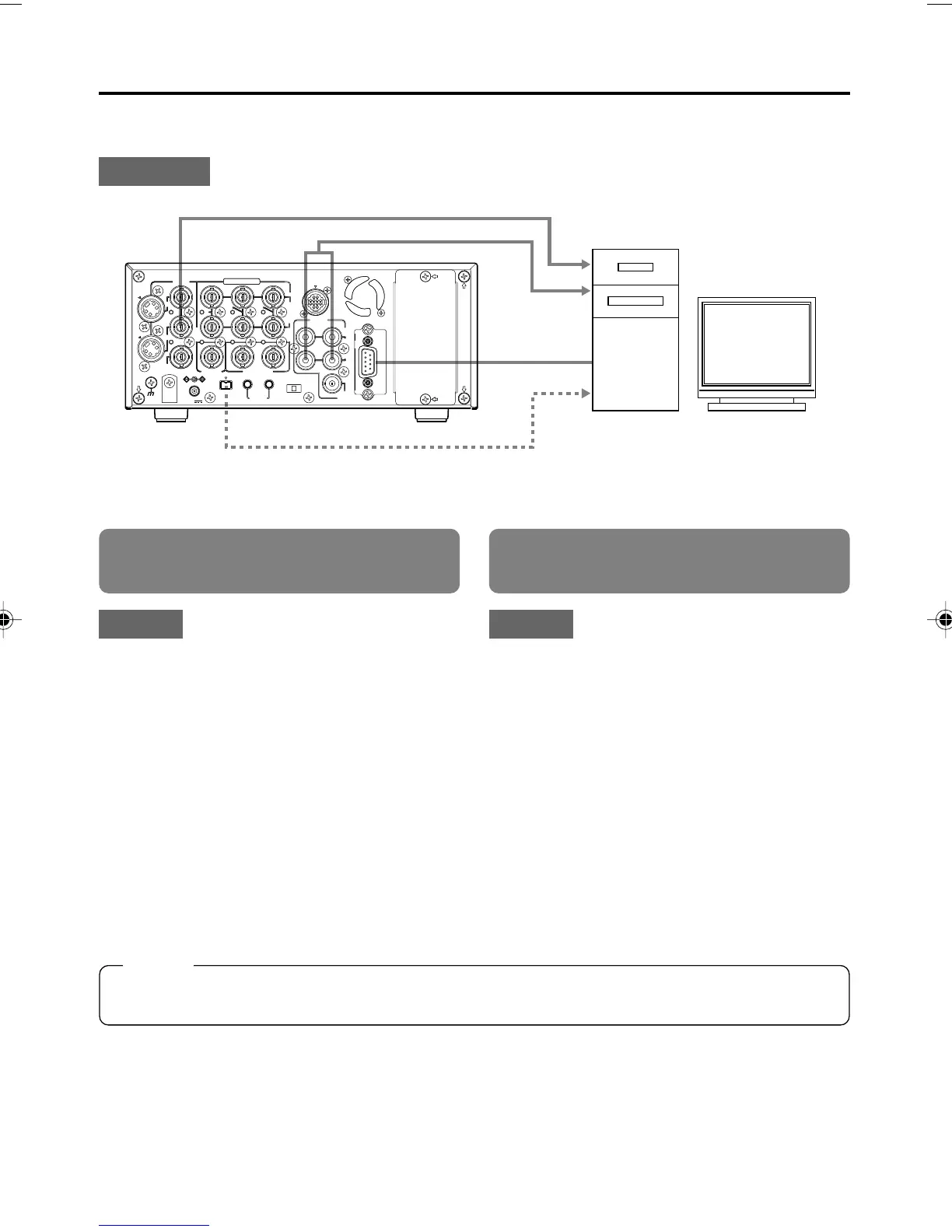
EDIT – Using a non-linear editing system –
Tape contents of BR-DV6000 are captured by a non-linear editing system and the non-linear edited
contents are recorded on BR-DV6000.
:Connection:
:Setting:
Set the REMOTE/LOCAL switch on the
front panel to REMOTE.
REMOTE (1/2) Menu screen
• Set REMOTE SEL 9-PIN to “ON”.
REMOTE (2/2) Menu screen
● REMOTE FF/REW MODE:
Use this item to select the operation to be per-
formed if the FF or REW command is received
during playback. (FF/REW or Search)
If the search operation is not performed prop-
erly, set it to “SEARCH”.
● CONTROLLER TYPE (in the REMOTE 2/2
Menu screen):
Set this item to “TYPE1”.
:Setting:
REMOTE (1/2) Menu screen
● Set REMOTE SEL DV to ON or LOC+REM.
Set this item to ON if it is to become enabled
only when the REMOTE/LOCAL switch on the
front panel is set to REMOTE.
Set this item to LOC+REM if it is to become
enabled regardless of the position of the RE-
MOTE/LOCAL switch.
Control with the DV terminal
(Digital signals)
Memo
If the time code of BR-DV6000 is not displayed correctly when the non-linear side moves one frame
forward or backward, set the STILL mode to “FRAME.”
IEEE1394 (image, audio, control)
DV terminal
Analog audio
Analog video
Non-linear system
DV6000U_52-071_Eng.p65e 06/03/03, 11:40 PM68



 To Next Page