49
BR-DV6000
PROFESSIONAL
MENU RESET
A.DUB
EJECT
COUNTER
AUDIO INPUT
SELECT
MONITOR OUTPUT REMOTE
LOCAL
CTL L
MIX
R
CH-1/2
MIX
CH-3/4
DV
LINE
Y/C
(CPN)
TC
UB
REW STOP FF
REC
OPERATE
PLAY PAUSE
DISP
SET SEARCH+
BLANK CUE UP
HOLD
PHONES REC LEVEL
CH-1/3 CH-2/4
MIC
SEARCH–
Mini
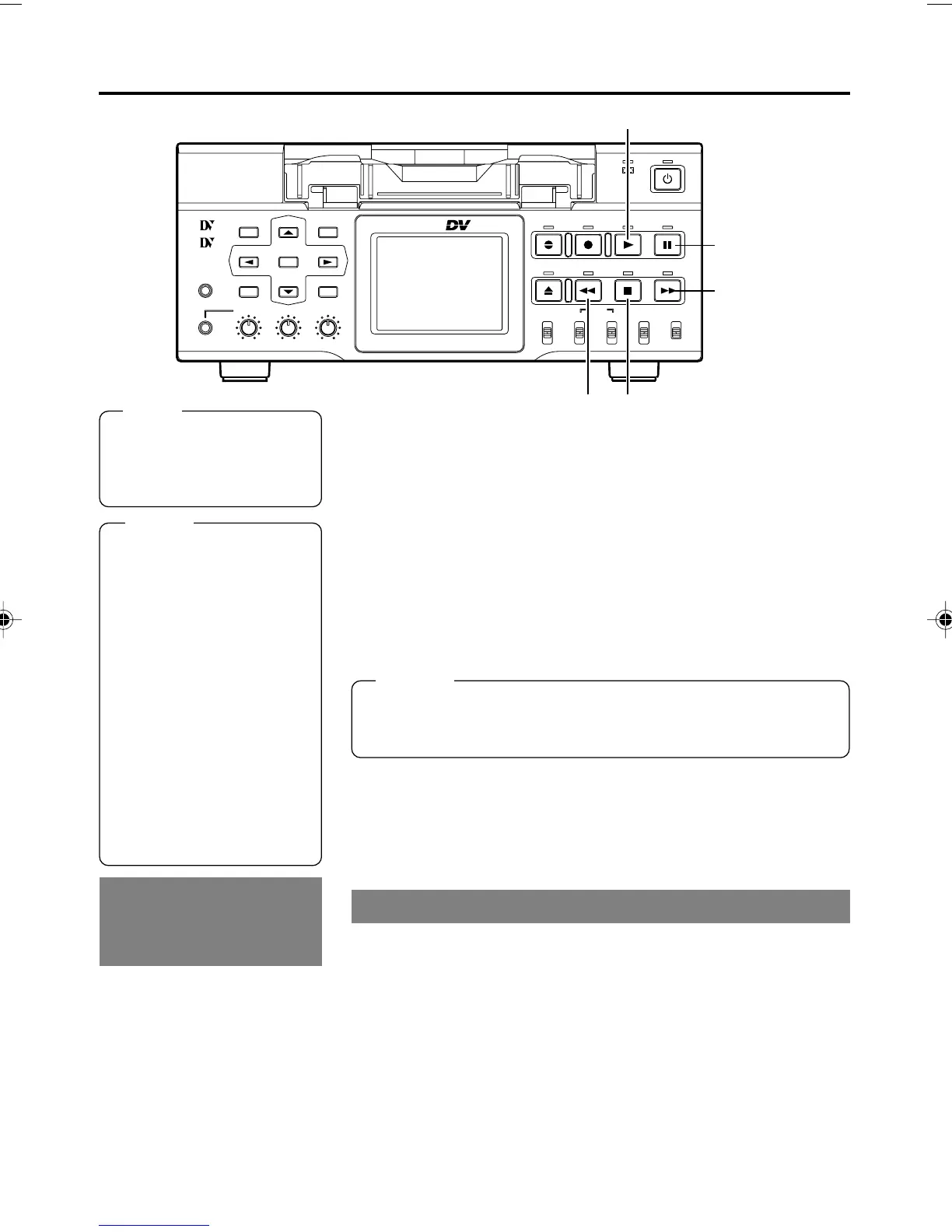
PLAY button
PAUSE button
FF button
STOP button
Note
Tapes recorded in the LP
mode cannot be played.
The monitor displays an
alarm message: “LP TAPE!”
Memo
● Images cannot be pro-
duced properly if the signal
format selected for PB/DV
IN in the SYSTEM (2/2)
Menu screen is different
from the one of the tape to
be played.
● When output of still image
continues for a prolonged
period, BR-DV6000 enters
the tape protection mode.
The time can be selected
from LONG PAUSE TIME in
the SYSTEM Menu screen.
● Only PAL/NTSC DVCAM
tapes are detected auto-
matically in the PLAYBACK
mode.
BR-DV6000 does NOT auto-
matically select NTSC/PAL
playback. NTSC or PAL play-
back mode selection is per-
formed in the menu.
• Set PB/DV IN in the SYSTEM
(2/2) Menu screen to PAL for
playing a tape recorded in
PAL.
• Signal systems cannot be
converted.
Playback of
tapes recorded in
the PAL format
1.
Load a recorded cassette tape.
¥ The power for BR-DV6000 is turned on.
2.
Start playback.
Press the PLAY button.
¥ Playback starts. If the tape is recorded in the DVCAM format,
the status display of the recording/playback speed mode (SP/
LP) disappears from the monitor or LCD.
3.
Pause the tape.
Press the PAUSE button.
¥ A still image is output.
4.
Resume playback.
Press the PLAY button.
5.
Stop playback.
Press the STOP button.
Fast forward/rewind
When BR-DV6000 is in the STOP mode, press the FF
button to fast-forward the tape.
When BR-DV6000 is in the STOP mode, press the REW
button to rewind the tape.
Memo
The still image selected with STL/F.ADV MODE in the SYSTEM
(1/2) Menu screen is output. (1st field image/ 2nd field image/
Frame image)
PLAYBACK – Basic playback procedure –
REW button
DV6000U_28-051_Eng.p65e 06/03/03, 11:40 PM49



 To Next Page