45
BR-DV6000
PROFESSIONAL
MENU RESET
A.DUB
EJECT
COUNTER
AUDIO INPUT
SELECT
MONITOR OUTPUT REMOTE
LOCAL
CTL L
MIX
R
CH-1/2
MIX
CH-3/4
DV
LINE
Y/C
(CPN)
TC
UB
REW STOP FF
REC
OPERATE
PLAY PAUSE
DISP
SET SEARCH+
BLANK CUE UP
HOLD
PHONES REC LEVEL
CH-1/3 CH-2/4
MIC
SEARCH–
Mini
LIGHT
ON
OFF
COUNTER
CTL
TC
UB
RESET
OPERATE/WARNING
MONITOR
SELECT
STATUSSHUTTER
MENU
FILTER
1 3200k
2 5600k
3 5600k+ND
POWER
NG
G
A
IN
O
U
T
P
U
T
W
H
T
.B
A
L
V
T
R
ON OFF
ALARM
MONITOR
S
A
V
E
S
T
B
Y
H
M
L
B
A
R
S
C
A
M
A
U
T
O
K
N
E
E
P
R
S
T
A
B
O
N
O
F
F
CH-1
CH-2
AUDIO
LEVEL
AUTO IRIS LOLUX
BACK L
NORMAL
SPOT L
STRETCH
NORMAL
COMPRESS
FULL AUTO BLACK
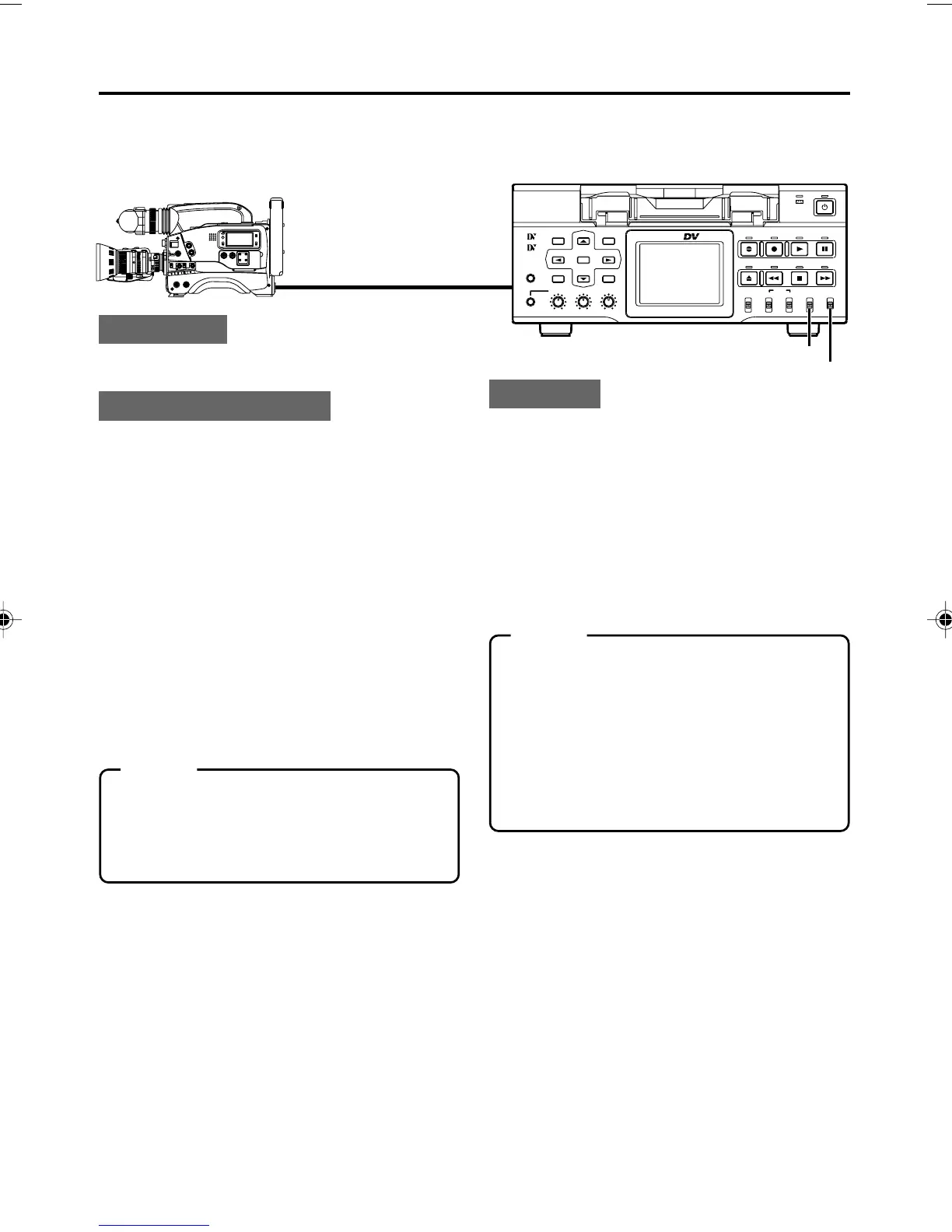
In combination with DV equipment, BR-DV6000 can perform continuous, long-hour recording.
BR-DV6000 can be set as the backup unit connected to a DV camcorder (GY-DV300/DV500/DV550/
DV5000, etc.). When the recording tape of the source unit nears its end, BR-DV6000 can start
recording, enabling long-hour recording.
:Connection:
Connect the DV terminal of the source unit to the
DV terminal of BR-DV6000 with a DV cable.
:Setting up BR-DV6000:
Set the INPUT SELECT switch on the
front panel to “DV”.
Set the REMOTE/LOCAL switch on the
front panel to “REMOTE”.
Set BACKUP REC TIME in the SYSTEM
(1/2) Menu screen.
Use the following settings according to the tape
length of the source unit.
* For DV or mini DV cassette tape:
25MIN : 30-minute tape
55MIN : 60-minute tape
75MIN : 80-minute tape
115MIN : 120-minute tape
175MIN : 180-minute tape
265MIN : 270-minute tape
OFF : No backup recording
:Operation:
1.
Recording begins on the source unit.
❈
Ensure that recording starts from the begin-
ning of the recording tape.
2.
BR-DV6000 begins recording when the tape
of the source unit nears its end (about 5 min-
utes before the end of the tape).
• BR-DV6000 begins recording when the re-
cording time of the source unit reaches the
time set by BACKUP REC TIME.
DV terminal
DV cable
DV terminal
Backup unit: BR-DV6000
INPUT SELECT switch
RECORDING – Backup recording function –
Memo
• In backup recording, BR-DV6000 records
video/sound from the source unit.
While this unit is performing backup record-
ing, continue shooting from the source unit.
• The audio mode is the one selected in the
source unit. (32 K/48 K)
• Set BACKUP REC TIME to “OFF” if the unit
is not performing backup recording.
Set the REMOTE SEL DV in the RE-
MOTE (1/2) Menu screen to ON or
LOC+REM.
Set TC DUPLICATE in the TC/UB/
CLOCK (1/2) Menu screen to OFF.
• It records the data of the built-in time code
generator.
• When TC DUPLICATE is set to AUTO, the
time code of the DV camcorder will stop ad-
vancing. If the DV cable is disconnected, the
time code of the backup recording will stop
advancing.
For using GY-DV5000 as the source unit
Set DV REC TRIGGER in the OTHERS (1/2)
Menu screen of GY-DV5000 to OFF.
Memo
With REPLICATION in the SYSTEM (2/2)
menu screen set to “DV”, BACKUP REC TIME
is fixed to “OFF”. For using the backup record-
ing function, set REPLICATION to “OFF” or
“SERIAL”.
REMOTE/LOCAL switch
DV6000U_28-051_Eng.p65e 06/03/03, 11:39 PM45



 To Next Page