Digital Video Cassette Technology
30
3. Click the Read button on the EEPROM Utility toolbar.
Figure 49 Read Toolbar Button
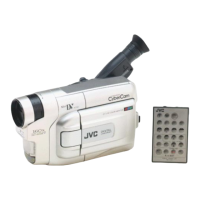
4. The camera’s settings are displayed in the EEPROM Utility window.
The status bar at the bottom of the window shows the selected cell’s address
and value. In the window shown below, the selected cell’s address is 00, and
its value is 20.
You can also determine the cell’s address by looking at the heading for its
row and column. For example the cell’s address in the upper left corner is
000. The cell’s address immediately below it is 010.
Figure 50 EEPROM Utility Window
Save the settings
It is prudent to save the camera’s settings before altering them or before adjusting the camera.
1. To store the camera’s settings, click the Save button on the EEPROM
Utility toolbar.
Figure 51 Save Toolbar Button



 To Next Page