EasyManua.ls Logo

JVC HR-D540EE - Page 17

JVC HR-D540EE
90 pages
Print Icon
To Next Page IconTo Next Page
To Previous Page IconTo Previous Page
Loading...
SECTION
1
DISASSEMBLY
AND
MECHANISM
ADJUSTMENTS
1.1
DISASSEMBLY
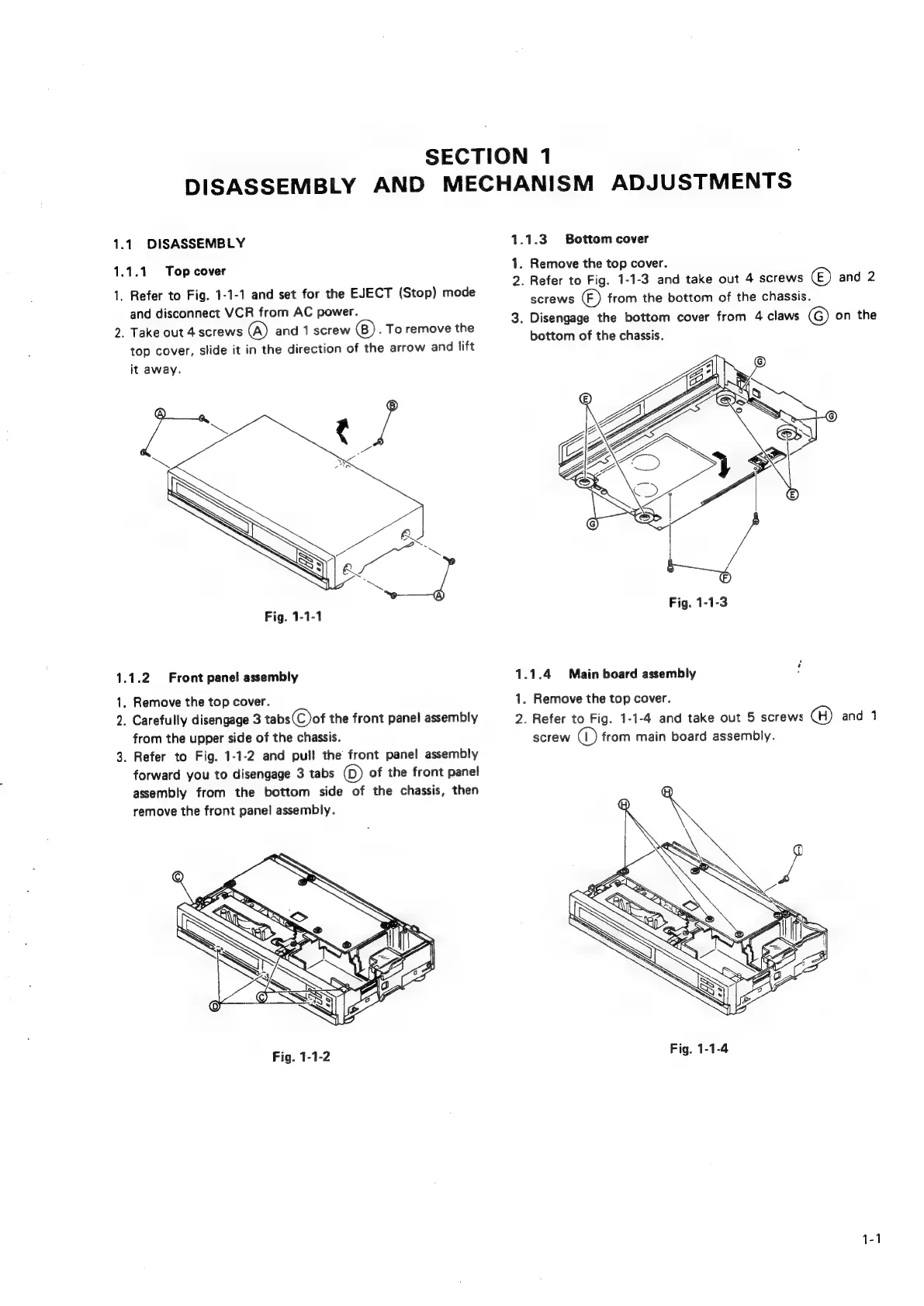
1.1.3
Bottom
cover
1.1.1
Top
cover
1.
Remove
the
top
cover.
1.
Ref
Fig.
1-1-1
and
§
EJECT
(S
4
2.
Refer
to
Fig.
1-1-3
and
take
out
4
screws
©)
and
2
,
oe
de
Vee
oe
:
(Step)
meds
screws
)
from
the
bottom
of
the
chassis.
ane
aren
baal
poe
3.
Disengage
the
bottom
cover
from
4
claws
©
on
the
2.
Take
out
4
screws
(@)
and
1
screw
.
To
remove
the
.
oe
eet
:
.
;
bottom
of
the
chassis.
top
cover,
slide
it
in
the
direction
of
the
arrow
and
lift
it
away.
Fig,
1-1-1
Fig.
1-1-3
yas:
1.1.2
Front
panel
assembly
1.1.4
Main
board
assembly
1,
Remove
the
top
cover.
1.
Remove
the
top
cover.
2.
Carefully
disengage
3
tabs(C)of
the
front
panel
assembly
—-2.
Refer
to
Fig.
1-1-4
and
take
out
6
screws
(H)
and
1
from
the
upper
side
of
the
chassis.
screw
(1)
from
main
board
assembly.
3.
Refer
to
Fig.
1-1-2
and
pull
the
front
panel
assembly
forward
you
to
disengage
3
tabs
()
of
the
front
panel
assembly
from
the
bottom
side
of
the
chassis,
then
remove
the
front
panel
assembly.
1-1

Related product manuals