EasyManua.ls Logo

JVC HR-D540EE - Page 18

JVC HR-D540EE
90 pages
Print Icon
To Next Page IconTo Next Page
To Previous Page IconTo Previous Page
Loading...
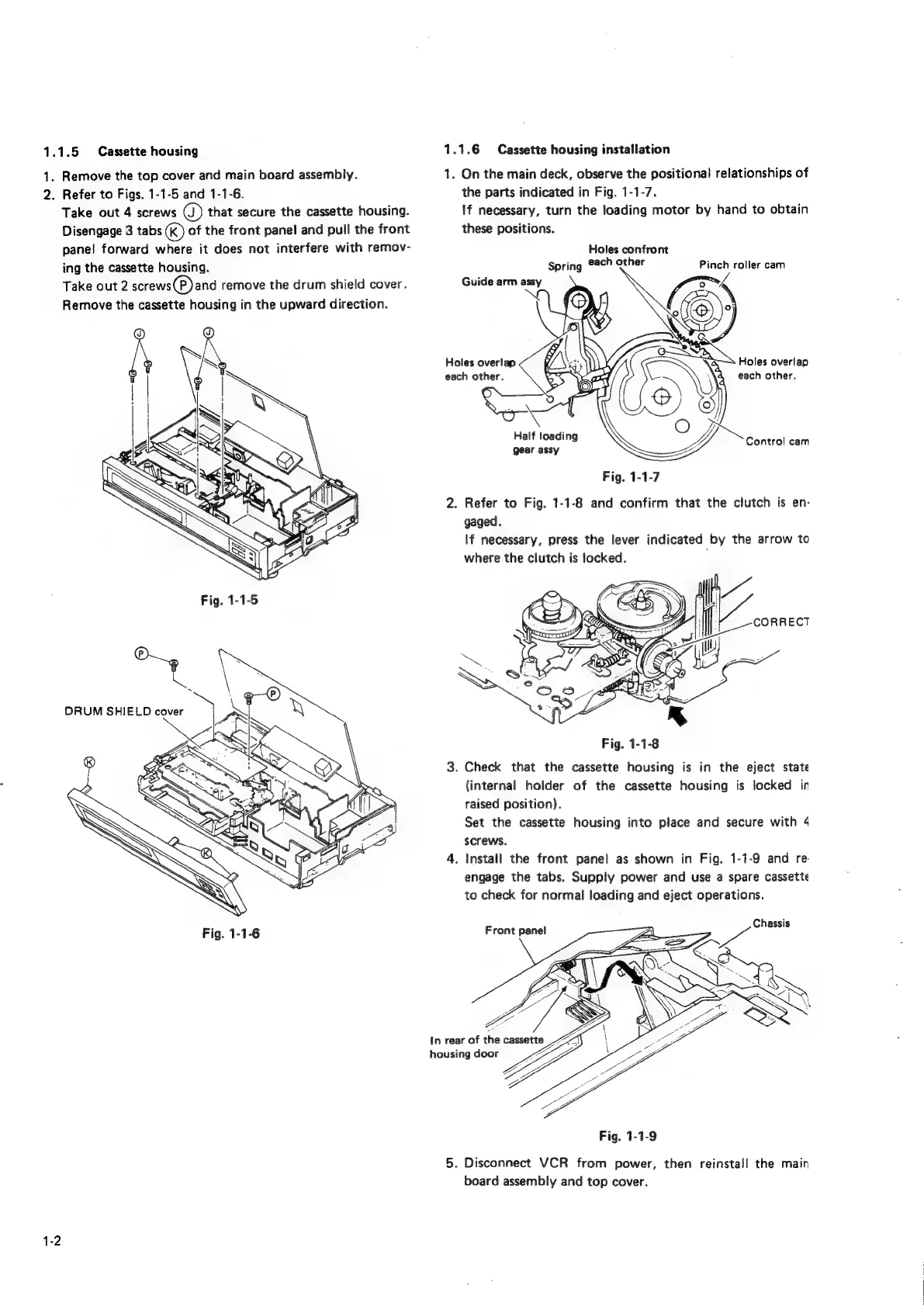
1.1.5
Cassette
housing
1.
Remove
the
top
cover
and
main
board
assembly.
2.
Refer
to
Figs.
1-1-5
and
1-1-6.
Take
out
4
screws
@)
that
secure
the
cassette
housing.
Disengage
3
tabs
(kK)
of
the
front
panel
and
pull
the
front
pane!
forward
where
it
does
not
interfere
with
remov-
ing
the
cassette
housing.
Take
out
2
screws(P)and
remove
the
drum
shield
cover.
Remove
the
cassette
housing
in
the
upward
direction.
1-2
1.1.6
Cassette
housing
installation
1.
On
the
main
deck,
observe
the
positional
relationships
of
the
parts
indicated
in
Fig.
1-1-7.
If
necessary,
turn
the
loading
motor
by
hand
to
obtain
these
positions.
Holes
confront
Spring
each
other
Pinch
roller
cam
Guide
arm
assy
Holes
overlap
Holes
overlap
each
other.
each
other,
Half
loading
Control
cam
gear
assy
Fig.
1-1-7
2.
Refer
to
Fig.
1-1-8
and
confirm
that
the
clutch
is
en-
gaged.
If
necessary,
press
the
lever
indicated
by
the
arrow
to
where
the
clutch
is
locked.
Fig.
1-1-8
3.
Check
that
the
cassette
housing
is
in
the
eject
state
(internal
holder
of
the
cassette
housing
is
locked
in
raised
position).
Set
the
cassette
housing
into
place
and
secure
with
4
screws.
4.
Install
the
front
panel
as
shown
in
Fig.
1-1-9
and
re.
engage
the
tabs.
Supply
power
and
use
a
spare
cassette
to
check
for
normal
loading
and
eject
operations.
Chassis
Front
panel
Fig.
1-1-9
5.
Disconnect
VCR
from
power,
then
reinstall
the
main
board
assembly
and
top
cover.

Related product manuals