107
SYSTEM Menu
SYSTEM Menu Parameters & Functions
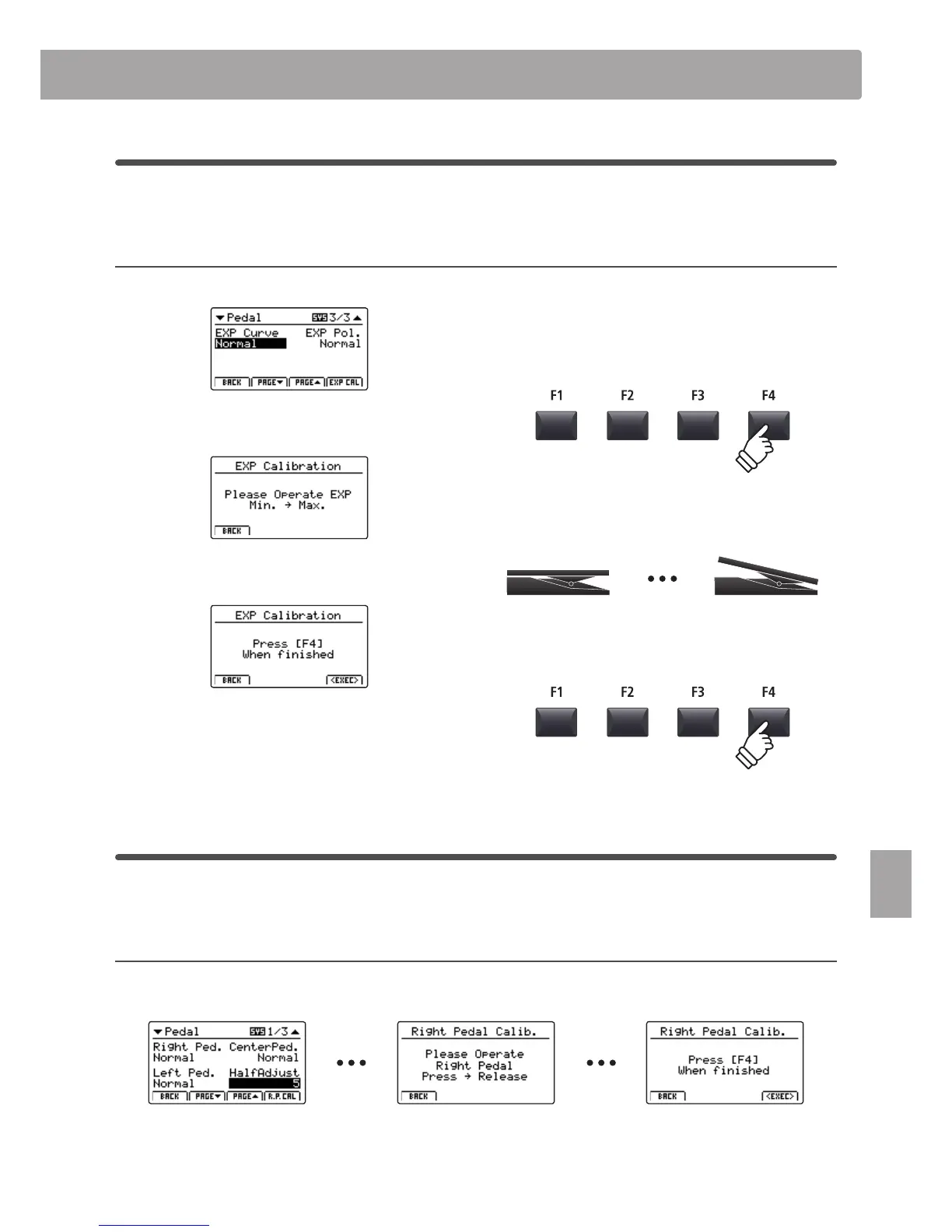
Expression pedal calibration
Depending on the brand and model of expression pedal connected to the MP7, it may be necessary to use the
calibration function to ensure that the pedal’s minimum and maximum range of values are detected correctly.
Calibrating the EXP pedal
Select the third page (3/3) of the Pedal SYSTEM menu.
Press the F4 function button (EXP CAL) to show the expression
pedal calibration screen in the LCD display.
Press the expression pedal to the minimum and maximum
positions several times to transmit the full range of values.
Press F4 function button (EXEC) to complete the expression
pedal calibration.
The full range of operation for the connected expression pedal
will be calculated automatically.
Right (damper) pedal calibration
As with the expression pedal, it may also be desirable to use the right pedal calibration function to ensure that the
damper pedal’s minimum and maximum range of values are detected correctly.
Calibrating the Right (damper) pedal
Select pages 1/3 or 2/3 of the Pedal
SYSTEM menu.
Press the F4 function button (R.P. CAL) to
show the right pedal calibration screen
in the LCD display.
Press the right pedal to the lowest
position to transmit the maximum value.
Press F4 function button (EXEC) to
complete the right pedal calibration.
The full range of operation for the
connected right (damper) pedal will be
calculated automatically.



 To Next Page