86
Recorder
3
Overdubbing an audio le
The overdub function adds supplementary recording(s) to an existing audio le, facilitating simple multi-track
recordings to be produced directly on the instrument.
Each overdub is recorded to a temporary le (i.e. the original audio le is not modied), allowing an unlimited
number of overdubs that to be made before eventually saving the nal recording.
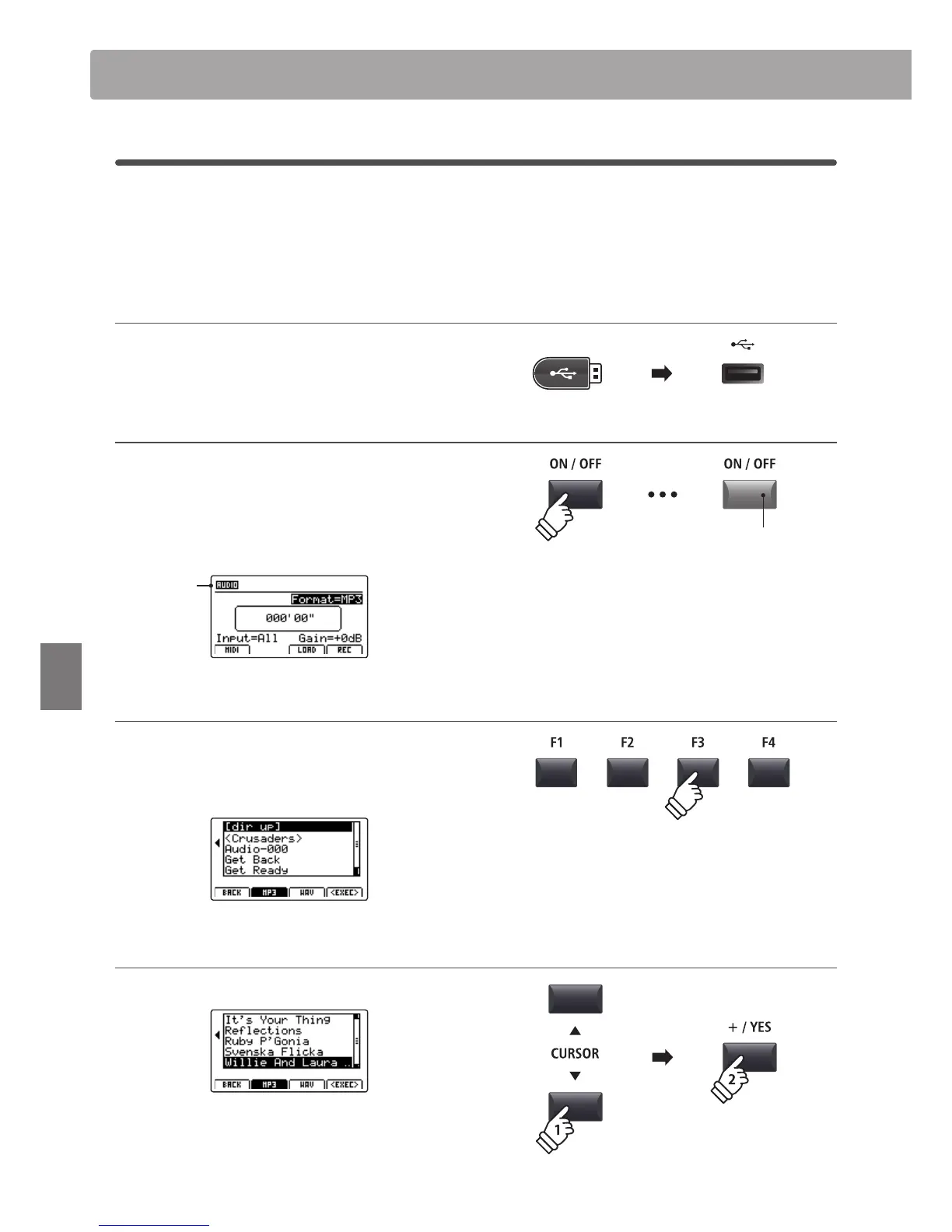
1. Connecting a USB memory device
Connect the USB memory device to the USB to Device port.
The USB device will be scanned.
2. Turning the Recorder mode ON
Press the RECORDER section’s ON/OFF button to turn Recorder
mode ON.
The LED indicator for the RECORDER section’s ON/OFF button
will turn ON, and the Audio recorder screen will be shown in
the LCD display.
Audio
recorder
selected
3. Selecting the Load Audio function
Press the F3 function button (LOAD).
A listing of the MP3 les stored in the root folder of the USB
device will be shown in the LCD display.
4. Selecting the audio le to load
Press the CURSOR
buttons to select the desired audio le.
Press the F4 function button (EXEC) or +/YES button.
The audio player screen will be shown in the LCD display.
Audio Record/Playback (USB memory)
LED indicator ON:
Recorder mode is turned ON
* If the MIDI recorder screen is shown, press the F1 function button (AUDIO)
to select the Audio recorder.



 To Next Page