66
STORE Button & SETUPs
The MP7’s SETUP memories allow the entire instrument conguration, including selected sounds, section volume
levels, parameter settings, and EQ adjustments, etc. to be stored and recalled immediately at the touch of a button.
SETUPs are arranged in an 8x8x4 conguration, allowing for a total of 256 individual memories.
This page explains how to select SETUP mode and recall a SETUP memory.
Selecting SETUP mode
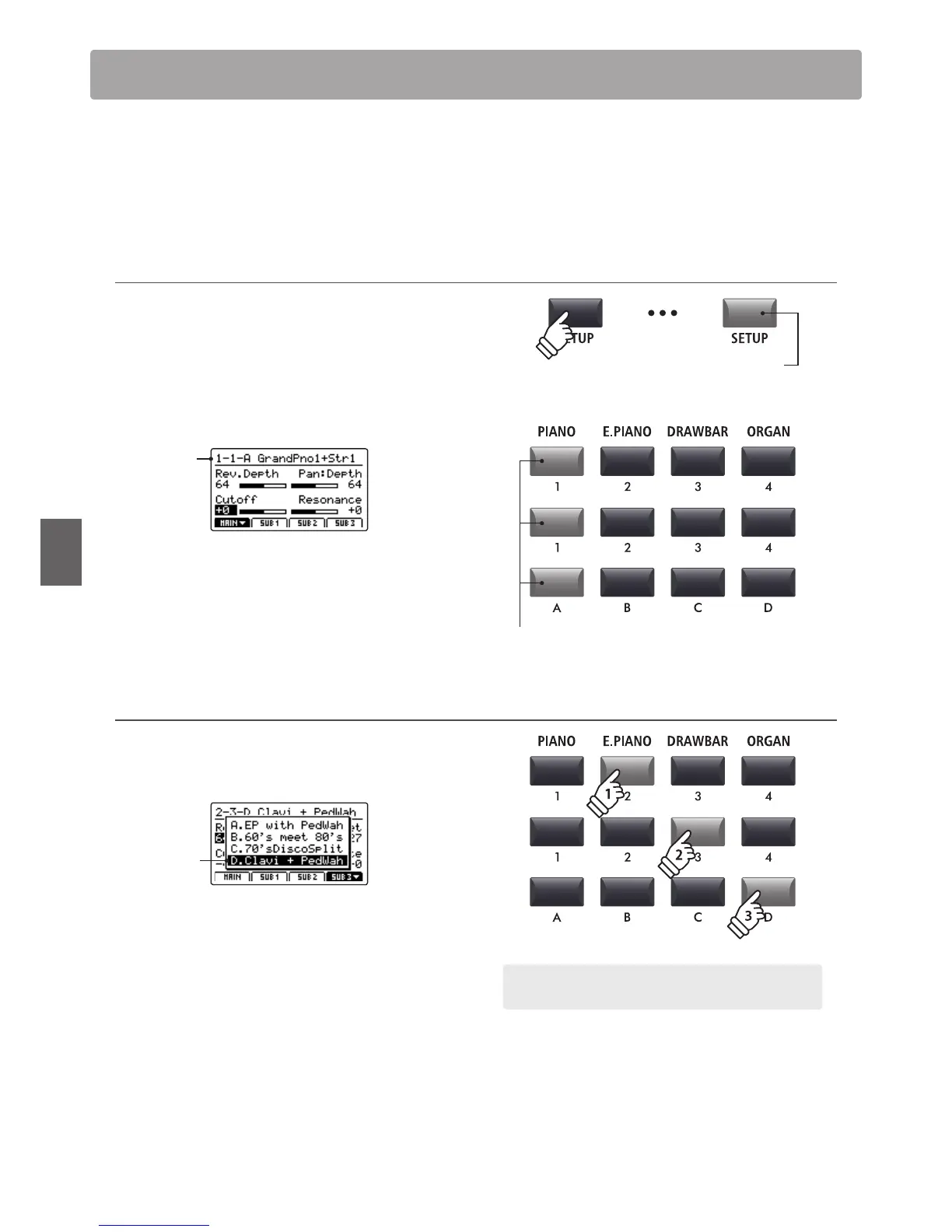
Press the SETUP button to select SETUP mode.
The LED indicator for the SETUP button will turn on to indicate
that SETUP mode is selected.
The LED indicators for the currently selected SETUP memory
buttons will also turn on, and the name of the SETUP memory
will be shown in the LCD display.
Selected
SETUP
* The previously selected SETUP memory will be recalled automatically.
Selecting SETUPs
While SETUP mode is turned ON:
Press the SETUP memory buttons to select the desired SETUP
memory.
Selected
SETUP
LED indicator ON:
SETUP mode is turned ON
LED indicator ON:
Selected SETUP buttons
SETUP Memories
Example: To select SETUP memory 2-3D, press 'E.PIANO' category
button, the '3' sub-category button, and the 'D' variation button.



 To Next Page