29
Main Operation
Changing the eect category, type and additional parameters
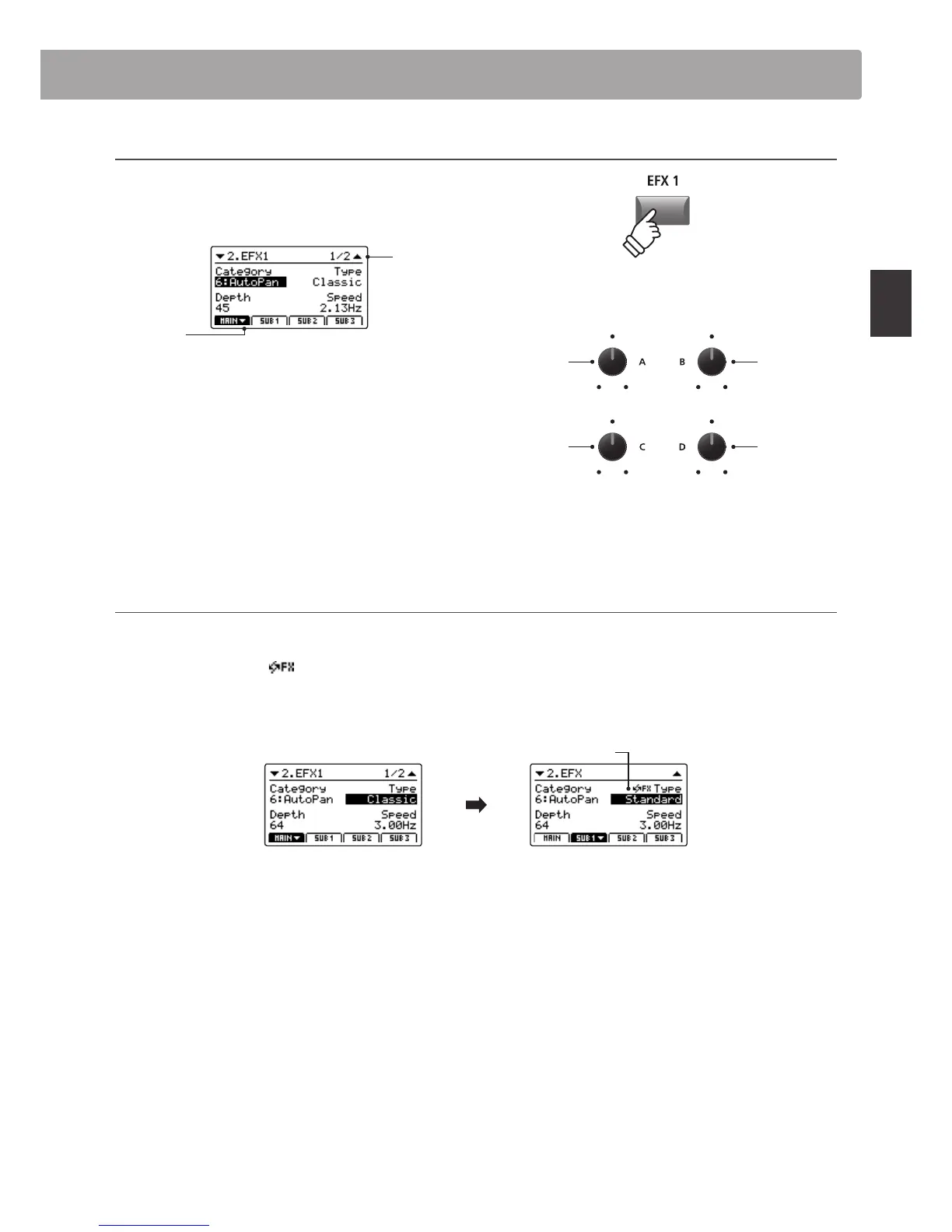
Press and hold the EFX button for the desired zone.
The rst EFX page of the zone’s EDIT menu will be shown in the
LCD display.
Page 1/2
arrow:
Next page
Turn the control knobs (A, B, C, D) to change the eect category,
type, and adjust additional eect parameters.
* The number of adjustable EFX parameters will vary depending on type.
For more information, please refer to page 120.
* Press the F1~F4 FUNCTION buttons (corresponding to the selected zone)
to scroll through the dierent parameter pages.
Press and hold the EFX button again to jump to the rst EFX
page of the EDIT menu, and once again to EXIT.
About Substitute eects for SUB1/SUB2/SUB3 zones
As noted above, the total number of eect types available for the MAIN zone is much larger than that of the SUB zones. Therefore, when
assigning a sound to a SUB zone that was prepared using an eect only available for the MAIN zone, the MP7 will automatically select the
closest ‘substitute’ eect. An icon will also be shown beside the type parameter to indicate that a substitute eect is being used.
The example below shows the ‘Classic’ AutoPan eect being substituted for the ‘Standard’ AutoPan eect.
* Only the EFX1 eect will be substituted. Any eects that are assigned to EFX2 will be disregarded.
MAIN zone EFX1 screen
A sound prepared on the
MAIN zone with ‘Classic’
AutoPan eect applied.
SUB1 zone EFX screen
The same sound assigned
to SUB1 zone, ‘Standard’
AutoPan eect is
automatically substituted.
Substitute eect icon
Parameter 1
Category
Parameter 2
Type
* Above knob assignments will change depending on EFX page displayed.
Eects Section
hold



 To Next Page