37
Table of ContentsSetting UpWi-Fi StreamingUsing KEF Connect AppFAQ and Troubleshooting
2. Turn on the Bluetooth feature of your device and select “KEF LS50 Wireless II” (or the
name you have created for the speakers) from the list of available devices to pair.
When Bluetooth pairing is done, the Bluetooth icon will stay lit.
The speakers remember your last paired Bluetooth device. Once Bluetooth
mode is selected, the speakers will automatically connect with your last paired
device if it is around.
9.3 Playback Controls
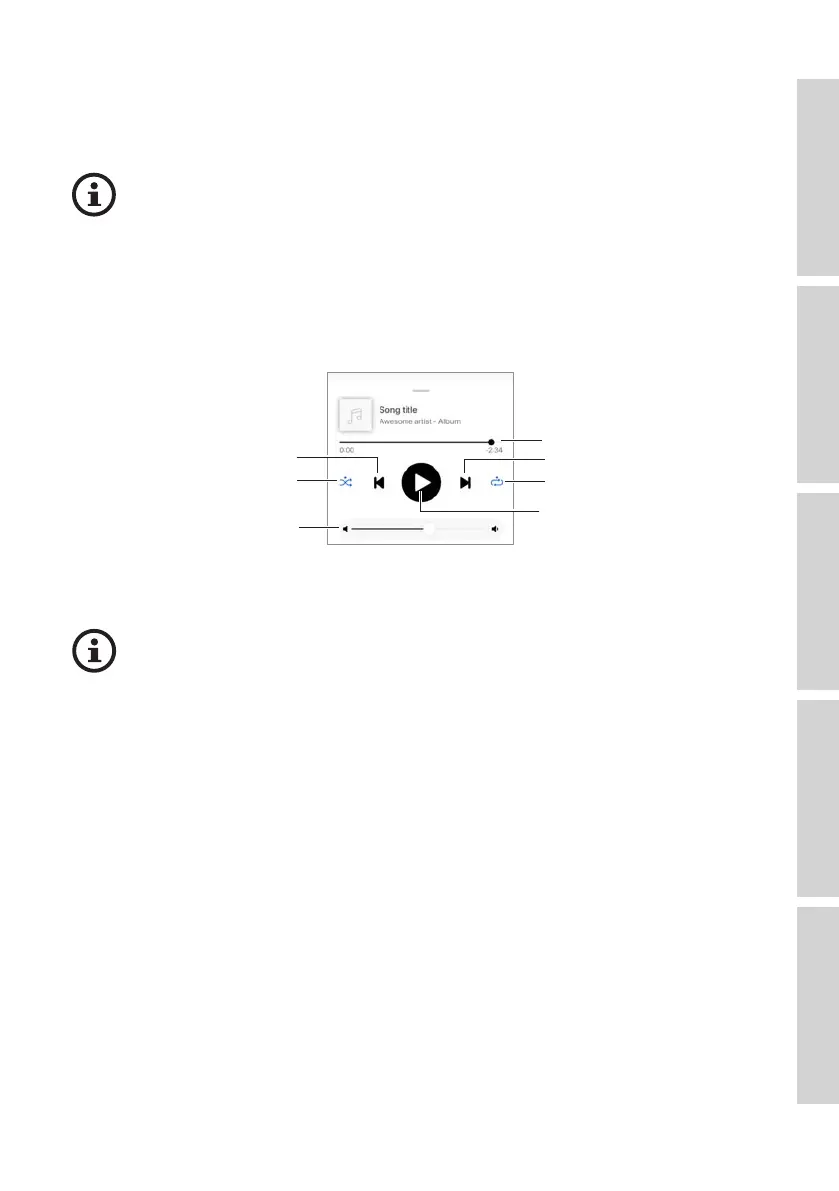
In the KEF Connect App, use the control elements below for playback controls.
Play/pause
Next
Volume control
Previous
Track scroll
Repeat
Shuffle
• The volume can also be adjusted on the top panel or remote control.
• The previous and next functions can also be operated on the remote control.



 To Next Page