57
Table of ContentsSetting UpWi-Fi StreamingUsing KEF Connect AppFAQ and Troubleshooting
14.4 Equalizations
For the best audio performance, apply sound settings according to your listening area.
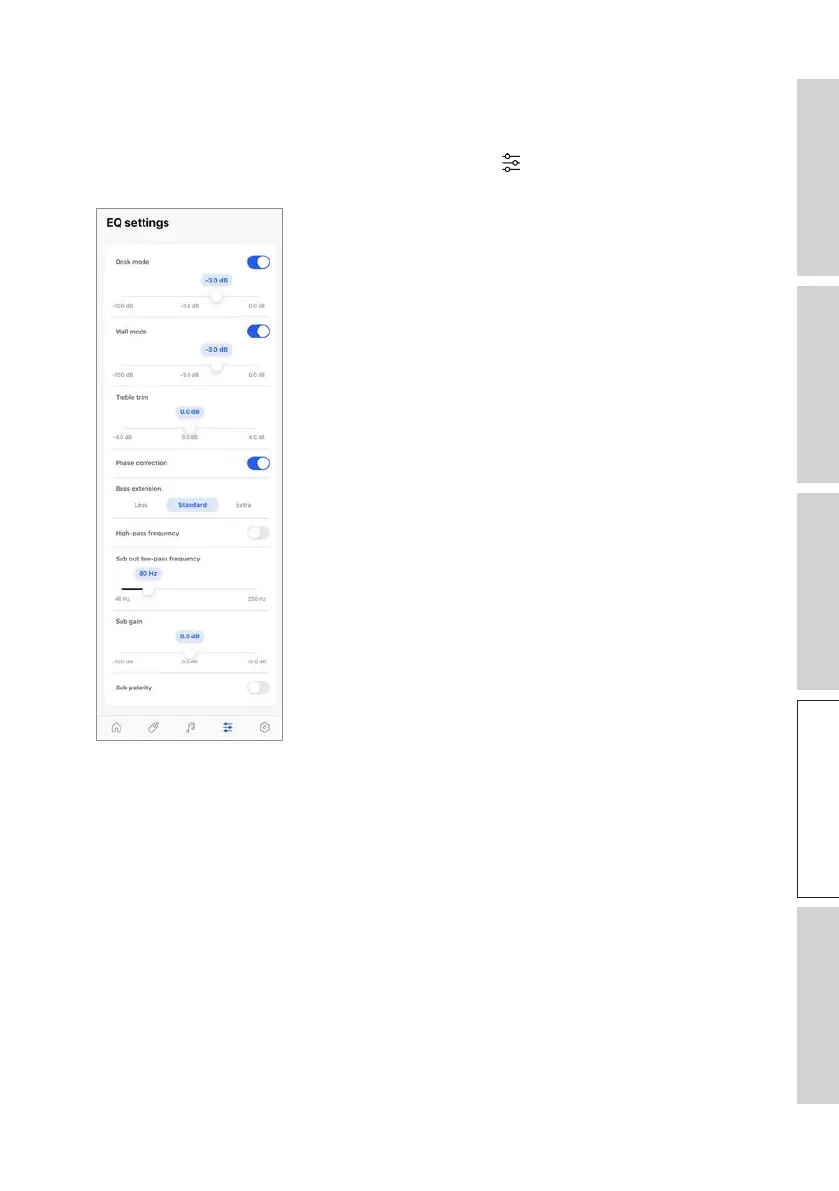
1. In the KEF Connect App, tap the EQ settings icon ( ) at the bottom of the Home
screen to access EQ settings.
The settings include:
• Desk Mode (On/Off, -10.0 dB to 0.0 dB)
• Wall Mode (On/Off, -10.0 dB to 0.0 dB)
• Treble Trim (-4.0 dB to 4.0 dB)
• Phase Correction (On/Off)
• Bass Extension (Less / Standard / Extra)
• High-Pass Frequency (On/Off, 50 Hz to 120 Hz)
• Sub Out Low-Pass Frequency (40 Hz to 250 Hz)
• Sub Gain (-10 dB to 10 dB)
• Sub Polarity (On/Off)



 To Next Page