66
Table of ContentsSetting UpWi-Fi StreamingUsing KEF Connect AppFAQ and Troubleshooting
14.9 Firmware Upgrade
14.9.1 Automatic Firmware Update
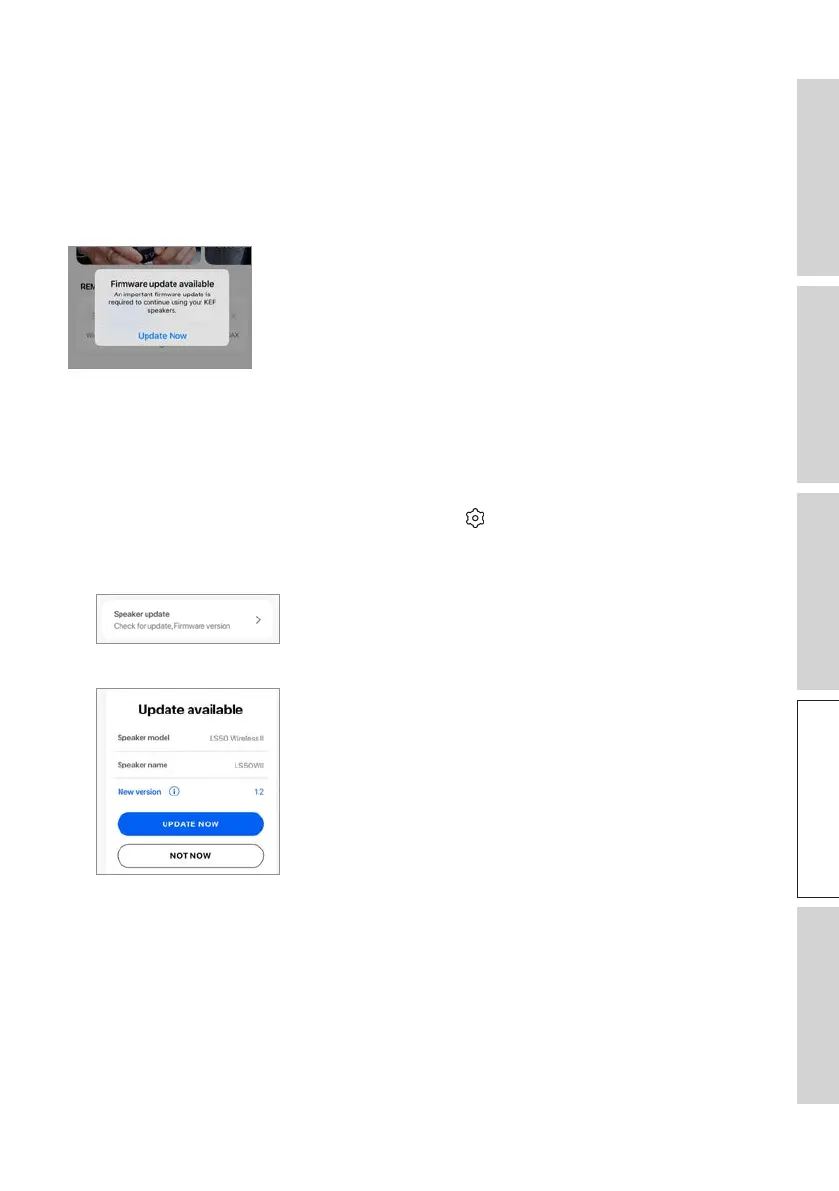
After you have successfully set up the speakers with the KEF Connect App, you may be
required to update the firmware if a new version is available. Follow the instructions in
the KEF Connect App to complete the update process.
14.9.2 Manual Firmware Update
This menu allows you to manually check for firmware updates.
To access this menu:
1. In the KEF Connect App, tap the Setting icon ( ) at the bottom of the Home
screen.
2. Tap “Speaker update”.
3. Ifanupdateisavailable,tap“Updatenow”toproceedwiththermwareupdate.



 To Next Page