Features of your vehicle
585
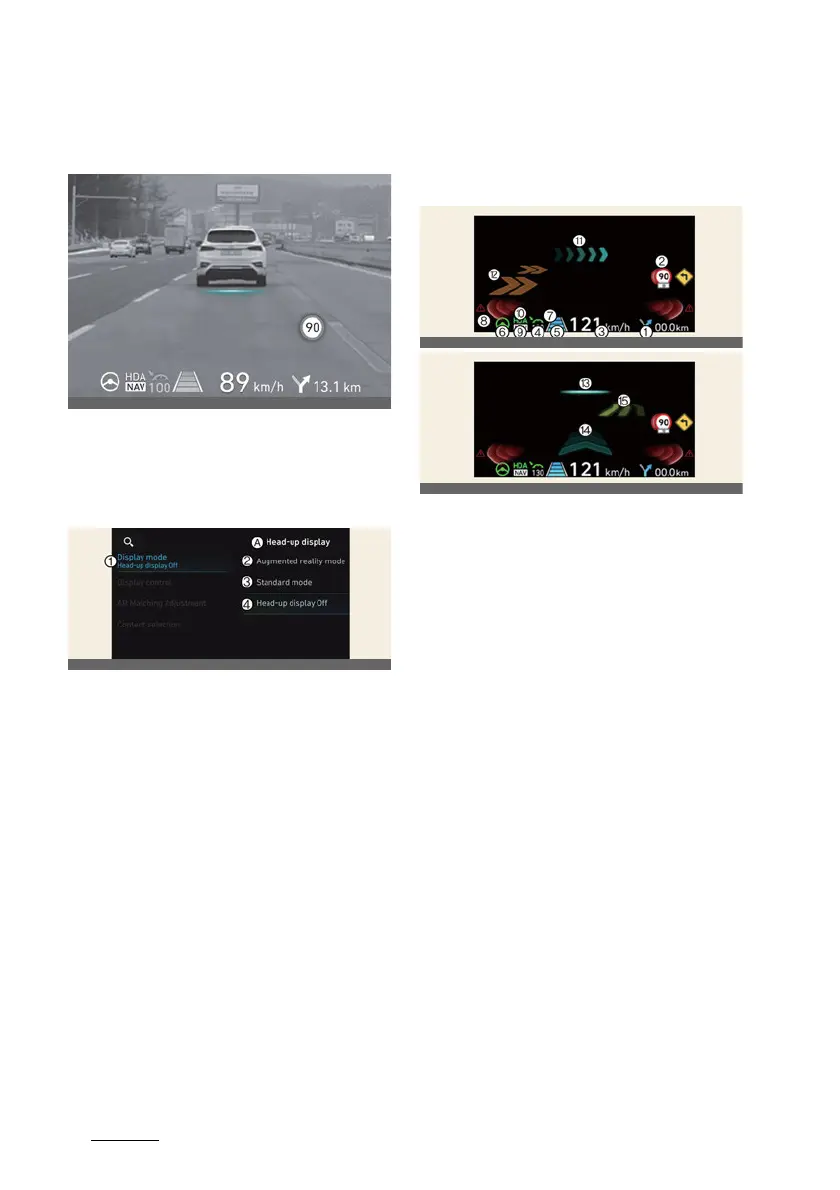
Augmented Reality HUD
Augmented Reality HUD (if
equipped)
The Head-Up Display projects the instru
-
ment cluster and navigation information
onto the windshield.
Head-up display settings
A:
Head-up display
1 Display mode
2 Augmented reality mode
3 Standard mode
4 Head-up display off
Head-up display can be enabled from
the Settings menu in the infotainment
system screen. Select either
Augmented
reality mode
or
Standard mode
from:
僅
Settings
→
Vehicle
→
Head-up dis
-
play
→
Display mode
→
Augmented
reality mode
/
Standard mode
After turning on the head-up display,
you can change the settings of
Display
control
,
Augmented reality calibra
-
tion
and
Content selection
of the
Head-Up Display.
Head-up display information
AR mode display information
1
Turn By Turn (TBT) navigation infor
-
mation
2
Traffic information
3
Speedometer information
4
SCC set speed information
5
SCC vehicle distance information
6
Lane Following Assist information
7
Lane Safety information
8
Blind-Spot Safety information
9
Highway Auto Speed Change infor
-
mation
10
Highway Driving Assist information
11
Turn by turn (TBT) navigation infor
-
mation (AR)
12
Lane Safety information (AR)
13
Front Vehicle indicator (AR) (if High
-
way Lane Change Assist function
equipped)
14
Leading Vehicle Departure Alert (AR)
15
Highway Lane Change Assist infor
-
mation (AR)



 To Next Page