Features of your vehicle
885
Storage compartment
Operation
僅 Pull the cargo security screen towards
the rear of the vehicle by the handle
(1).
僅 Insert the guide pin into the guide (2).
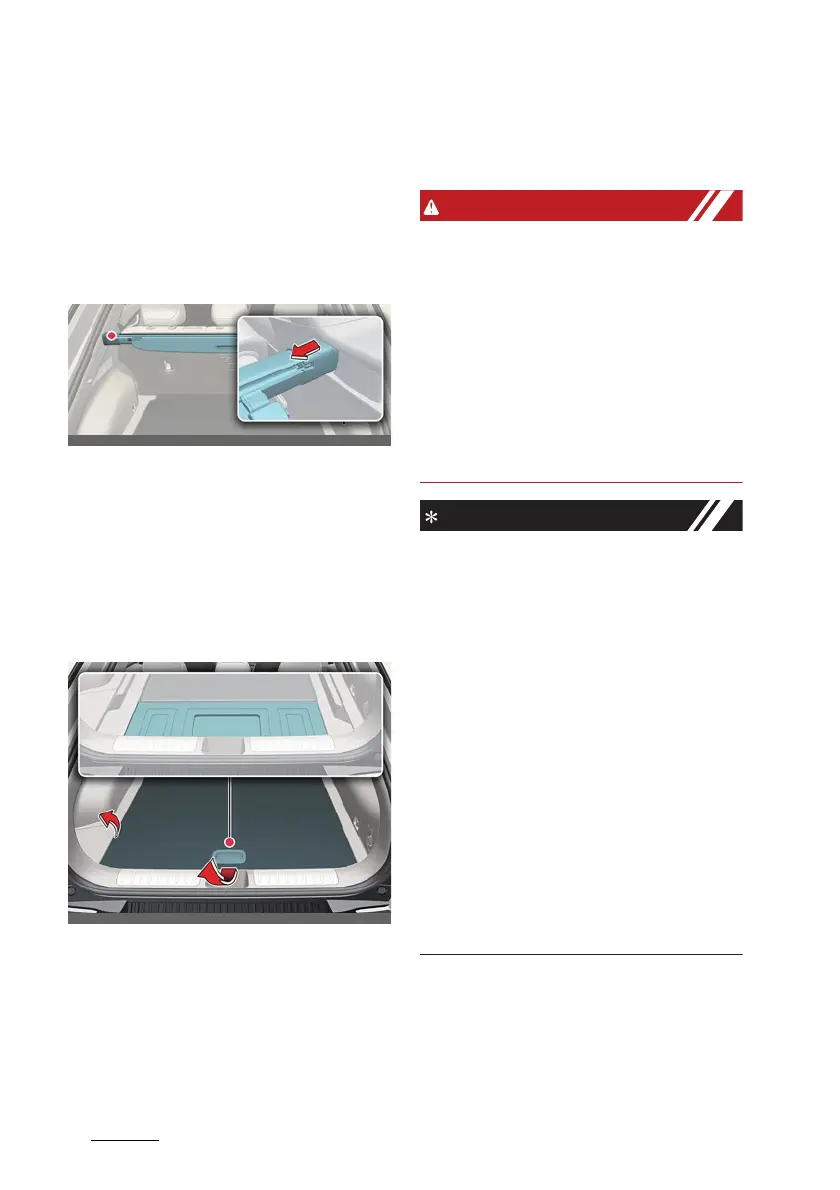
Removing the cargo security
screen
Operation
僅 Push the guide pin in the direction.
僅 Pull the cargo security screen out.
僅 Open the luggage tray and keep the
cargo security screen in the tray.
Removing the cargo security
screen from luggage tray
Operation
僅 Pull the luggage tray board up.
僅 Push the guide pin into the center.
僅 While pushing the guide pin, pull out
the cargo security screen.
僅 The luggage side tray can be
removed to remove the cargo security
screen more easily.
僅 Do not place objects on the cargo
security screen. Such objects may
move around inside the vehicle and
possibly injure vehicle occupants
during an accident or when braking.
僅 Never allow anyone to ride in the lug
-
gage compartment. It is designed for
luggage only.
僅 Maintain the balance of the vehicle
and locate the weight as forward as
possible.
僅 Since the cargo security screen may
be damaged or malformed, do not put
luggage on it when it is used.
僅 Pull out the cargo security screen
using the handle in the center to pre
-
vent the guide pin from falling out of
the guide.
僅 The cargo security screen may not
automatically slide back in if the cargo
security screen is not fully pulled out.
Fully pull it out and then let go.
僅 The cargo security screen and rear
seat may be damaged when the rear
seatback is reclined.
僅Note that if you release the handle
while pulling the luggage screen han
-
dle all the way, the screen may wind
up quickly and be damaged.



 To Next Page