KIC 2000 v2.4.0.x
KIC 2000 User Manual 31
Entering Oven Recipe
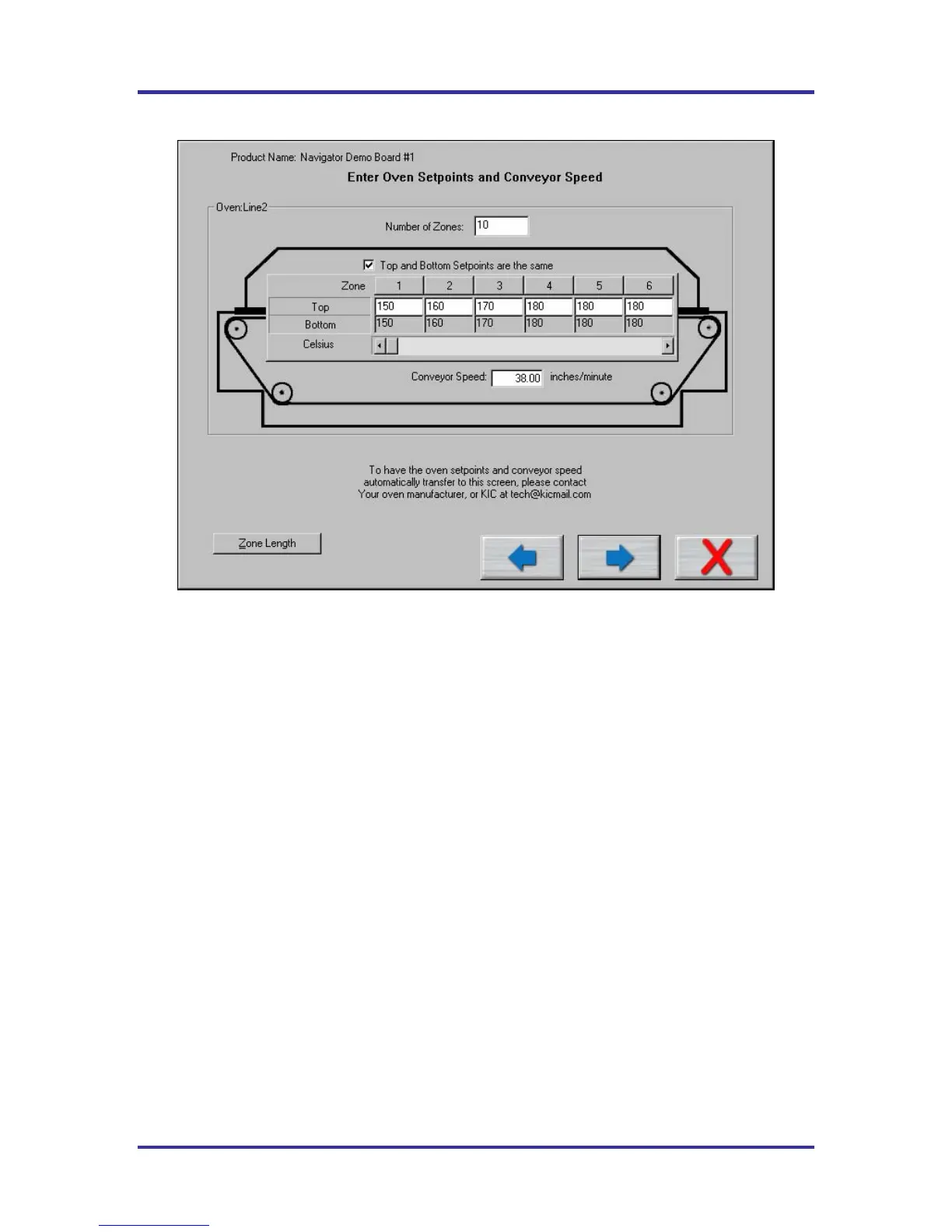
Figure 44: Run a Profile screen #2
This screen does not appear when the KIC 2000 is communicating with the oven controller.
The recipe information is:
Number of Zones – Enter in number of heated zones in your oven.
Top and Bottom Set points are the Same – If your settings always have the top and bottom set points the
same, check this. The bottom set point will automatically be entered as you enter the top set point.
Different top and bottom set points
The software gives you the ability to enter separate top and bottom zone set points, and have them
displayed on the graph. And, when used with the Navigator, it will maintain the top and bottom offset in its
prediction. During the Run a Profile routine, when you get to the screen where you enter in the zone set
points, there is a check box for Top and Bottom Set points are the same. Deselect that checkbox if you are
running different top and bottom set points. Either way, using the same or different top and bottom set
points, the graph will always display a top and bottom set point values.
Zone Temperature fields – You will have a field for input of the temperature setting for each zone based
on the Number of Zones you enter at the top. For more than six zones you will have to scroll over to enter
the temperatures.
Conveyor Speed – Enter the Conveyor speed that your oven is curretnly set at.
Zone Length – See page 32 for details.



 To Next Page