TERRA 4K Operation Manual(KineOS 6.2)
©2019 Kinefinity Inc. Page 12 / 60
2.2 Mount
TERRA is designed with original KineMOUNT, which needss a Mounting Adapter II before attaching a lens.
The adapters include EF Mounting Adapter II, EF Mounting Adapter II with KineEnhancer, EF Mounting
Adapter II with e-ND, PL Mounting Adapter II, PL Mounting Adapter II with e-ND, and also SONY E Mounting
Adapter.
There are only three steps to install adapter II to the KineMOUNT, take EF adapter as an example. Turn off
the camera and then:
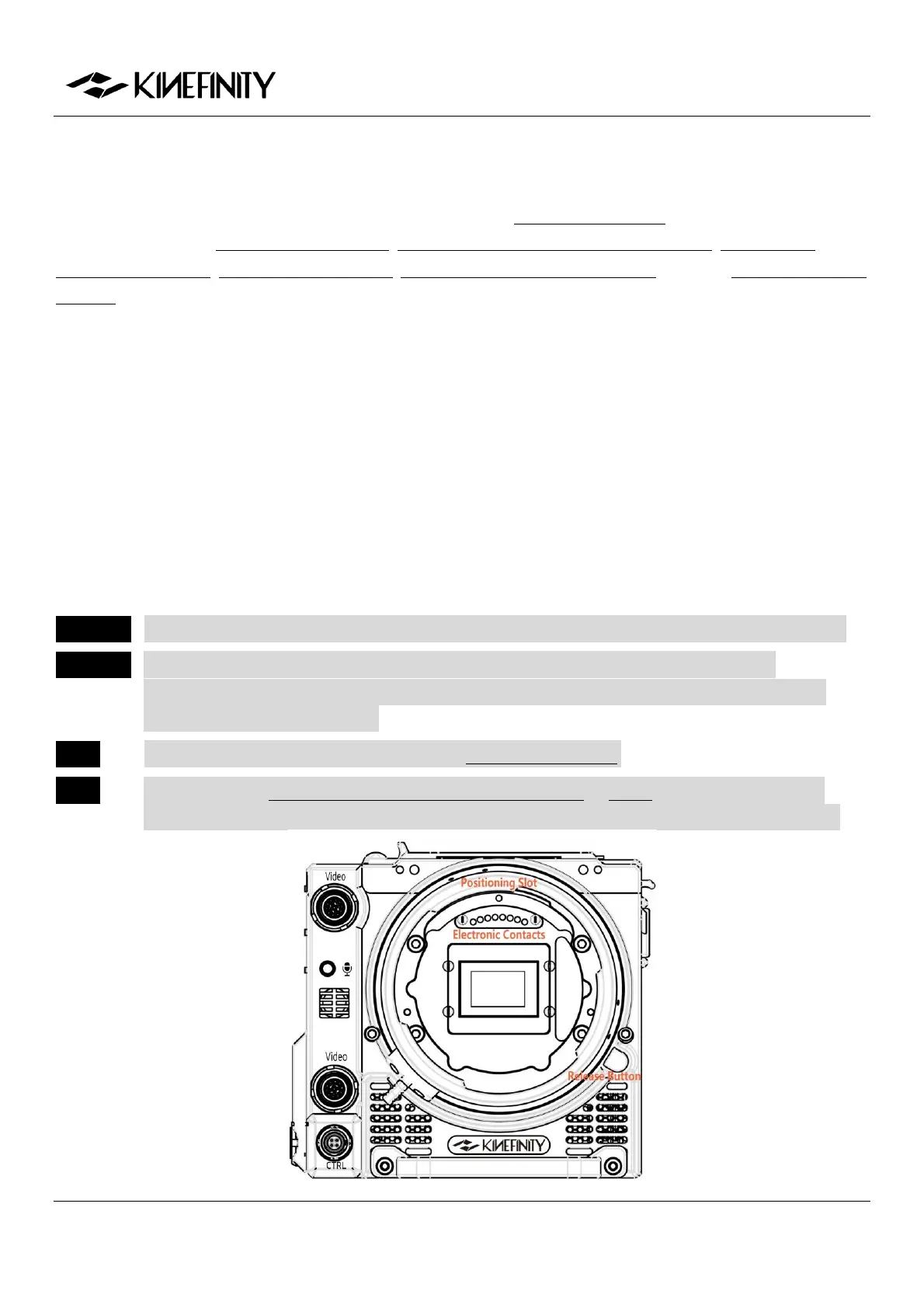
1. Release: keep pressing the KineMOUNT Release Button and rotate the locking ring of KineMOUNT
counter-clockwise, then take off the KineMOUNT cover;
2. Install: there is a positioning slot above the electronic contacts of KineMOUNT, please match the
arcuate protrusion on the adapter with the locating slot of KineMOUNT when attaching the
mounting adapter to the camera;
3. Lock: rotate the locking ring of KineMOUNT clockwise to fasten the adapter to KineMOUNT firmly.
Power on TERRA after mounting the adapter. Press "CONFIG" and check the bottom of this menu, if it
presents EF sys 9(or other number), it means you have mounted the adapter successfully.
CAUTION Power off camera when swapping different adapters, else camera or adapters may get burned.
CAUTION As the FFD of KineMOUNT is very short, please don't try to attach any lens directly to
KineMOUNT, or it will cause permanent damage to CMOS imaging sensor and OLPF, except
lenses tailored for KineMOUNT.
NOTE TERRA's New KineMOUNT only works with Mounting Adapter II.
NOTE When install the EF Mounting Adapter II with KineEnhancer or e-ND, please don't touch the
optical glass. Any damage caused to the glass is irreversible, and the glass has to be replaced.


 To Next Page