TERRA 4K Operation Manual(KineOS 6.2)
©2019 Kinefinity Inc. Page 7 / 60
CAUTION Cameras delivered after May 2018 is with the new quick release port, which is for the KineBACK-
W. It is easy to mount it on the body, but please also be careful when you do it. While other
TERRA is with old version port and KineBACK instead of the quick and hard connection,
therefore, please follow the instructions and be cautious when you install/remove KineBACK
to/from camera body.
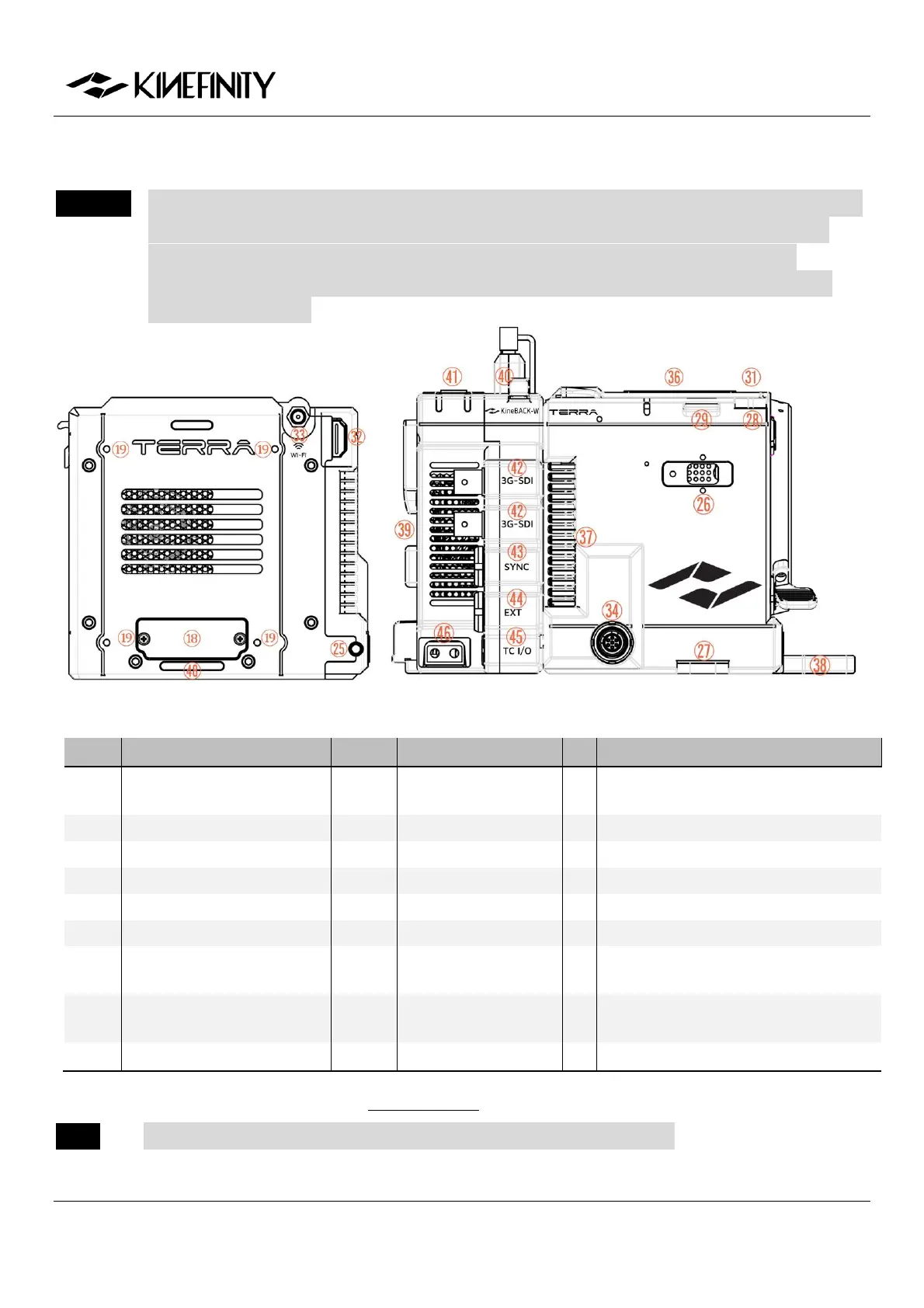
Back View Right View of Body with KineBACK-W (KineMOUNT)
KineBACK-W Screw Holes
(M3)
Audio XLR Port x2 (KineBACK-W)
3G-SDI Port x2 (KineBACK-W)
D-Tap Power Output x2 (KineBACK-W)
Front Support
(Detachable)
SideGrip Screw Holes (M2.5)
V-mount Battery
Plate (KineBACK-W)
KineBACK-W Positioning Hole
Battery Release Button (KineBACK-W)
For the definition of ports, please refer to 5.2 Connectors. SYNC and Video Ports are proprietary.
NOTE TERRA 4K cameras shipped before Dev. 2018 only have one Video port.


 To Next Page