Issue: 08/2012
Before opening the shutter housing, wait until the
shutter stands still!
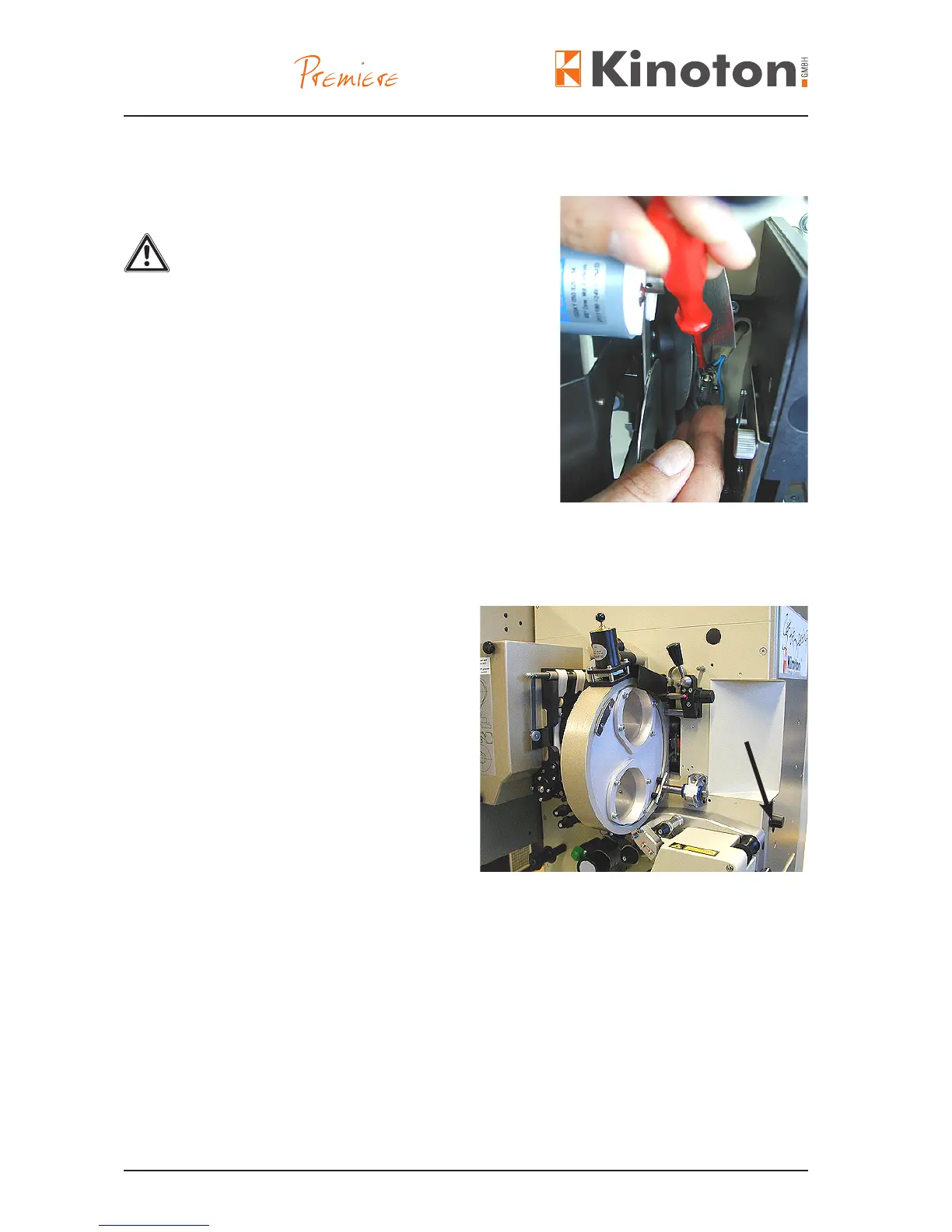
• Remove the shutter housing.
• Put screw driver behind the lamp socket (arrow)
and lift the lamp out of the socket.
• Push the new pilot lamp into the socket and
close shutter housing.
The correct adjustment of the lm pressure skate is mandatory in order to run the lm
easefully and steady-going and with minor wear and tear of projector and lm copy.
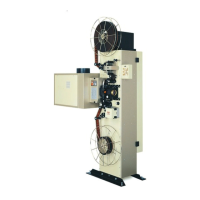
• Reduce the skate pressure by turning
the adjusting knob (arrow) such that
the picture begins to shake
vertically on the screen.
$The projector running noise becomes
louder and more unsteady.
• Increase the skate pressure until the
running noise becomes quietly and
steadily and the picture steadiness is
correctly.
X
Z Only tighten the lm pressure skate as much as is absolutely necessary!
Z Pressure too low:
- The picture shakes on the projecting screen.
- Loud noise
Z Pressure too high:
- The sprocket teeth, the lm perforations, the lm pressure skate and the runner
strips will wear excessively.
- Film emulsion will be left in the gate.
Z The necessary pressure of the skate depends on the used lm material.
It is recommended to check the skate pressure again, after splices have run through
the lm gate and also after the lm material has been changed.


 To Next Page