SANARIUM M, S
PAGE 12
5070189/02.03
5. Operation
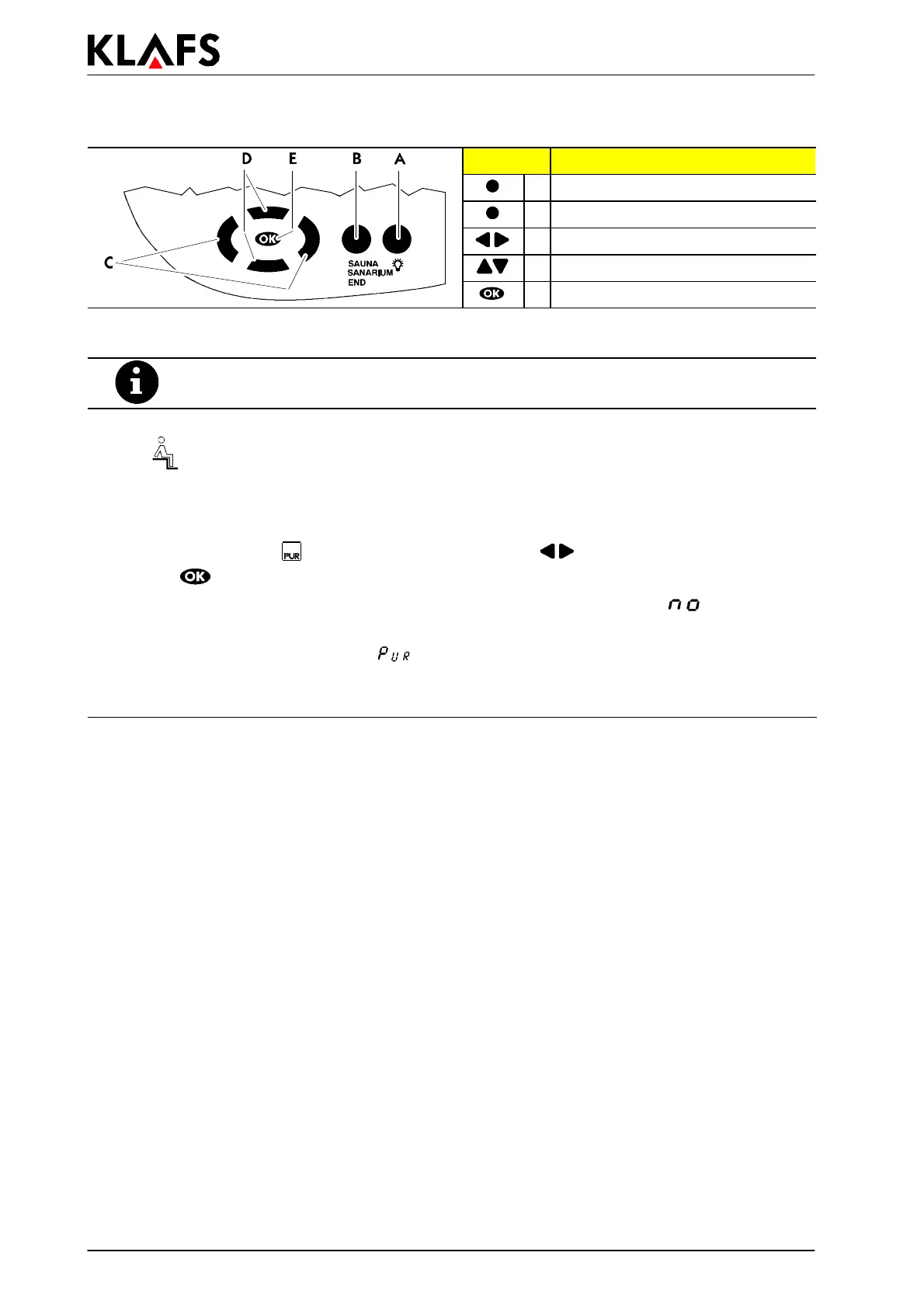
Button: Description:
A Cabin light button
B Operatingmodebutton
C Left/Right buttons
D Up/Down buttons
E OK button
5.5. Starting the SaunaP
UR
form of bathing
Make sure that the evaporator water tank is empty.
' See Chapter 5.11. - Putting the evaporator out of operation.
. Requirement: Only possible during sauna operation. Setpoint temperature must be reached.
The
symbol must appear in the display.
' Start sauna operation if required, see Chapter 5.4.
. It is possible to start the SaunaP
UR form of bathing on the control unit or on the internal display
using the SaunaP
UR - button (optional).
1. To select the SaunaP
UR form of bathing, use the left/right buttons on the control unit.
2. Use the
button to start the form of bathing.
. If the temperature for the SaunaP
UR form of bathing has not yet been reached, appears in the
control unit display.
. During the SaunaP
UR form of bathing appears in the control unit display.
. After approx. 20 minutes or a temperature drop of approx. 15 Kelvin in the sauna cabin, the
SaunaP
UR form of bathing ends automatically. The sauna heater starts heating again.



 To Next Page