OM7007 Radio / CD Player - Section 70
Page 70-1
AM/FM RADIO / CD / MP3 / USB / iPOD™ / AUX PLAYER
OPERATING INSTRUCTIONS
GENERAL RADIO RECEIVER FUNCTIONS
The receiver is equipped with:
• An AM band with 6 AM presets
• Two FM bands for a total 12 FM presets
• One Weatherband with 6 WX presets
• USB port to access additional music files
• Auxiliary port to access additional music files
Turning On the Power
With the key switch ON, the receiver can be turned
on and off by pressing button (1, Figure 70-1).
Pressing ON/AUDIO (2) knob also activates the
radio.
One-Hour Timer
With the key switch OFF, pressing the button or
the ON/AUDIO (2) knob will turn on the receiver and
activate the receiver's one-hour timer. The receiver
will turn off after one hour. Pressing the button or
ON/AUDIO (2) knob again reactivates the one-hour
timer.
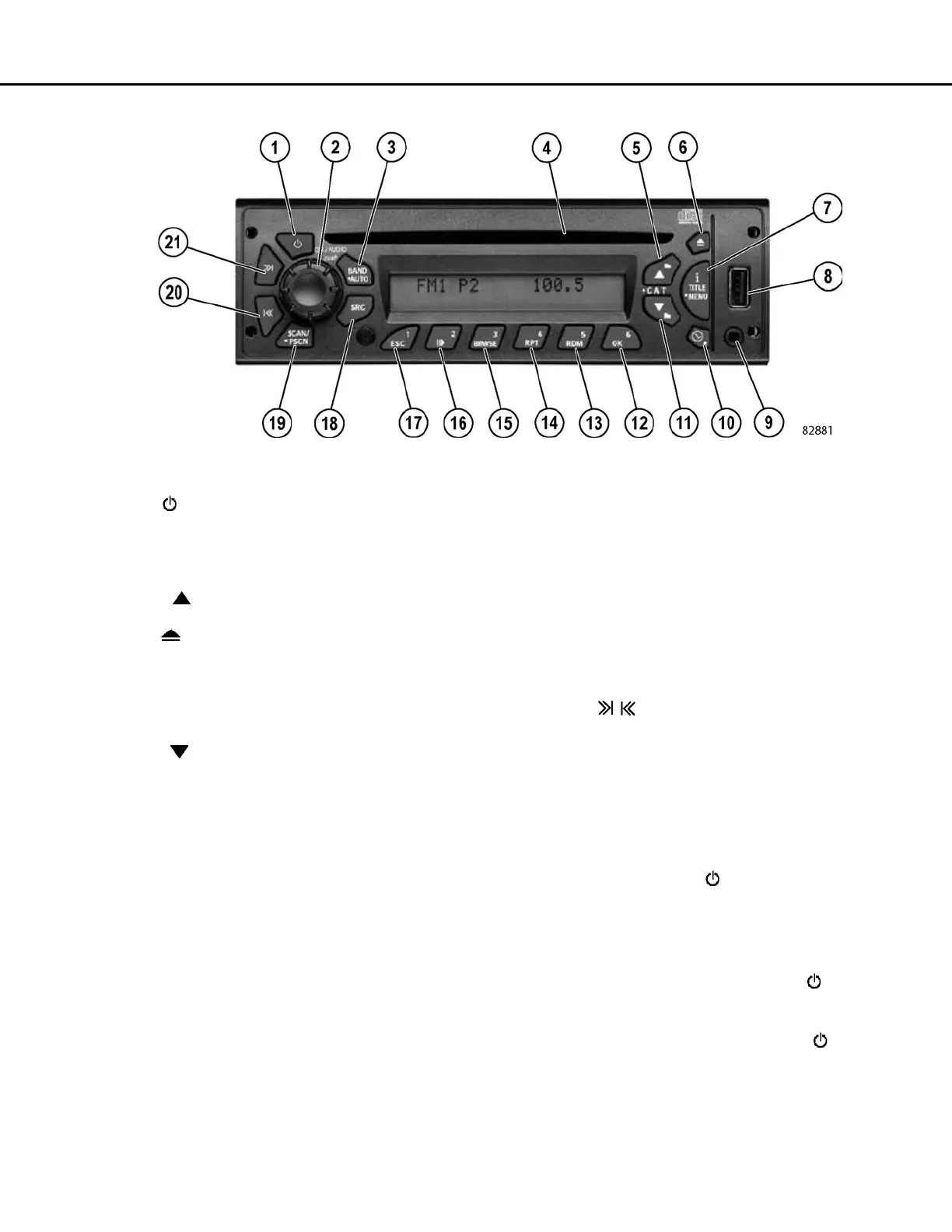
FIGURE 70-1. AM/FM RADIO / CD PLAYER
1. - Turns the radio on or off
2. ON/AUDIO - Power/volume/receiver settings
3. BAND/AUTO - Switches bands, stores stations to
presets.
4. CD Slot - Place CDs into radio
5. + SCROLL - Switches to next available radio sta-
tion or changes folder on CD/MP3 or USB
6. - Ejects CD from radio
7. i TITLE/MENU - Displays information/title of current
song
8. USB - Input port for memory devices
9. AUX. - Input port for external audio devices
10. CLOCK/ALARM - Displays alarm set time
11. - SCROLL- Switches to previous radio station,
or changes folder on CD/MP3/USB
12. OK - Enables selection on a menu
13. RDM - Plays CD tracks and MP3/WMA files and fold-
ers randomly
14. RPT - Repeats the same CD track or WMA file/folder
until cancelled
15. BRWSE - Allows access into iPod menu
16. PAUSE/PLAY - Pauses CDs, MP3 files and iPod
17. ESC - Exits when in a menu or backs one submenu
18. SRC - Switches to CD/MP3/USB/iPod/Aux mode
19. SCAN/PSCAN - Scans all stations and presets in
current band CD/MP3/WMA/ files and folders
20. SEEK - Switches to next or previous available
radio station/CD track/MP3/WMA file
Push Buttons 12-17 - Pre-set stations/controls CD/
MP3/WMA/USB/iPOD functions



 To Next Page