167
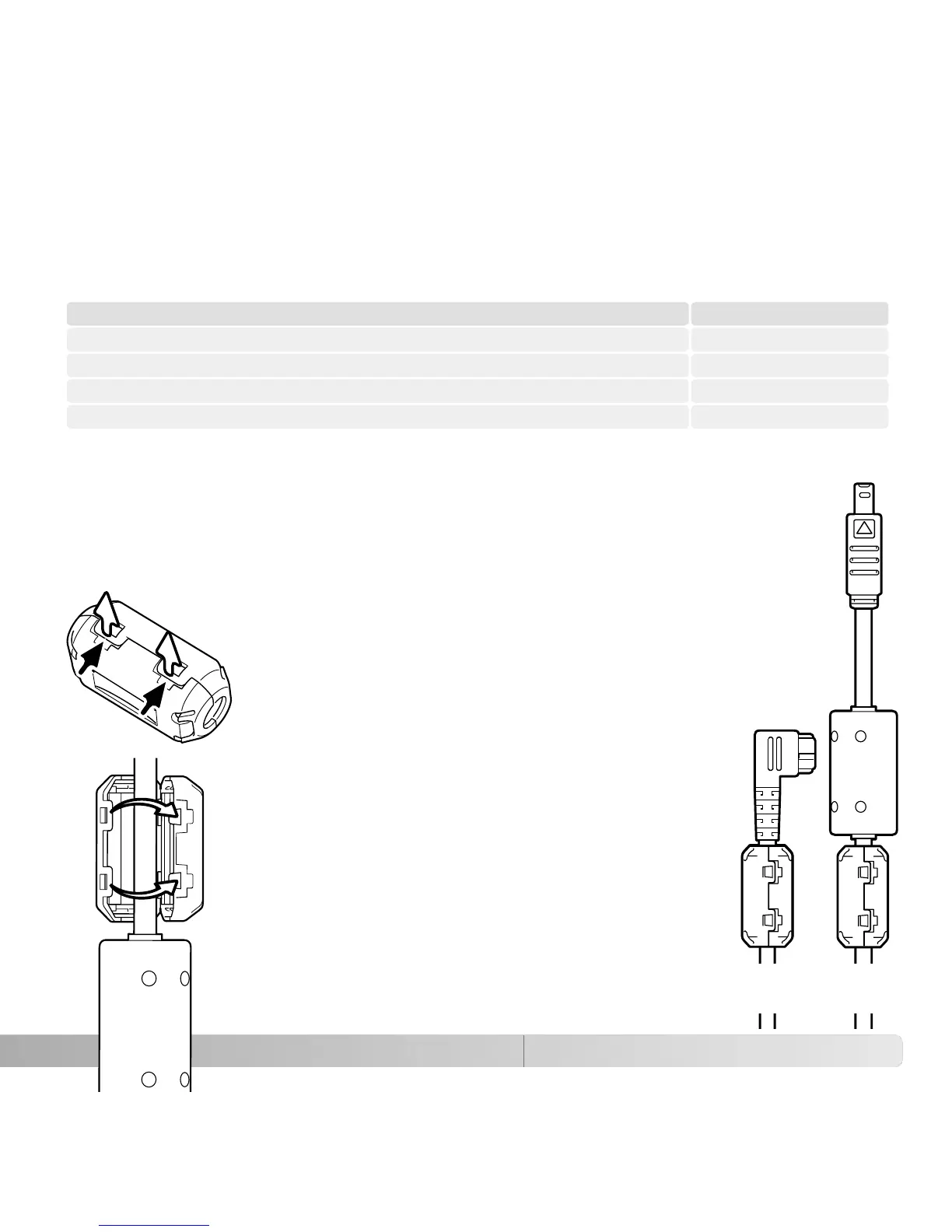
ATTACHING THE FERRITE CORE FRC-100
ABOUT THE LITHIUM-ION BATTERY CHARGER CORD
The included AC cord is designed for the current of the sales region. Only use the cord
in the region it was purchased.
Japan (100V)
Continental Europe, China, Korea, Singapore (220-240V)
Great Britain, Hong Kong (220V-240V)
United States, Canada (110V-120V)
APC-140
APC-110
APC-120
APC-130
Region Product code
When using an optional remote cord (RC-1000S or RC-1000L), or when
operating the camera with the optional DiMAGE Capture software, the cord and
USB cable must have the supplied ferrite core (FRC-100) attached. The ferrite
core reduces harmful interference.
Slide a thin blunt object under the two latches on
the core to open it.
The core must be placed on the end of the cable
that is connected to the camera as shown on the
right.
Place the core around the cable and close. Confirm
the latches on the core have caught.
USB
cable
Remote
cord















 To Next Page