Solving Other Problems196
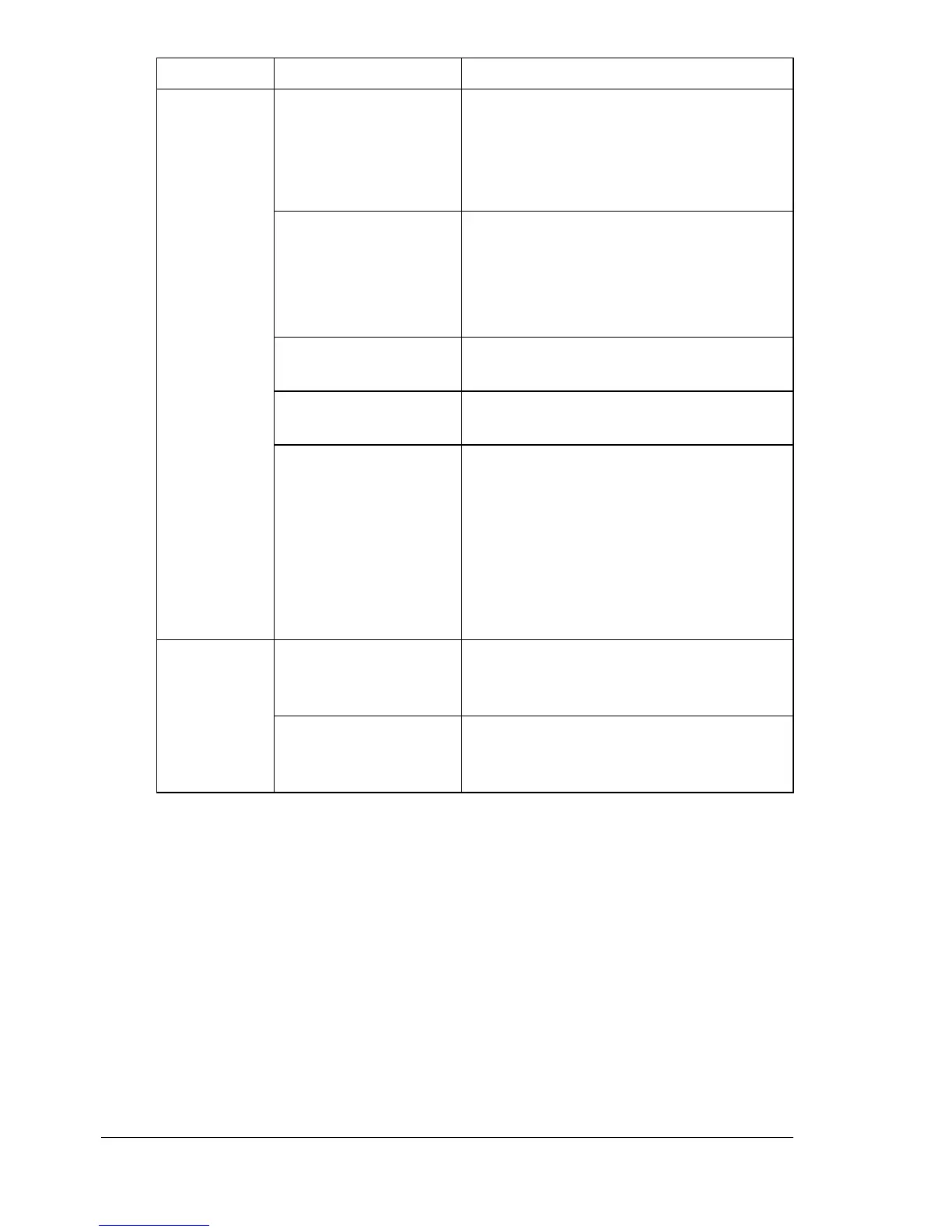
Printing
takes too
much time.
The printer is set to a
slow printing mode
(for example, thick
stock or transpar-
ency).
It takes more time to print on special
media. When using regular paper,
make sure that the media type is set
properly in the driver.
The printer is set to
Energy Saver mode.
It takes time for printing to start in
Energy Saver mode. If you do not want
to use this mode, disable it. (
SYS
DEFAULT MENU/ENERGY SAVER
menu)
The job is very com-
plex.
Wait. No action needed.
The printer memory is
insufficient.
Add more memory.
A toner cartridge for a
different region or an
unapproved genuine
toner cartridge is
installed (
INCOR-
RECT TONER X
is
displayed in the mes-
sage window).
Install a correct KONICA MINOLTA
toner cartridge approved for your spe-
cific printer.
Blank pages
come out
during print-
ing.
One or more of the
toner cartridges are
defective or empty.
Check the toner cartridges. The image
will not print if one or more cartridges
are empty.
The wrong media is
being used.
Check that the media type set in the
driver matches the media loaded in the
printer.
Symptom Cause Solution














 To Next Page