15 Accessories
15.1 Installation
15.1.4 Fixing kit mounting on OME
Fixing kit Application Article No. Suitable for
Mounting on flowmeter
OME
UZA21
1.2
BEM300/BEM500/OME-013
UZA22
1.2
BEM300/BEM500/OME-020
UZA24
2
BEM300/BEM500/OME-032
1
Not suitable for OME with DIN flanges
2
Not suitable for OME with temperature sensor connection
15.1.5 Adapter set for conversion of BEM4U to BEM300/BEM500
Adapter set Application Article No. Suitable for
o Mounting in the
control cabinet
o Conversion of
BEM4U to
BEM300/BEM500
EGT23 BEM300
BEM500
Scope of delivery:
o 1sheeting bonded to
seal
o 1sheeting
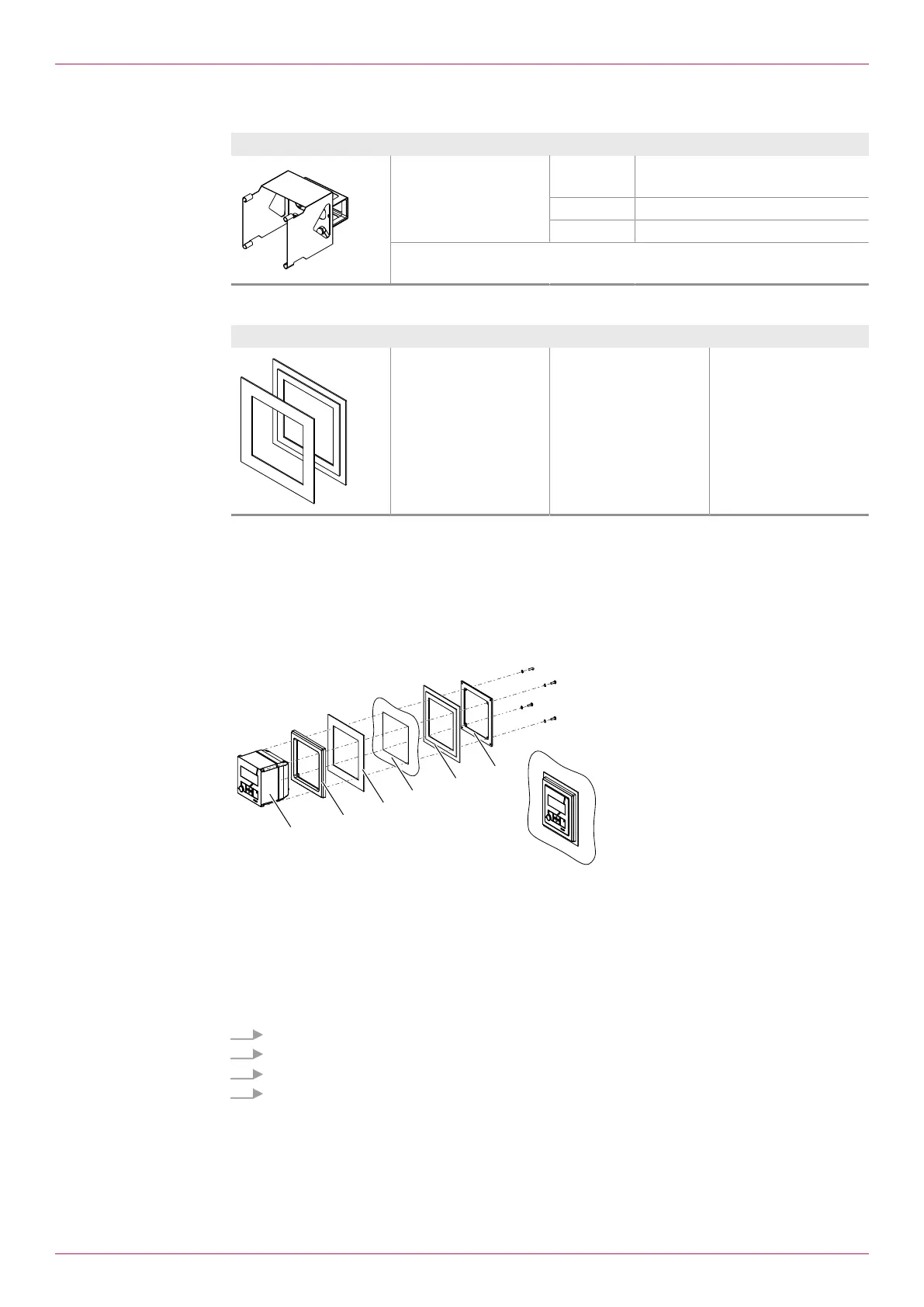
Change BEM4U to BEM500
Notice The previously used temperature sensors have to be replaced by temperature sensors with Pt100 out-
put. These temperature sensors are available from KRAL. During conversion, observe setting the tem-
perature sensor units.
Notice Depending on the sheeting thickness of the control cabinet the supplied screws may have to be re-
placed by longer screws.
1 Electronic unit 5 Sheeting**
2 Front frame* 6 Sealing frame*
3 Sheeting bonded to seal** 7 Screws and wedge lock washers*
4 Control cabinet
* Included in the scope of delivery of the
BEM300/BEM500
** Adapter set
1. Remove the BEM4U.
2. Slide the front frame2 and sheeting with seal3 from the rear onto the electronic unit1.
3. Position the electronic unit in the control cabinet section.
4. Slide on the sheeting5 and sealing frame6 and fasten using the screws and wedge lock
washers7.
Operating instructions
OIE 12en-GB Edition 2020-03
43


 To Next Page