6-17
Sending > Specifying Destination
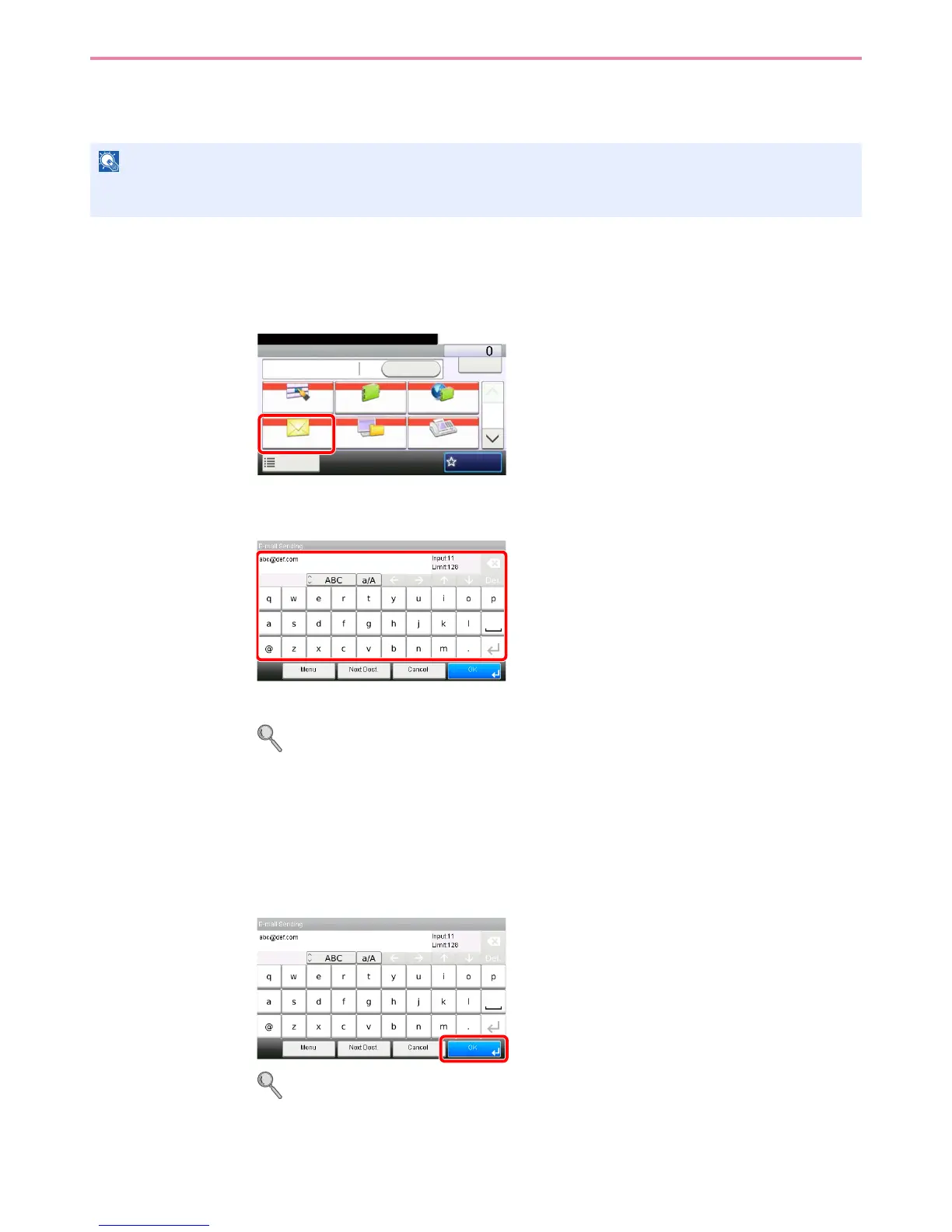
Entering a New E-mail Address
Enter the desired e-mail address.
1
Display the screen.
1 Referring to Basic Operation on page 6-2, display the screen.
2
2
Enter destination E-mail address.
Up to 128 characters can be entered.
Refer to Character Entry Method on page 11-7 for details on entering characters.
To enter multiple destinations, press [Next Destination] and enter the next destination. Up to
100 E-mail addresses can be specified.
You can register the entered email address in the Address Book by pressing [Menu] and then
[Add to Address Book]. You can also replace the information for a previously registered
destination.
3
Accept the destinations.
Destinations can be changed later. Refer to Checking and Editing Destinations on page 6-21.
NOTE
Access the COMMAND CENTER beforehand and specify the settings required for sending e-mail. For details, refer to
COMMAND CENTER (Settings for E-mail) on page 2-23.
GB0055_00
Send Dest. :
Recall
Check
E-mail
One Touch Key Address Book Ext Address Book
FAXFolder
Functions
10:10
1/2
Favorites
Ready to send.
GB0057_07GB0057_07



 To Next Page