6-40
Sending > Sending Functions
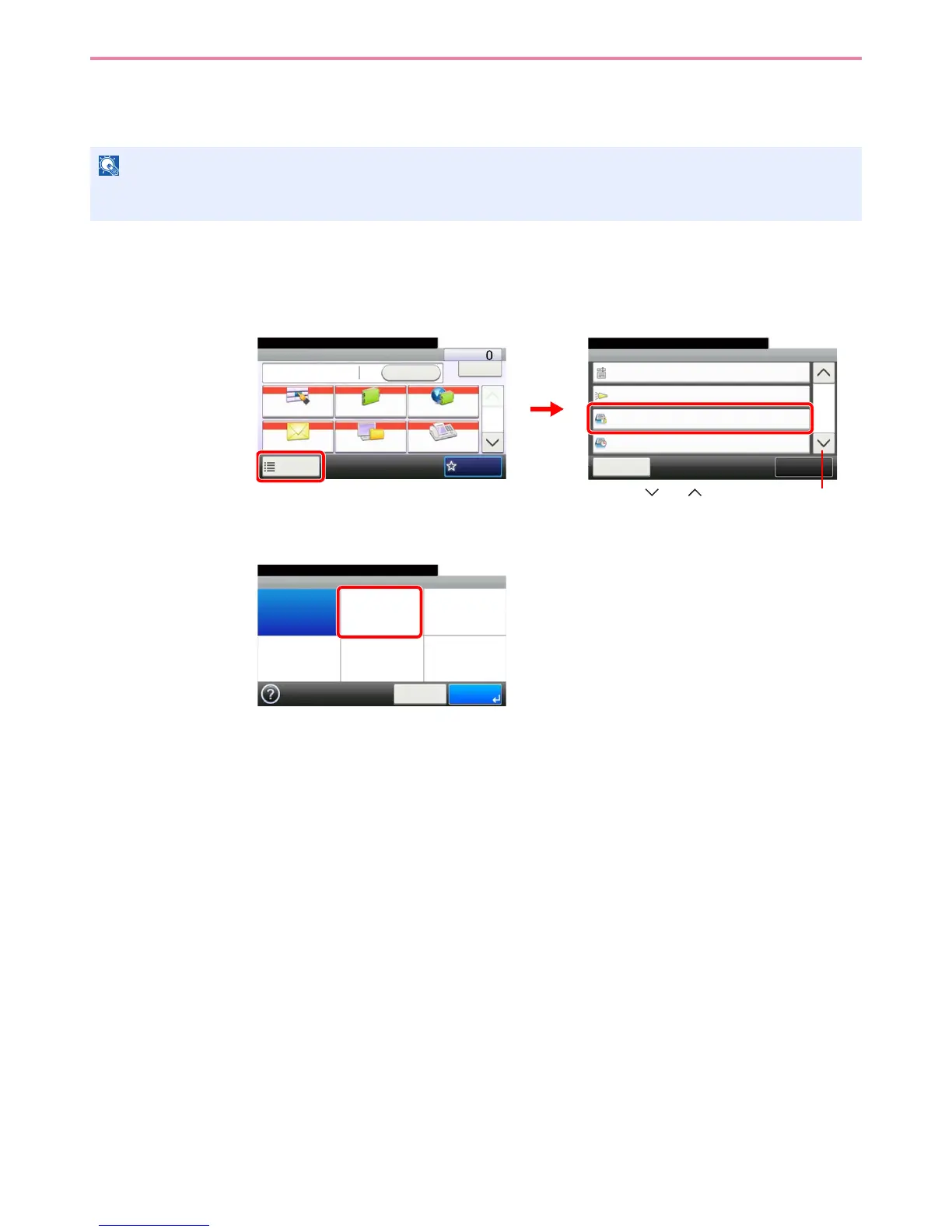
FTP Encrypted TX
Encrypt images when using FTP. Encryption secures the document transmission.
1
Display the screen.
1 Referring to Basic Operation on page 6-2, display the screen.
2
2
Select the function.
NOTE
To use FTP encryption, set SSL to [On] in the Secure Protocol settings. For details, refer to Secure Protocol on page
9-22.
Functions
Close
10:10
Off
Off
E-mail Subject/Body
Job Finish Notice
5/6
Add/Edit
Shortcut
Ready to send.
FTP Encrypted TX
FAX Delayed Transmission
Off
Off
Send Dest. :
Recall
Check
E-mail
One Touch Key Address Book Ext Address Book
FAXFolder
Functions
10:10
1/2
Favorites
Ready to send.
GB0055_00
GB0081_04
2
1
Use [ ] or [ ] to scroll up and down.
GB0091_00
FTP Encrypted TX
Off On
10:10
Cancel OK
Ready to send.


 To Next Page