3-23
Common Operations > Favorites
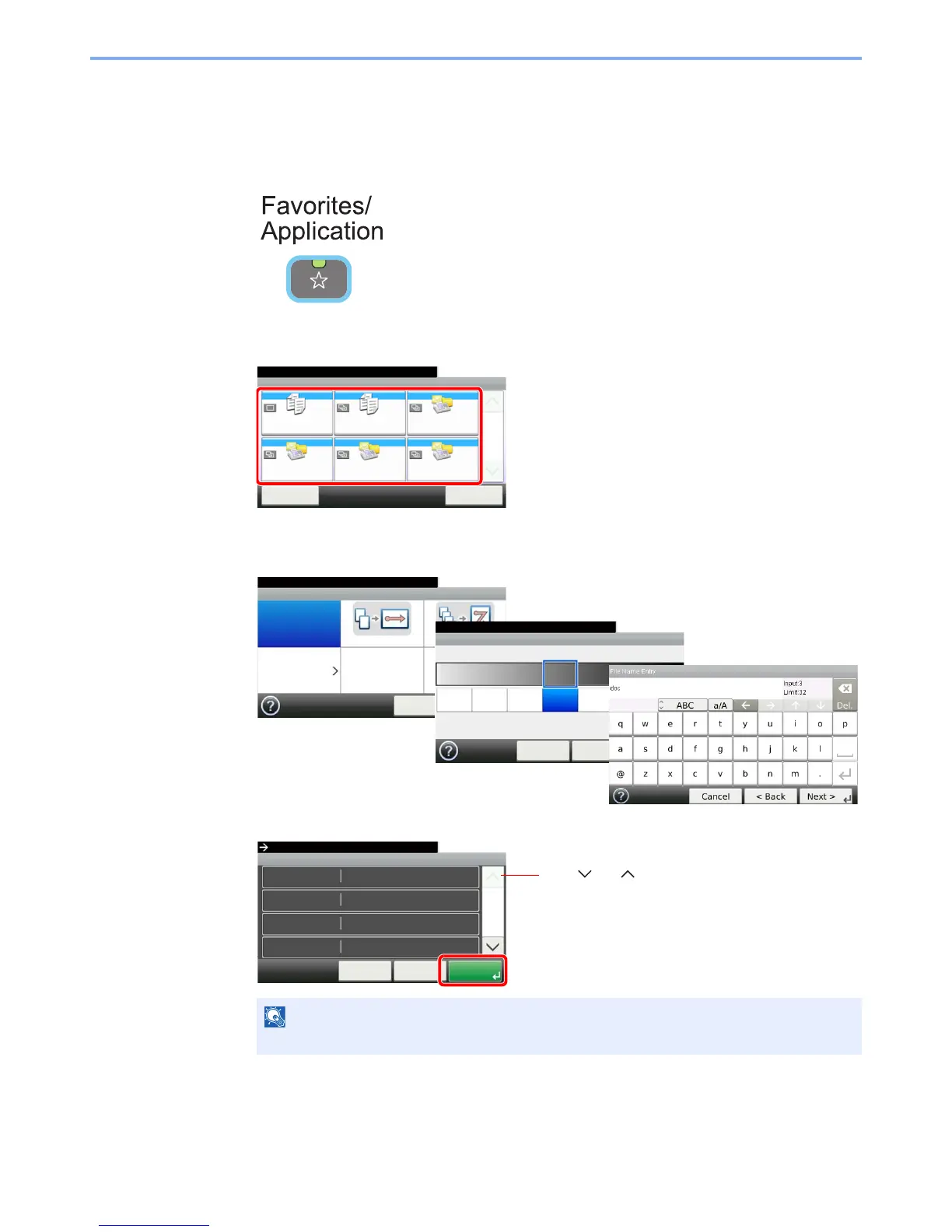
Using Favorites
Call up settings from a favorite.
1
Display the screen.
2
Select a favorite.
When using the wizard mode
1 The registered screens are displayed in order. Make the desired settings.
2 Confirm the settings and start the job.
NOTE
To edit the settings, press [<Back] and make changes as desired.
GB0056_00
Favorites
Menu
10:10
1/1
Select the function.
ID Card Copy Paper Saving Copy Scan to PC(Addre
ss Entry)
Scan to PC(Addre
ss Book)
Scan to E-mail(A
ddress Entry)
Scan to E-mail(A
ddress Book)
Application
Set Combine.
Combine
Off 2 in 1 4 in 1
Others
10:10
Next >Cancel
Density
10:10Adjust the density.
Lighter
< Back
Normal
-3
Darker
-2 -1 0
Next >Cancel
+1 +2 +3
GB0008_99
GB0016_99
GB0057_99
GB0820_00
Confirmation
1Copies
10:10
Cancel
Paper Selection
Zoom
Density
Copies
Auto
100%
< Back
1/6
Start
Press [Start] to start copying.
Normal 0
Use [ ] or [ ] to scroll up and down.



 To Next Page