9-29
Setup, Registration, and User Management > System Menu
7 Press [OK] after color registration is complete.
Detailed Settings
1
Display the screen.
2
Print the chart.
A chart is printed. On the chart, for each of M (magenta), C (cyan) and Y (yellow), charts for H-
1 to 9 and V-1 to 5 are printed.
1
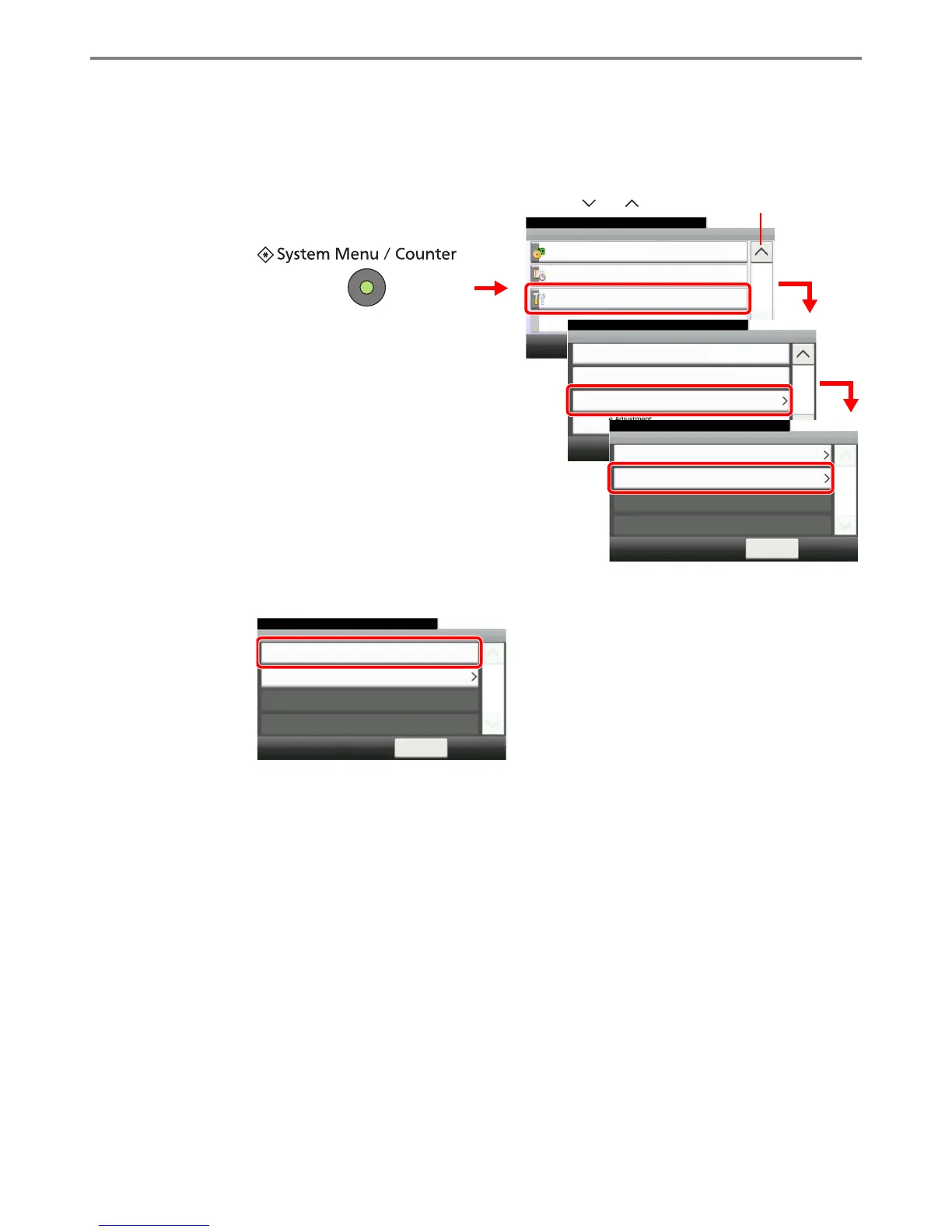
System Menu/Counter.
System Menu
10:10
Adjustment/Maintenance
5/5
System
Date/Timer
2
Correcting Black Line
10:10System Menu/Counter.
Display Brightness
< Back
2/4
Off
Adjustment/Maintenance
Color Registration
Tone Curve Adjustment
3
3
GB0629_01
Use [ ] or [ ] to scroll up and down.
GB0054_04
Normal
10:10System Menu/Counter.
Detail
< Back
1/1
Adjustment/Maintenance - Color Registration
4
GB0641_00
GB0642_01
Color Registration - Detail
10:10System Menu/Counter.
Registration
Print Chart
1/1
< Back



 To Next Page