2-19
Preparation before Use > Installing Software
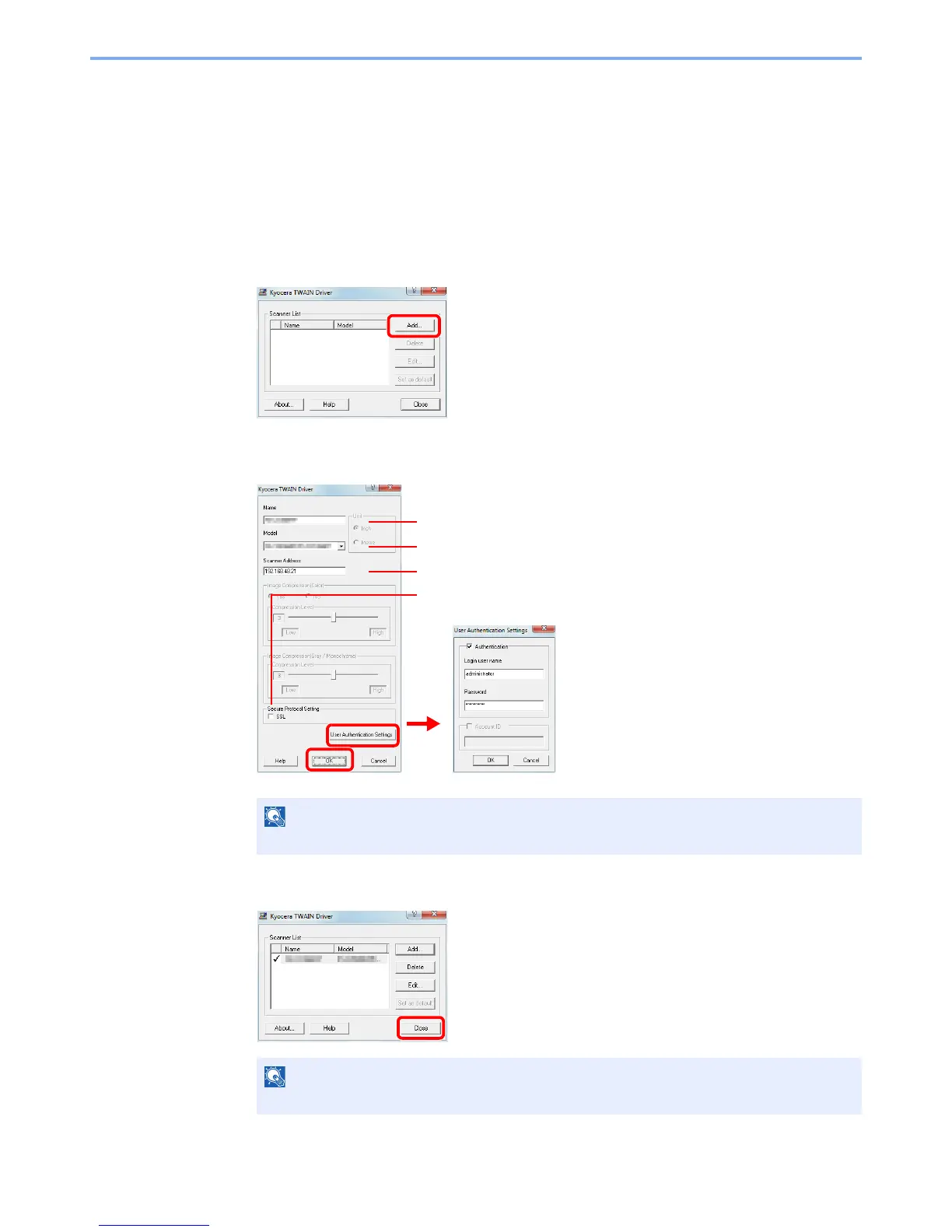
Setting TWAIN Driver
Register this machine to the TWAIN Driver.
1
Display the screen.
1 Select Start button of the Windows display, All Programs, Kyocera and then TWAIN
Driver Setting.
In Windows 8, select Search in charms, Apps, and then TWAIN Driver Setting.
2 Click Add.
2
Configure TWAIN Driver.
3
Finish registering.
NOTE
When the machine’s IP address is unknown, contact Administrator.
NOTE
Click Delete to delete the added machine. Click Edit to change the settings.
Enter the machine name.
Select this machine from the list.
Enter the machine's IP address or host name.
When user authentication is enabled, select the
checkbox beside Authentication, and enter
Login User Name (up to 64 characters) and
Password (up to 64 characters).
When job accounting is enabled, select the
checkbox beside Account ID, and enter the
account ID as many as eight digits.
3
2
1
5
6
When using SSL, select the checkbox beside SSL.
4



 To Next Page