9-37
Setup, Registration, and User Management > User Login Administration
2
2
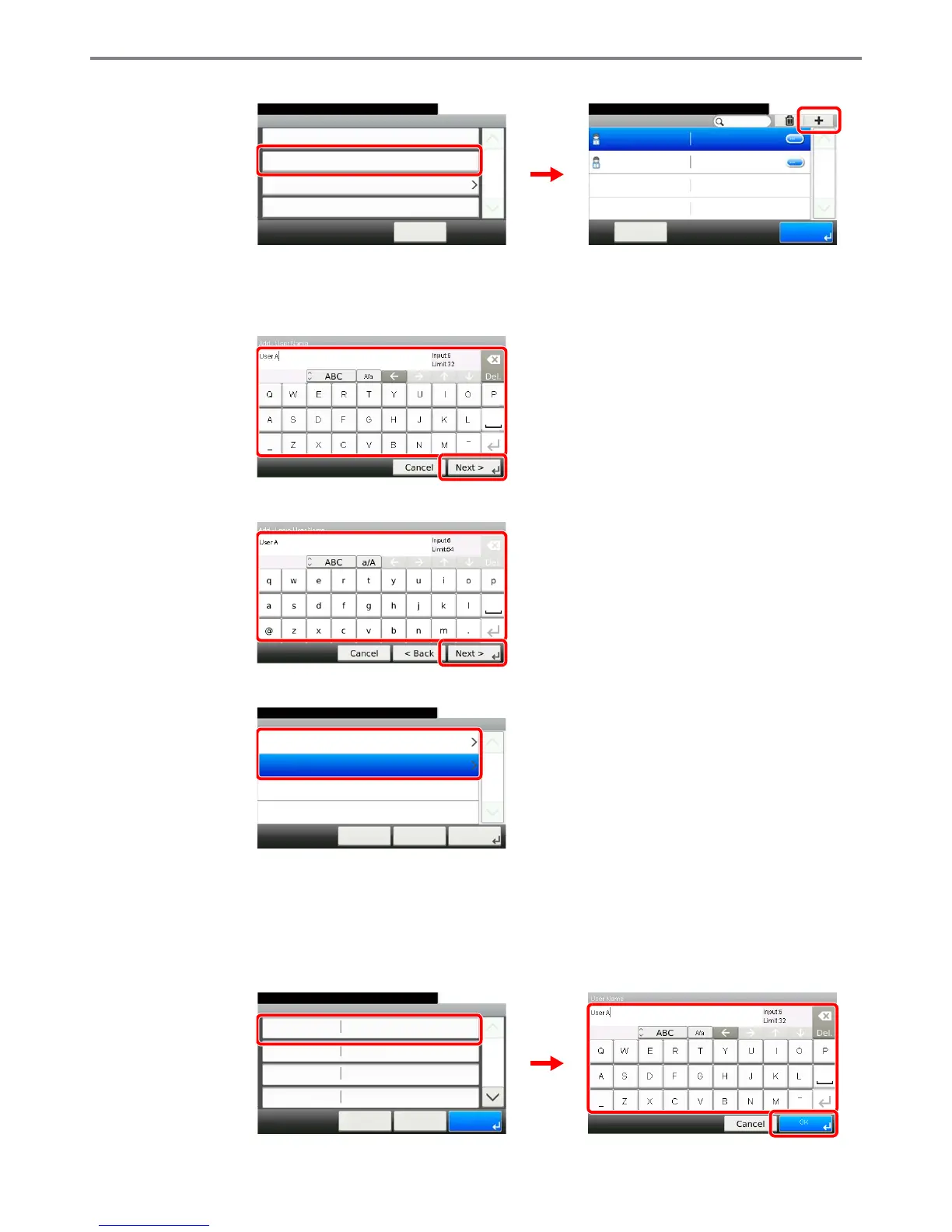
Enter the user information.
[User Name]
[Login User Name]
[Access Level]
Select the user access privilege.
3
Check the settings.
Check the settings and change or add information as needed.
[User Name]
User Login
10:10System Menu/Counter.
Local User List
< Back
1/1
Local Authentication
Simple login settings
User Login/Job Acco... - User Login Setting
Local User Authorization
Off
GB0435_00
10:10System Menu/Counter.
Admin
Menu
1/1
End
Admin
DeviceAdmin 2600
User Login S... - Local User List
GB0440_00
1
2
GB0057_51
1
2
GB0057_53
1
2
GB0445_00
Add - Access Level
10:10System Menu/Counter.
User
Administrator
< Back
1/1
Next >Cancel
Add - Confirmation
User A
10:10
Cancel
Select the item that you want to change.
Login User Name
Login Password
Account Name
User Name
User A
**********
< Back
1/2
Save
Others
GB0446_00
1
2
GB0057_26
3



 To Next Page