6-20
Sending > Specifying Destination
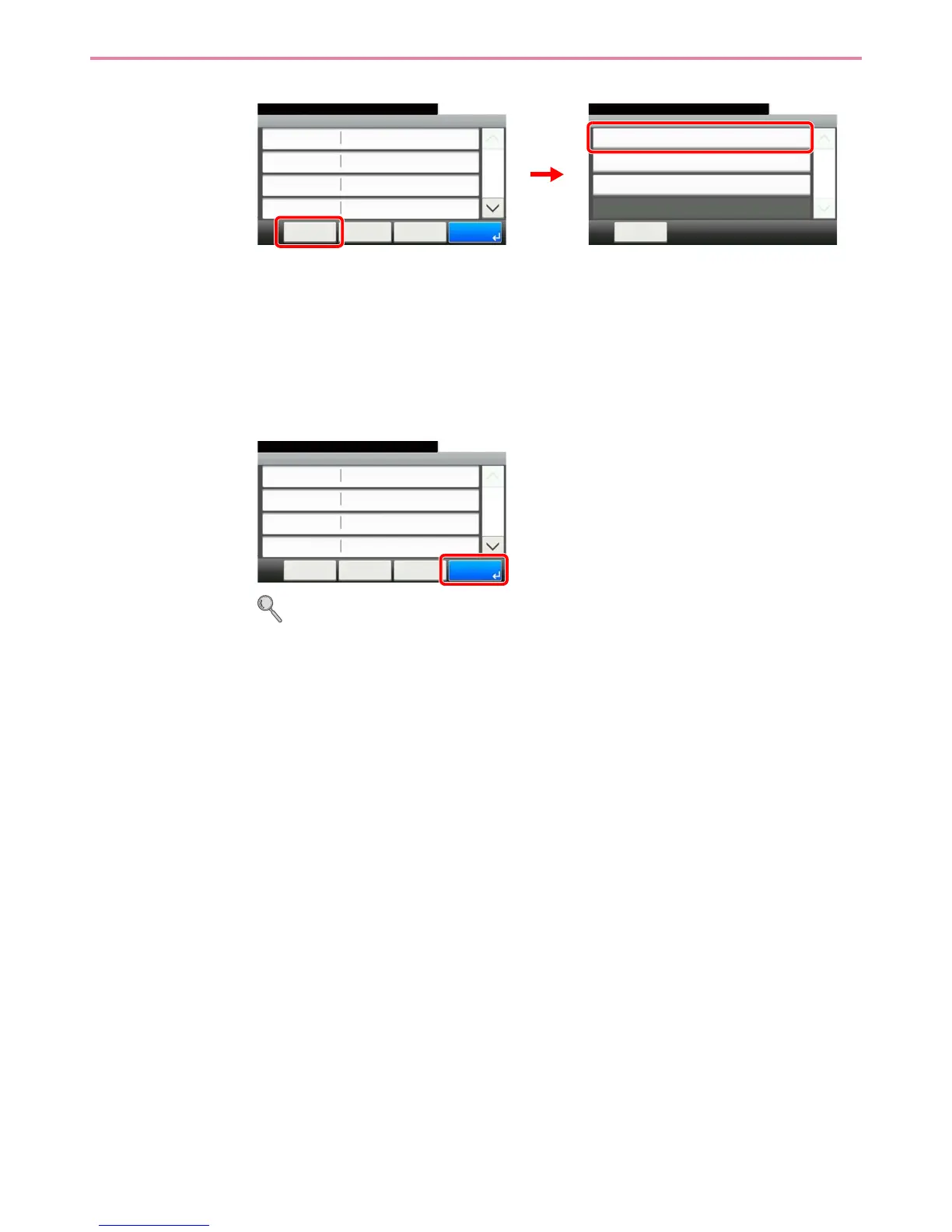
Confirm the connection status.
Connected. appears when connection to the destination is correctly established. If Cannot
connect. appears, review the entry.
To enter multiple destinations, press [Next Destination] and enter the next destination. You can
specify a combined total of up to 5 FTP and SMB destination folders.
You can register the entered information in the Address Book by pressing [Menu] and then
[Add to Address Book].
5
Accept the destinations.
Destinations can be changed later. Refer to Checking and Editing Destinations on page 6-21.
Menu
Connection Test
10:10
Close
Next Destination
Add to Address Book
1/1
Folder - Confirmation
abc
10:10
Cancel
Ready to send.
Path
Port
Login User Name
Host Name
abc
139
< Back
1/2
OK
abc
Menu
GB0128_00
GB0020_00
2
1
GB0128_00
Folder - Confirmation
abc
10:10
Cancel
Ready to send.
Path
Port
Login User Name
Host Name
abc
139
< Back
1/2
OK
abc
Menu



 To Next Page