7-6
Document Box > Saving Documents to USB Memory (Scan to USB)
4
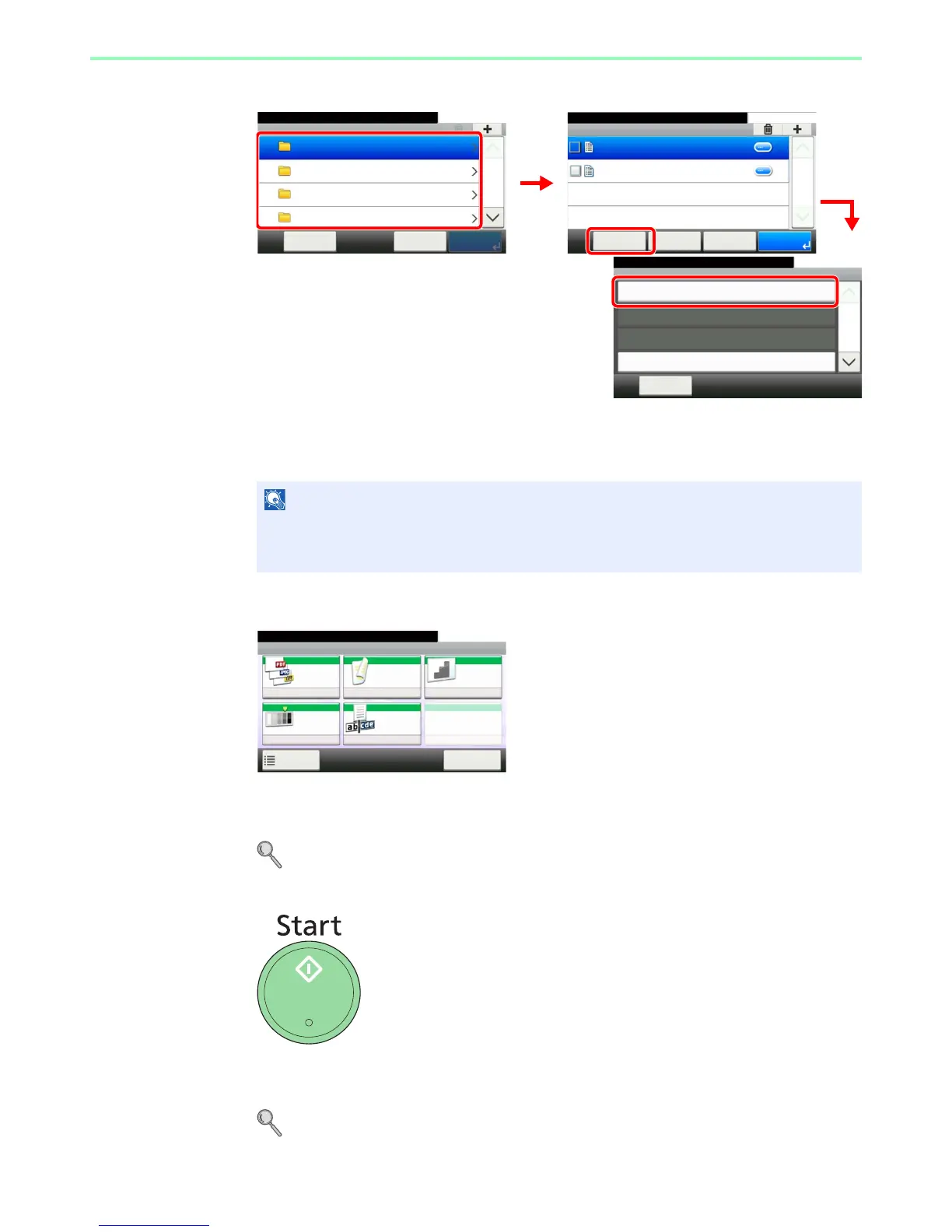
Select the folder.
Select the folder where the file will be stored and press [Menu] and then [Store File].
The machine will display the top 3 folder levels, including the root folder. To return to a higher
level folder, press [< Back].
5
Select the functions.
Select the function to use for Document Box.
Press [Functions] to display other functions.
For details, refer to Functions for Document Box on page 7-8.
6
Start storing.
Press the Start key to start storing.
Remove the USB memory.
For details, refer to Removing USB Memory on page 7-7.
NOTE
Up to 100 documents and folders can be displayed for each directory. If the number of
documents and folders in a directory exceeds 100, you will be unable to save additional
documents.
Menu
Store File
10:10
Close
Document Box.
Print
Delete
Select All
1/3
GB0089_00
Removable Memory
10:10Document Box.
DEF
GHI
JKL
ABC
Cancel PrintMenu
1/25
Removable Memory
10:10Document Box.
7-9-2.JPG
11-3-3.JPG
< Back PrintMenu
1/1
Cancel
GB0089_03
1
2
3
GB0107_00
GB0096_00
Ready to store in Box.
Store File
File
Format
Duplex Scan
Resolution
Density File Name
Entry
Normal 0
PDF 1-sided 300x300dpi
doc
Functions
10:10
Cancel



 To Next Page