Operation
Assigning individual IP addresses to the LS10 of a network
Setting the IP over the network
LS10 are typically controlled over Ethernet. Follow this procedure to dene the IP addresses of all LS10 on the same
subnet.
If the IP addresses of the switches need to be set on a different subnet, refer to Setting the IP via USB (p.28).
Procedure
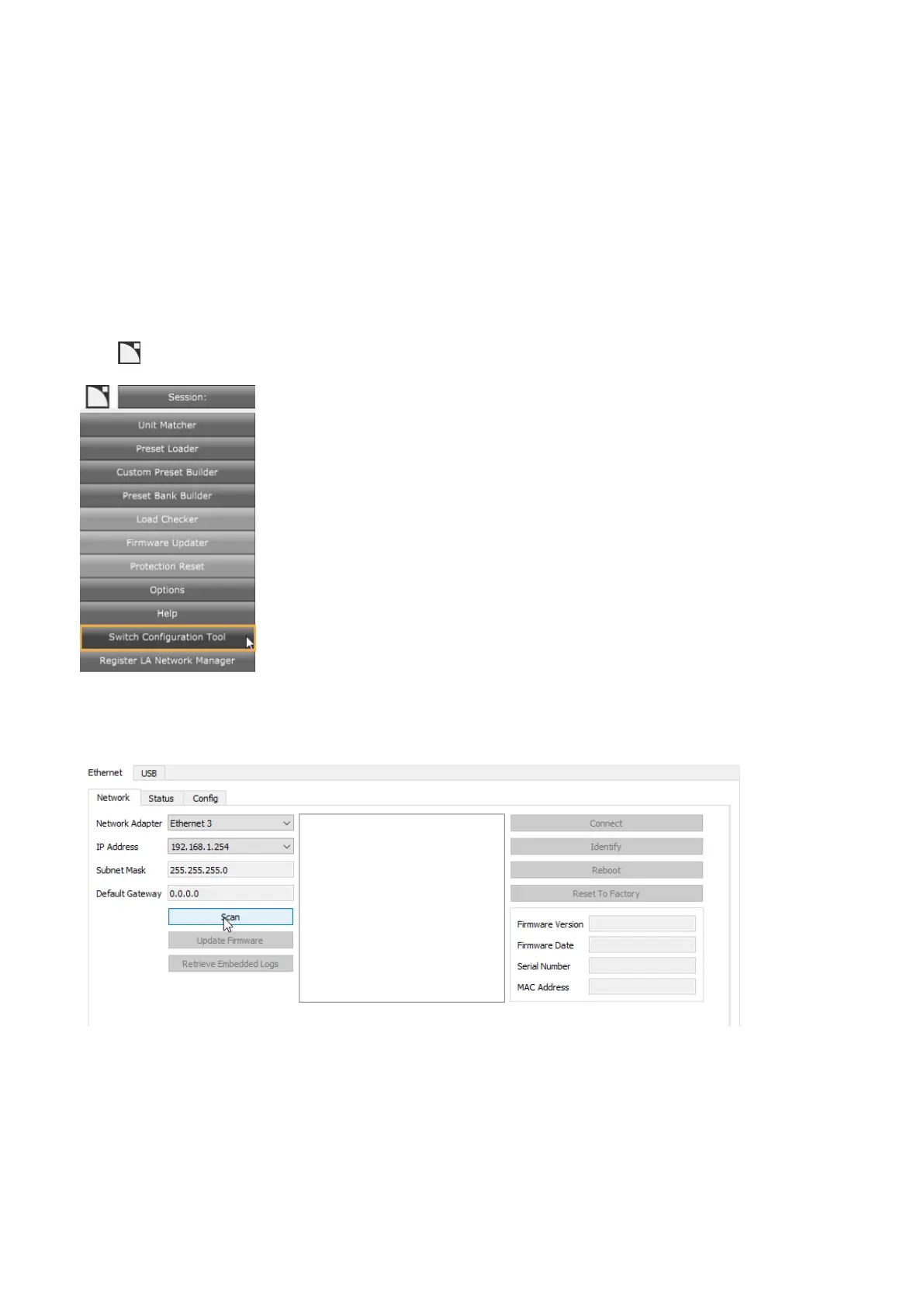
1. Set the Network Interface Card (NIC) of the computer hosting LA Network Manager to 192.168.1.254 /
255.255.255.0.
2. Connect one LS10 at a time to this NIC with an Ethernet cable.
3. Open the application with LA Network Manager.
Click > Switch Conguration Tool.
The application opens on the Ethernet tab.
4. Select the NIC.
5. Click Scan.
The default IP address of LS10 is 192.168.1.200. If the switch is not detected, then press the RST button of the
switch for seven seconds to reset the IP address, and scan again.
26 LS10 owner's manual (EN) version 1.0


 To Next Page