Operation
Ethernet
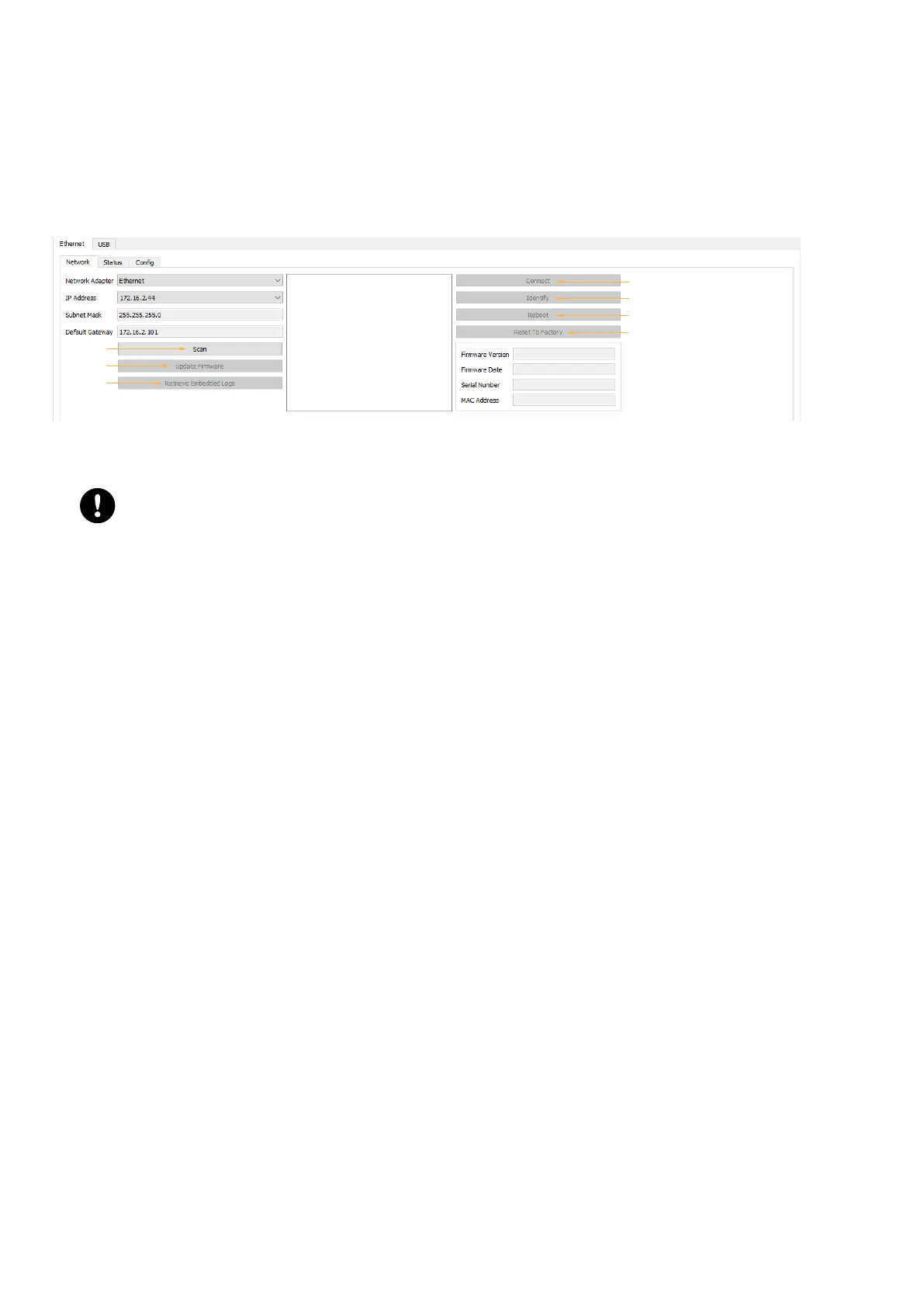
The Ethernet tab features three sub-tabs of conguration:
• Network
• Status
• Cong
Network
1
2
3
4
5
6
7
Network tab allows to identify one or several LS10 and to apply the following functions:
1. Scan: scans the network to detect devices using a broadcast detection mechanism.
Risk of detection failure
Before scanning, it is essential that:
the subnet mask of the network card used and the subnet mask set on the LS10 match.
the network card and the LS10 pertain to the same subnet.
2. Update rmware: allows to update the rmware of one more LS10 that have been detected, after selecting them
in the central frame.
3. Retrieve Embedded Logs: retrieves the logs of one more LS10 that have been detected, after selecting them in
the central frame.
4. Connect/Disconnect: allows to connect to one device at a time to monitor its status and dene particular settings
in the Cong tab.
5. Identify: identies the connected device. The green LEDs of the ports blink.
6. Reboot: reboots the connected device.
7. Reset To Factory: resets the connected device to factory default settings.
32 LS10 owner's manual (EN) version 1.0


 To Next Page