LaCie Wireless Space • DESIGN BY NEIL POULTON Beyond Basic Install: Setup Wizard
User Manual page 76
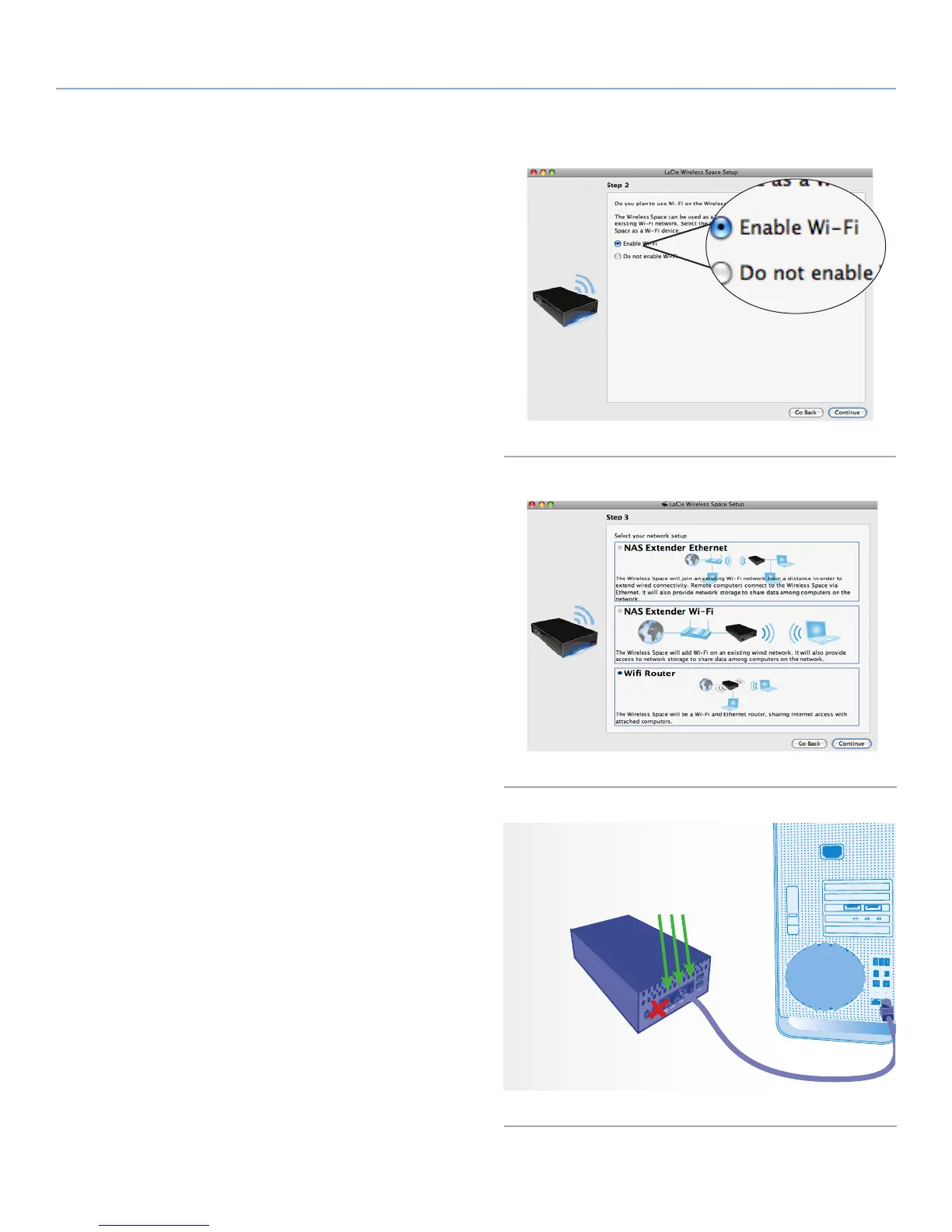
4. Select Enable Wi-Fi. Click Continue. (Fig. 121)
5. Select Wifi Router. Click Continue. (Fig. 122)
6. You will be prompted to connect your computer to the Wireless
Space. Please use one of the three ports marked LAN1, LAN2,
or LAN3 on the back of the Wireless Space (1.4.2. Rear View).
DO NOT connect the cable to the port named INTERNET (Fig.
123). LaCie recommends a Gigabit Ethernet cable for optimal
performance (1.6. Gigabit Ethernet Cables And Connectors).
7. Once the Wireless Space has been connected to the computer,
click Continue.
8. The Setup will search for your Wireless Space. Move to the next
step if the device is found. If not, please reinsert the Ethernet
connections on the Wireless Space and the computer before
trying again.
continued on the next page>
Fig. 121
Fig. 122
Fig. 123
Attach the computer to
LAN1, LAN2, or LAN3.
Do not attach the com-
puter to the INTERNET
port for the Setup.















 To Next Page