LaCie Wireless Space • DESIGN BY NEIL POULTON Beyond Basic Install: Setup Wizard
User Manual page 77
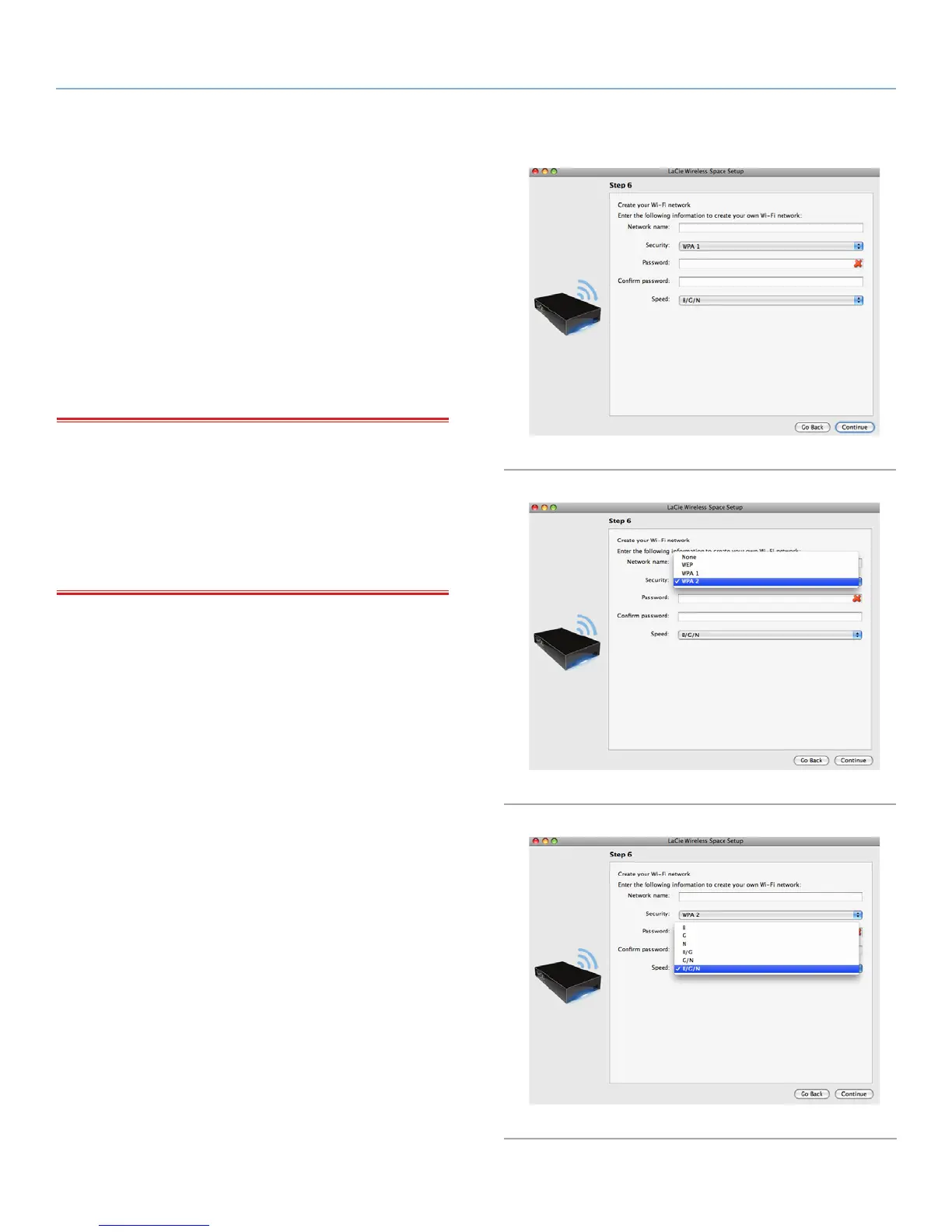
9. You must provide the following information to create a Wi-Fi
access point (Fig. 124):
✦ Network name
✦ Security protocol (Fig. 125)
✦ Password
✦ Speed (Fig. 126)
✦ See 4.1. Before the Installation for further information on how
to fill out each field.
✦ Make certain to write down all the information so that you may
use it when joining the Wireless Space Wi-Fi network from a
wireless device.
IMPORTANT INFO: LaCie strongly recommends that all Wireless
Space clients secure their Wi-Fi networks. For this reason, the Setup
Wizard offers three levels of security and password protection when
configuring the Wi-Fi access point. Please note that you may adjust
these settings in the Dashboard administration tool after the installa-
tion. While the Dashboard and the Setup offer “None” as a security
option, we urge all users to consider the risks to their home networks
as well as potential drains on their wireless bandwidth.
continued on the next page>
Fig. 124
Fig. 125
Fig. 126















 To Next Page