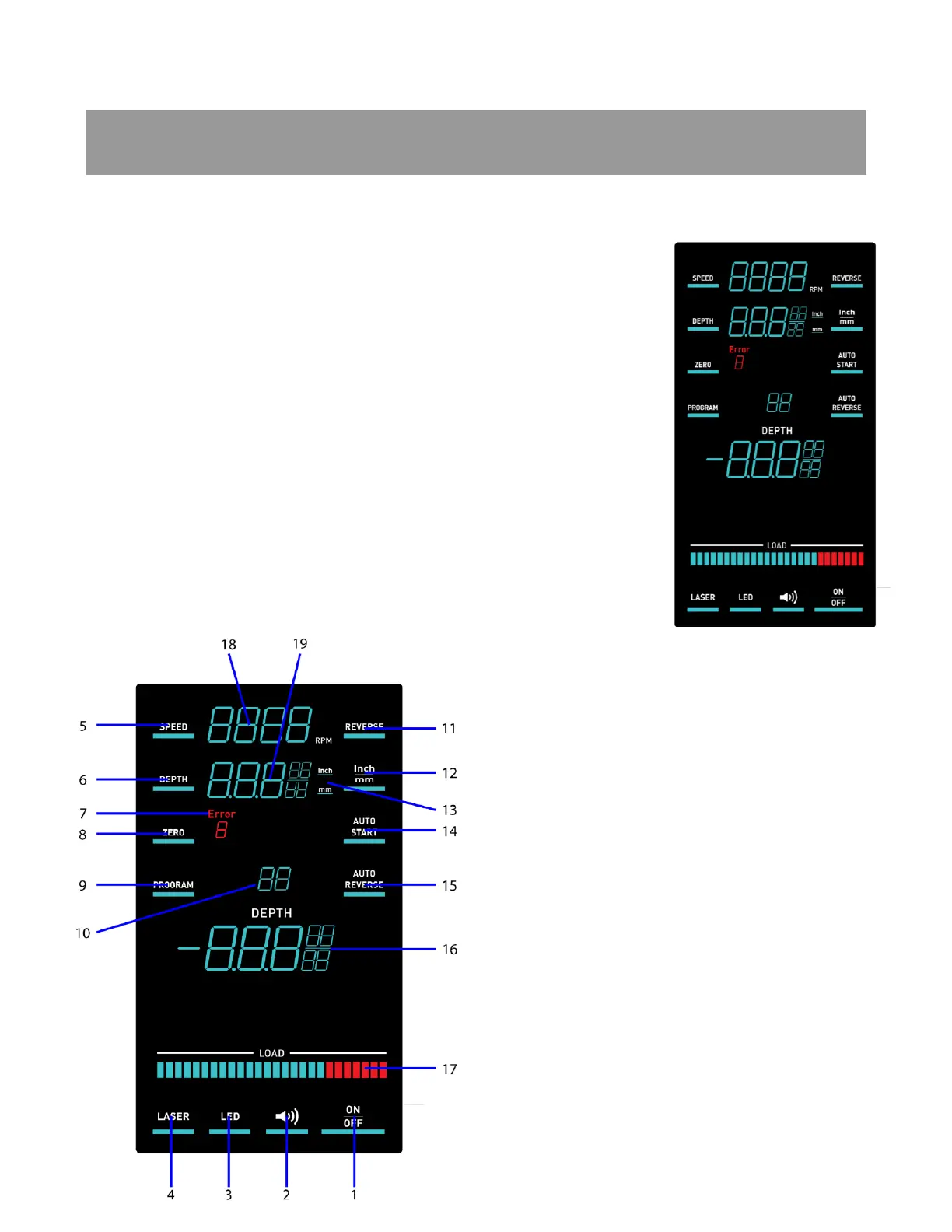
Specific and repeatable applications can be achieved with programming within the Control
Panel. For example, tapping can be programmed with a specific RPM, stopping point and then
reversing to back a tap out of the newly threaded hole.
The DP20 touch screen will illuminate all the lit elements of the
screen during start up. This momentary illumination is a normal part
of the boot up sequence.
After start up the screen will return to normal operation screen with
the settings from the previous use. If the previous settings are not
saved in memory, the screen starts with normal default settings.
Certain settings will always return to default settings when the drill
press is powered on. The motor ON/OFF button will default to the Off
position so that the drill press motor does not start inadvertently. The
Tone button will default to the On position so that button presses are
accompanied by an audible tone. This button can be turned off if
desired when using the drill press. The default increment display
setting is in decimal inches. The Auto Start feature will default to the
Off position if the drill press has been turned off or unplugged.
1. Motor ON/OFF button
2. Touch screen Tone button
3. LED work light ON/OFF button
4. Crosshair laser ON/OFF button
5. Speed setting button
6. Depth setting button
7. Error code display
8. Material surface Zero setting button
9. Program mode and selection button
10. Program number display
11. Forward/Reverse button
12. Increment display selector button
13. Increment in use display
14. Automatic motor start button
15. Automatic reverse selection
16. Live depth display
17. Motor load meter
18. Drill speed RPM display
19. Depth setting display



 To Next Page