(850) 610-2870 www.lanesharkusa.com 31
Lane Shark LS-3ADJUSTMENTS
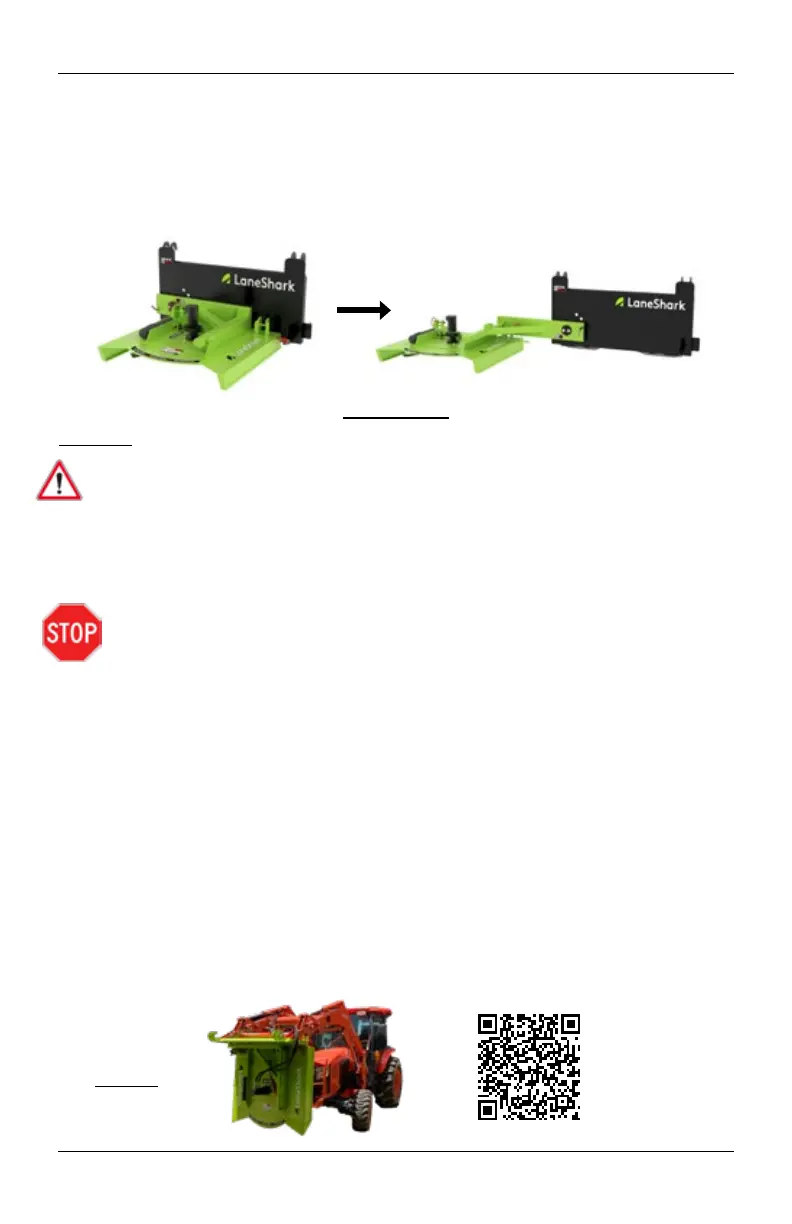
Oset Position
This position allows the Lane Shark to extend from directly in front of the
tractor to horizontally beside the tractor. The oset position is the recommended
position for cutting around ponds, near ditches, and along roadsides. On this page
you will be shown how to correctly move the Lane Shark from the home position
(Shown on pg. 30) to the oset position.
Instructions
CAUTION
While changing positions on the Lane Shark there is a crushing hazard. DO NOT
place ngers, hands, or body between the Lane Shark and tractor while changing
positions.
1. Make sure all hydraulic hoses are disconnected from the Lane Shark.
2. Lift the boom of the tractor until the Lane Shark has enough clearance
between the ground to point directly down. (Shown in Figure 1)
STOP before going any further make sure you have read and completed the
“Before you get started” section on page 29.
3. Pull both pins on the left and right sides of the Lane Shark.
4. Facing the front of the tractor pull the right side of the Lane Shark away from the
front of the tractor until the bottom of the cutting deck is oset and facing away
from the front of the tractor.
5. Facing the front of the tractor pull the right corner of the Lane Shark until the
bottom of the cutting deck is facing the tractor once again.
6. Once the Lane Shark has been completely extended, pull the keeper pin from the
position adjustment pin, and lock it into the desired position hole.
7. On the backside of the mounting plate the position adjustment pin will protrude
roughly 1/2”. Place the keeper pin that you previously removed through the exposed
hole of the position adjustment pin.
8. Reinstall both pins on the deck of the Lane Shark.
9. Reinstall both hydraulic Lines on the Lane Shark.
Figure 1
Position Change
Safety Video
Scan with Smart Phone


 To Next Page