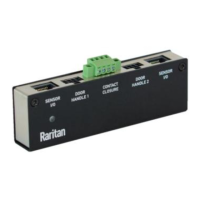
▶ To select the normal state of DX2‑CC2:
1) Log in to the web interface of the product where DX2‑CC2 is being connected.
2) On the Peripherals page, select the sensor you want to congure. Click Edit Sengs to congure
polarity.
a. Choose one of the normal state opons.a.
Opon Descripon
Normally
Open Factory default.
• It is considered normal when the switch/detector connected•
to DX2‑CC2 is open.
• When the switch/detector turns closed, an alarm is shown.•
Normally
Closed
• It is considered normal when the switch/detector connected•
to DX2‑CC2 is closed.
• When the switch/detector turns open, an alarm is shown.•
DX2-CC2 Contact Closure Sensor LEDs
LED descripon in this secon applies to all contact closure sensors.
LEDs indicate states of detectors/switches connected to the contact closure sensor channels.
The LED is lit when the associated detector/switch enters the "alarmed" state.
The meaning of a lit LED varies depending on the Normal state sengs.
• When the Normal state is set to Normally Closed (N.C):•
LED Sensor state
O Closed
Lit Open
• When the Normal state is set to Normally Open (N.O):•
LED Sensor state
O Open
Lit Closed
Cascading DX2 Sensor Packages
To increase the number of connected DX2 sensor packages per Sensor port of a supported managing
device, you can cascade DX2 using standard network patch cables (CAT5e or higher).
25


 To Next Page
 Loading...