▶ Vibraon sensor:
The built-in vibraon sensor detects the vibraon of any object where DX‑VBR is axed.
• Range: 0 - 13.85g•
• Accuracy: +-0.1g•
▶
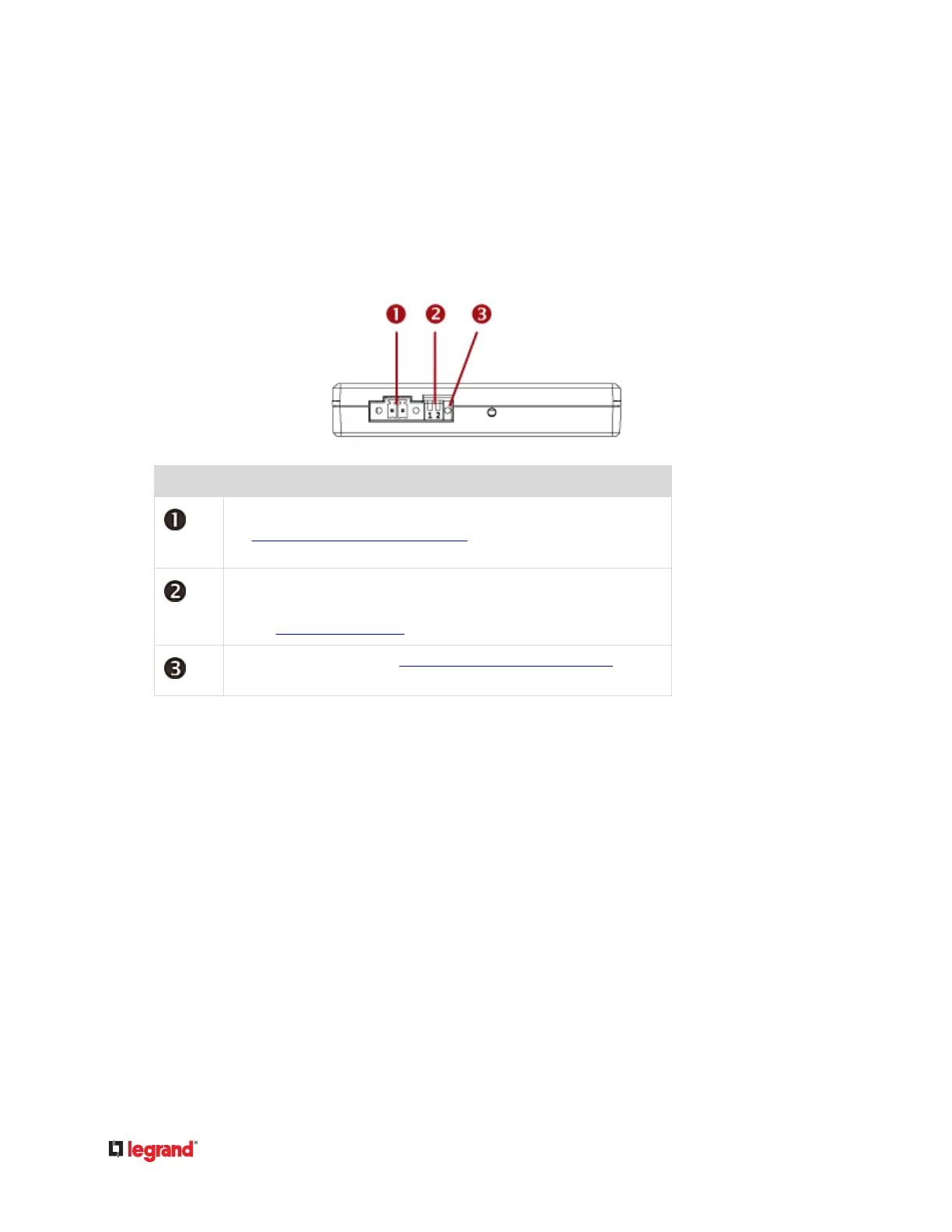
DX‑VBR Terminals, DIP switches and LED:
Numbers Components
One CC channel comprising a pair of terminals.
See Connecng Detectors/Actuators to DX (on page 50) for how to connect
a CC sensor.
• Dip switch 1 congures the Normal state of the CC channel.•
•
Dip switch 2 does not control any CC channel and can be ignored.
•
See Adjusng DIP Switches (on page 53).
CC status LED. For details, see DX2-CC2 Contact Closure Sensor LEDs (on page
25).
Making Connecons
Pre-installed DX Brackets
To allow you to hang or ax a DX onto an object or posion, two brackets have been installed on the
rear side of a DX sensor package when shipped out of the factory.
Below is the diagram of a DX sensor package with two brackets installed.
49


 To Next Page
 Loading...