EN
30
INSERTING/REMOVING THE MEMORY CARD
The camera will save exposures to an SD (Secure Digital), SDHC
(High Capacity) or SDXC (eXtended Capacity) memory card.
Notes
• SD/SDHC/SDXC memory cards are available from various
suppliers in various sizes and with differing read/write speeds.
Memory cards with high storage capacities and high read/write
speeds offer quick storage and rendering.
• Check the memory card for correct alignment if you are having
difficulties inserting it into the camera.
• Video recordings require a high write speed.
• Proper camera function cannot be guaranteed when using
WLAN memory cards.
Ensure that the camera is switched OFF (see p. 36)
Open the cover of the battery compartment/memory card slot
and close it again afterwards (see p. 31)
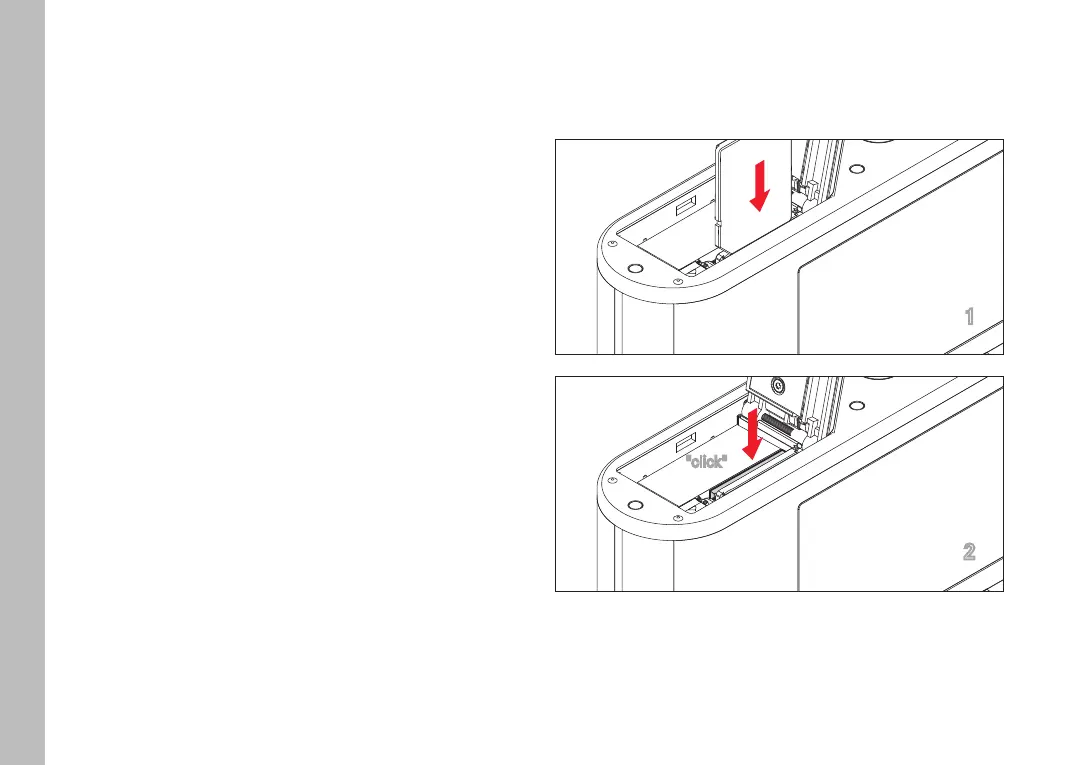
INSERTION
1
2
"click"
Push the memory card into the slot until you hear and feel it
clicking into place
Preparation



 To Next Page