EN
54
LCD PANEL/VIEWFINDER (EVF) SETTINGS
The camera comes equipped with a 3" LCD color screen.
The following functions can be configured and used individually:
– Use of the LCD panel and EVF (electronic viewfinder)
– Eye sensor sensitivity
– Brightness
– Information display
– Automatic LCD panel shutdown (standby mode)
LCD PANEL/EVF USE
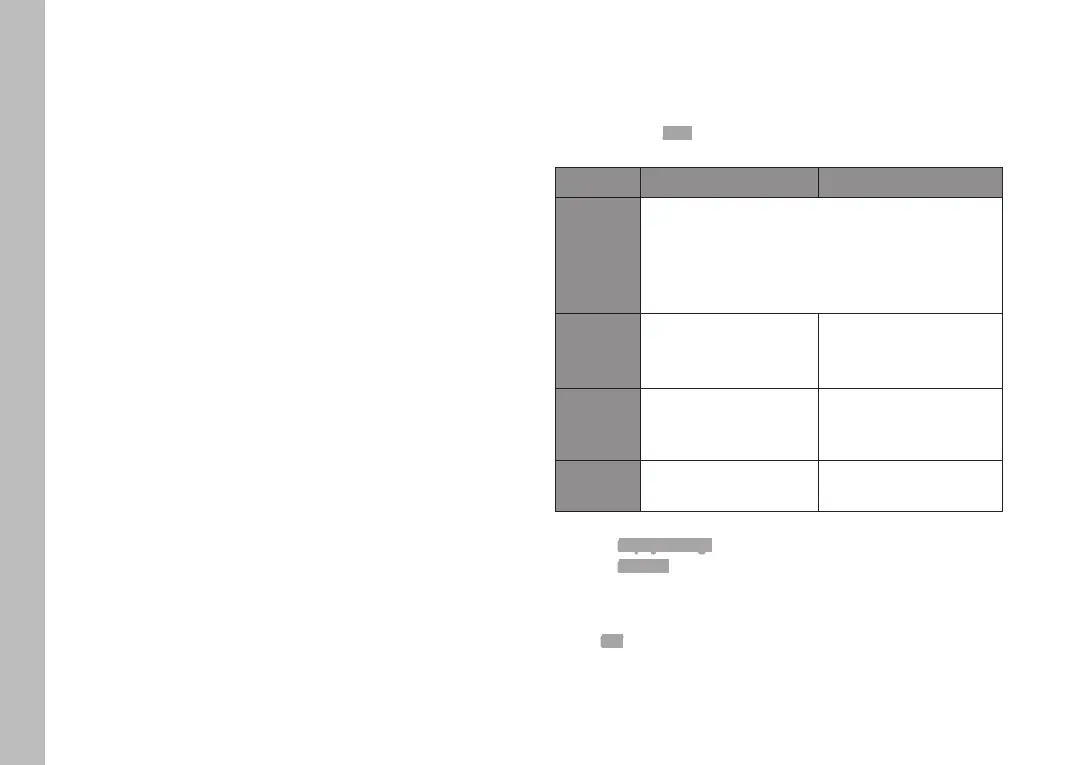
You can preset the situations in which EVF and LCD panel should
be used. The displays appearing on screen and in the viewfinder
are identical.
Factory setting: Auto
EVF LCD panel
Auto
The eye sensor in the viewfinder automatically
toggles the camera between LCD panel and EVF.
• Pictures
• Playback
• Menu control
LCD
• Pictures
• Playback
• Menu control
EVF
• Pictures
• Playback
• Menu control
EVF
Extended
• Pictures • Playback
• Menu control
Select Display Settings in the main menu
Select EVF-LCD in the submenu
Select a setting
Note
Select EVF if you want to keep the LCD panel switched off (e.g. on
dark environments).
Camera default settings


 To Next Page