EN
75
EXPOSURE MODES
There are four exposure modes available to adjust the rendering of
the object or to create the desired picture composition:
– Automatic program (
P)
– Aperture priority mode (
A)
– Shutter priority mode (
S)
– Manual setting (
M)
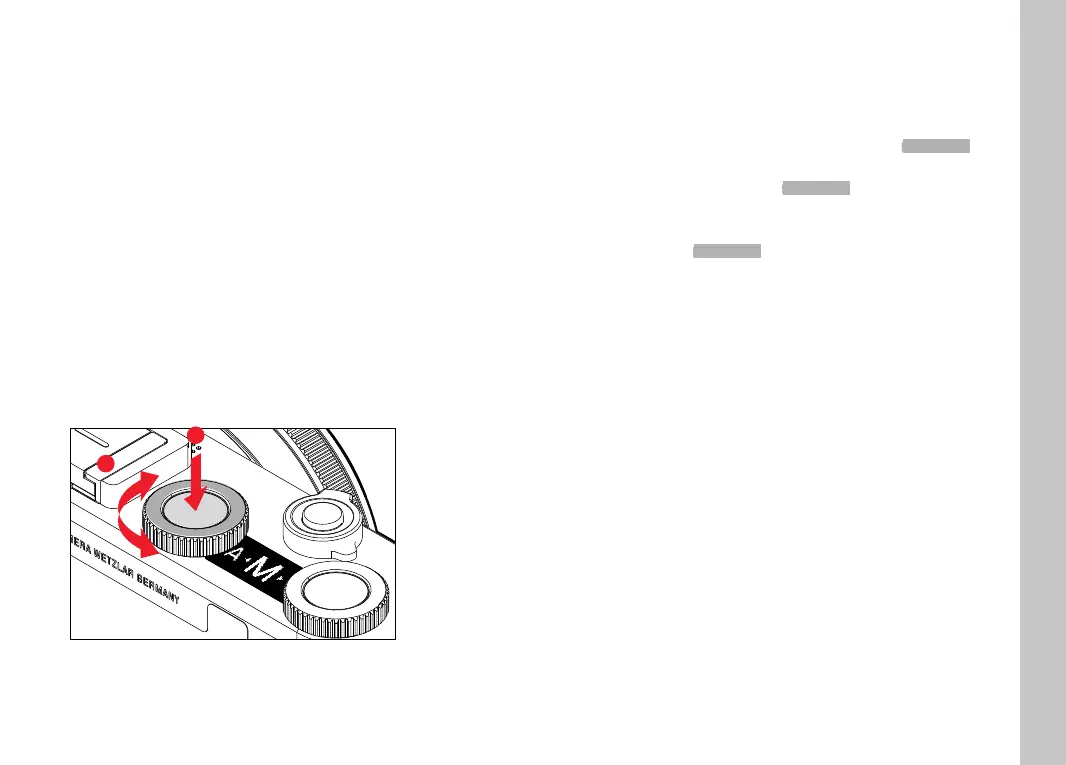
SELECTING A MODE
Press the left setting wheel button
• The currently selected mode is shown in the top display.
Turn the left setting wheel to select the desired mode.
• The mode display changes in the top display and on screen.
All modes can be reached by turning the wheel in either
direction.
• The selected mode will be applied automatically approx. 2s
after the setting wheel is moved the last time.
1
2
To apply the selected mode immediately
Press the left setting wheel button or the shutter button
Notes
• Only
A and M are available when using Leica M or R lenses with
a Leica M adapter L or Leica R adapter L, i.e.
P, S or Scene Mode
are unavailable. The camera will automatically switch to A when
the adapter is attached if
P, S or a Scene Mode is selected. Where
that is the case,
F0.0 is displayed as the aperture value.
• Should a Leica TL or SL lens be attached again later, and you
want to use
P, S or a Scene Mode, then you will have to set the
desired mode again.
Picture Mode



 To Next Page