EN
248
Review mode
DELETING RECORDINGS
Recordings on the memory card(s) can be deleted at any time - as
desired individually, several at a time, or all at the same time. This
can be useful, e.g. if they have already been saved to other media,
if you no longer require them or if you need to free up more space
on the memory card(s).
Note:
Deleting is possible regardless of whether a recording is being
displayed at normal size or several reduced pictures are displayed
(but not if the 30 recording review is activated with a red frame
around the entire block).
Procedure
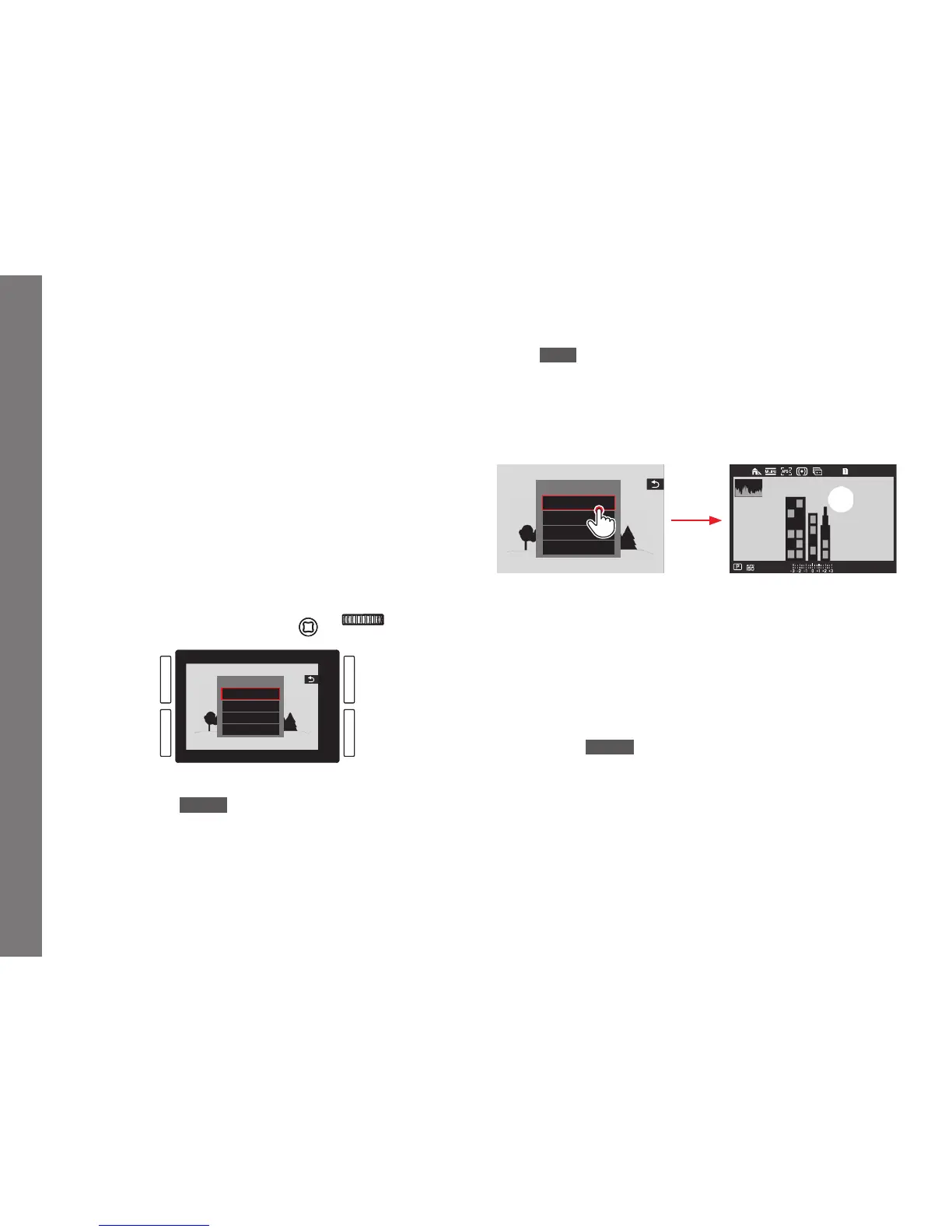
1. Press the
BL button.
• The corresponding submenu appears in the monitor.
DELETE
Single
Multi
Unrated
All
Note:
You can leave the
DELETE menu again without deleting anything:
Press the
TR button.
Deleting only unmarked recordings
Procedure
Tap on
Single, or press the click wheel or the joystick inwards.
If one of the other options is marked by the red frame, and you
want to use physical controls:
Turn the click wheel or press the joystick up or down.
• After deleting, the next recording appears.
DELETE
Single
Multi
Unrated
All
L9989999
AFc
F
Important:
After the steps described above are carried out, the recordings will
be immediately deleted without any additional confi rmation
queries.
Note:
Even while the
DELETE menu is visible, you can scroll through the
other recordings.
SL_EN.indd 248 16.09.2015 15:04:36



 To Next Page