EN
245
Review mode
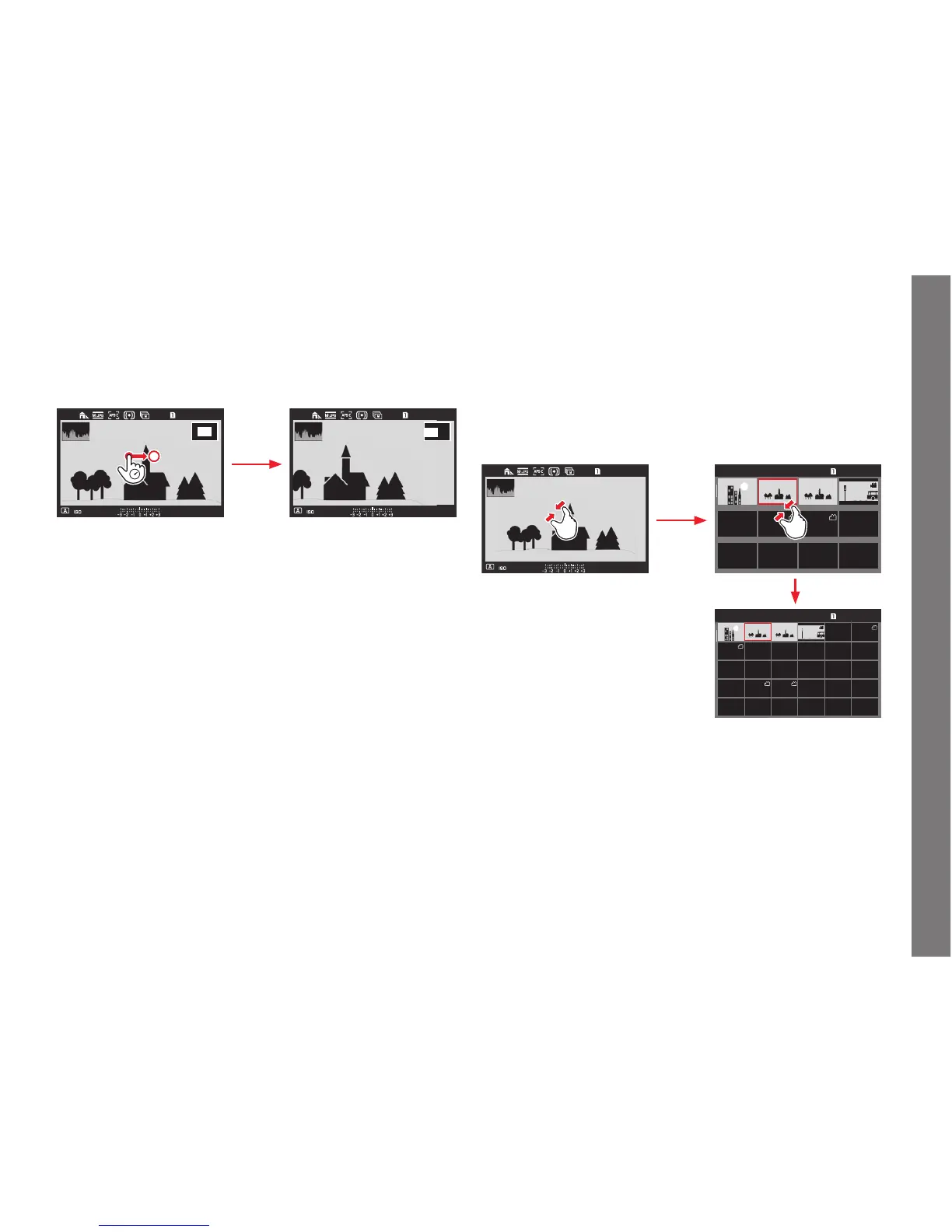
MOVING AN ENLARGED SECTION
• The rectangle inside the frame moves to the position of the
shifted section.
Using gesture control
623
L9990000
1/8000s
F
2.525000
623
L9990000
1/8000s
F
2.525000
Using physical controls
Press the joystick in the desired direction.
SIMULTANEOUS DISPLAY OF 12/30 RECORDINGS
The recordings can be reduced so that 12 or 30 are shown on the
screen. This makes it easier to get an overview and to fi nd a certain
recording.
The procedure is basically the same - in reverse - as when
enlarging.
Using gesture control
L9990000 10:30 01 NOV 2015 623/1200
L9990000 10:30 01 NOV 2015 623/1200
Using physical controls
Turn the top dial to the left. One click past normal view =
12-picture view, two = 30-picture view.
• The last picture to be shown at its normal size is marked by a
red frame.
SL_EN.indd 245 16.09.2015 15:04:35



 To Next Page