Chapter 4 - page 17
DISCOVERY manual
4
D-H002.0607EN
4.3.6 "Service" menu
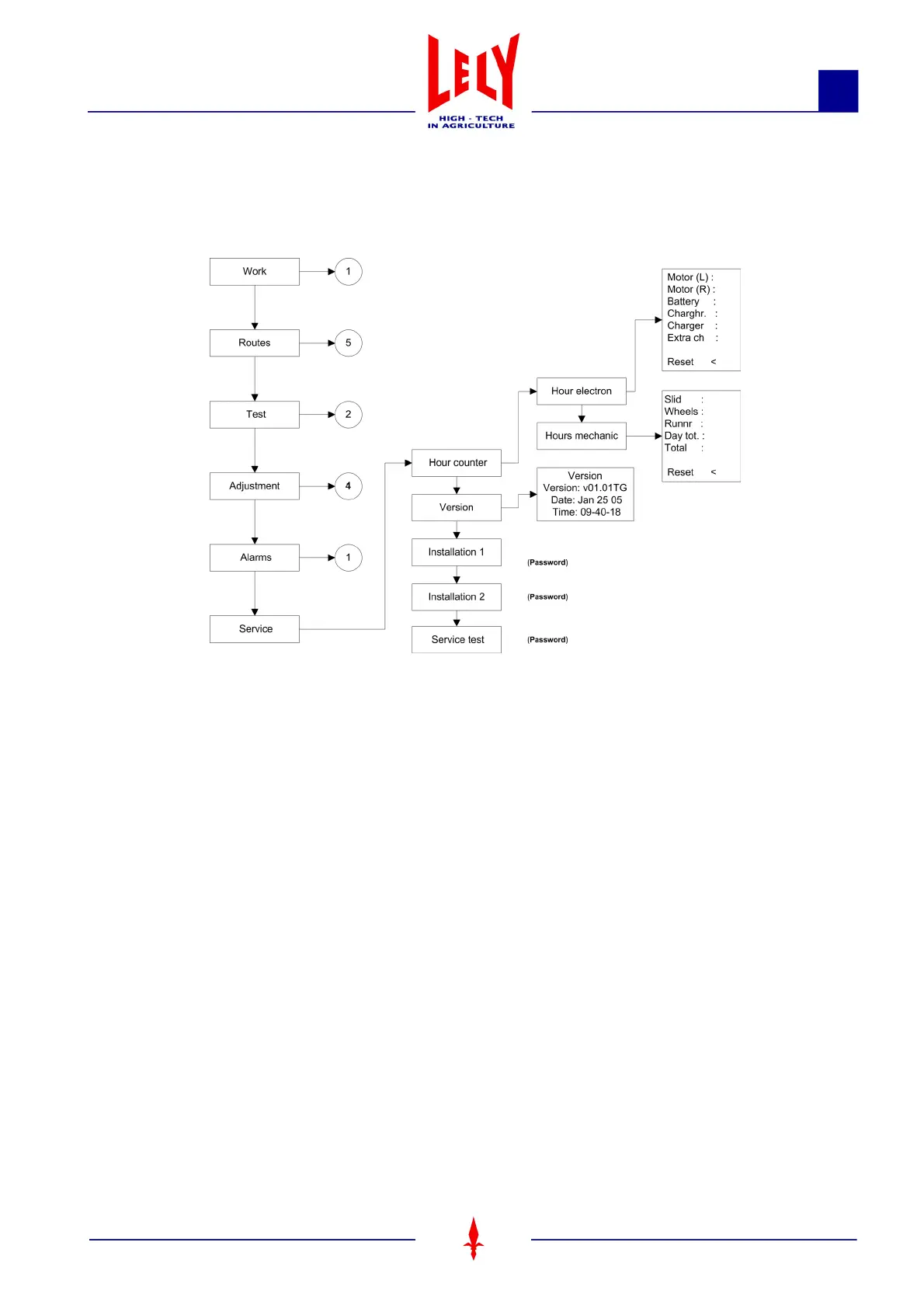
The "Service" menu consists of the following submenus:
"Service > Hour counter > Hour electron" submenu"
The following hours are recorded under "Hour electron":
• Motor (L):
Operational hours for the left-hand motor
• Motor (R):
Operational hours for the right-hand motor
•Battery:
Operational hours for the battery
• Charging hours:
Time spent recharging
• Charge:
• Extra l.:
Additional recharging (if the battery voltage is too low, the Discovery will recharge for 1 hour longer).
Each hourly counter (L/R motors, battery, etc.) can be reset individually. Place the "<" cursor next to the hourly
counter in question using the Soft2 button, then select "Reset".
"Service > Hour counter > Hour mechanic" submenu"
The following hours are recorded under "Hour mechanic":
•Slid:
Number of hours that the scraper has been working
Figure 4 8 "Service" flow diagram










 To Next Page